Backup Camera Parking Lines Explained
Backup camera parking lines are colored or white guide markings on a rear camera screen. They show where your vehicle is likely to go as you reverse. For many drivers, especially beginners, they make backing into a space feel less uncertain.
This guide explains what these lines mean, how they work, and the main types you may see. It also covers simple steps for using them and common mistakes to avoid.
Key Takeaways
- Backup camera parking lines show a likely path for your vehicle while reversing.
- Some lines stay fixed, while others move with the steering wheel.
- Lines help you judge direction, but they cannot show every object or slope accurately.
- Reversing slowly and checking with your own eyes and mirrors remains important.
What Are Backup Camera Parking Lines?
A backup camera is a small camera mounted near the rear of a vehicle. When you select reverse, its image appears on the central display. Parking lines are graphics laid over that image to help you judge the space behind you.
The lines work like a map of your intended path. They make a flat camera picture easier to read. Without them, it can be hard to tell how far away a wall or curb really is.
Guide Lines and Their Purpose
Guide lines usually run from the back of the vehicle outward. They often mark the car’s width so you can see if there is room on each side. Some systems also add short horizontal lines to show distance.
Their main purpose is to help you line up with a parking space, driveway or garage opening. They are a visual aid, not a substitute for careful driving.
Why Drivers Use Them When Reversing
Reversing is harder than driving forward for most people. The rear of the car is hidden, and the mirrors show only part of the scene. The rear camera fills that gap by showing what is directly behind the bumper.
Parking lines add direction to that view. They help drivers keep the car centered and avoid turning too sharply.
The Basics of How Backup Camera Parking Lines Work
Parking lines combine the camera image with on-screen graphics. The system uses the car’s width, its rear position and, in many cases, the steering angle. It then draws lines that match the likely path of the vehicle.
The exact design depends on the manufacturer. Some systems are simple, while others are more advanced.
Static Lines Versus Dynamic Lines
Static lines stay in one place on the screen. They usually show the car’s width and a few distance marks behind the bumper.
Dynamic lines respond to steering. They curve or shift to show the path the car will take, which makes them especially useful for parking.
How Steering Angle Changes the Guide Path
The steering angle is how far the front wheels are turned. A larger angle makes the car follow a tighter curve, and dynamic guide lines bend in the same direction.
The lines show if a turn will clear a post or a neighboring car. They are only an estimate, so keep moving slowly.
The Role of the Rear Camera and Display
The rear camera captures the view behind the vehicle. The display shows that image along with the guide graphics. A clear, well-placed camera gives the most useful picture.
A sharp screen makes the lines and nearby objects easier to see. The camera supplies the scene, and the display turns it into a usable guide.
Common Types of Parking Guide Lines
Parking guide lines come in several forms, and each helps with a different part of the task. Knowing the main types makes the screen easier to read.
Fixed Reference Lines and Distance Markers
Fixed reference lines stay put on the screen. They often mark the vehicle’s width and show distance behind the bumper.
These markers give a general sense of space. They do not measure exact distance, so treat them as rough guides.
Colored Zones: Red, Yellow and Green Explained
Some systems use colored zones to show distance. Red usually signals the closest range, yellow often means caution, and green usually means more room remains.
The exact colors and distances vary by manufacturer. Check the owner’s manual to learn what your system uses.
Trajectory Lines Versus Overlay Graphics
Trajectory lines follow the expected path of the car as the steering changes. They are most useful when turning into a space. Overlay graphics highlight broader areas on the image.
Trajectory lines focus on direction, while overlays focus on zones. Many systems combine the two.
Step-by-Step Guide to Using Parking Lines
Using parking lines well takes a few simple habits. The steps below apply to most vehicles. Always follow your owner’s manual for specific details.
Preparing Your Vehicle Before Reversing
Check the area around the car for people, pets, bikes and low objects. Make sure the camera lens is clean and the screen is on.
Confirm that the lines appear when you shift into reverse. If they do not, the system may be off or faulty, so rely on your mirrors and a look over your shoulder.
Aligning the Lines With the Parking Space
Move slowly until the lines point toward the middle of the space, or toward the opening for a driveway or garage. Keep the car roughly straight before you reverse.
If the lines cross a curb or post, adjust your position first. Correcting the approach early is easier than fixing it halfway through.
Reversing Slowly and Checking Clearance
Reverse at a slow, steady pace and stop often to confirm the car stays in line. Use your mirrors and windows too, since the camera covers only part of the area around the car.
Stop completely if something enters the path, even if the lines seem clear.
Tips for Reading Parking Lines Accurately
Parking lines are helpful, but they work best when you understand their limits. A few habits can improve how you read the screen.
Keeping the Camera Lens Clean
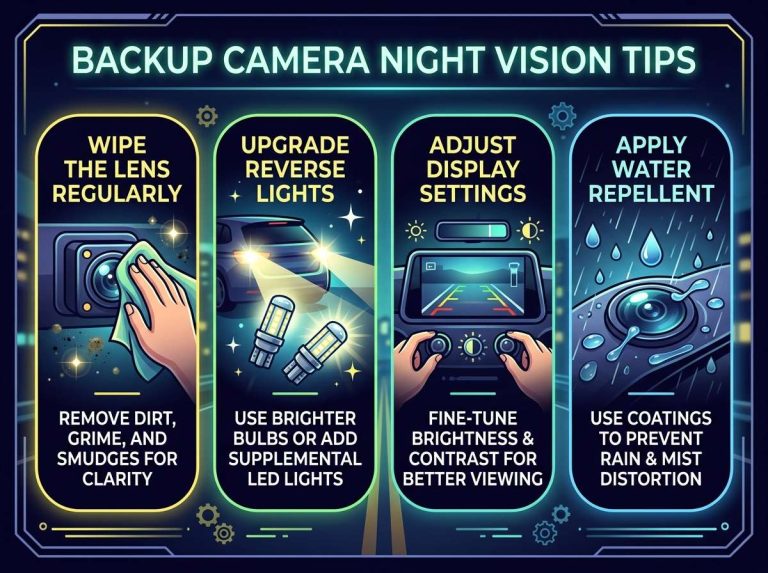
A dirty lens can blur the image and make the lines hard to trust. Dust, water spots, mud and snow can all cause problems. Wipe the lens gently with a soft cloth when needed.
Knowing Distance Estimates and Their Limits
Distance on a camera screen can be hard to judge. Objects close to the camera can appear larger, and lenses bend the view slightly, so the lines may not match real distance exactly.
Use the lines as a guide rather than a measuring tape. When an object is close, slow down and check it directly.
Using Mirrors and Sensors Alongside the Camera
Mirrors show the sides of the car and the area behind it. Glance at them often while reversing so nothing approaches unnoticed.
Parking sensors add another layer of warning by sounding or displaying alerts when objects get close to the bumper. Sensors and the camera work best together, since each can catch details the other misses.
Example Scenarios: Parking in Everyday Situations
Parking situations vary, and the same guide lines can help in different ways. The examples below show how beginners might use them.
Parallel Parking on a Busy Street
Parallel parking often requires turning the wheel sharply while reversing. Dynamic lines show where the rear corner will end up. Watch the lines near the curb and adjust the wheel gradually.
Keep an eye on traffic behind you, since the camera shows only a limited area. Move slowly and be ready to stop.
Backing Into a Driveway or Garage
When backing into a driveway, aim the lines at the center of the opening. Check that the sides of the car will clear the walls or posts. Go slowly, because garage openings can be tight.
If you are unsure of the final position, stop and get out to check.
Parking Near Curbs, Poles and Low Obstacles
Curbs and poles can be hard to spot on the screen. Low objects may sit below the camera’s field of view. Use the lines as a starting point and confirm with your eyes.
Stop well before the obstacle. Creep forward or backward in small steps until the spacing feels safe.
Comparing Parking Lines With Parking Sensors and 360-Degree Cameras
Parking lines are one of several parking aids, and other systems offer different kinds of help. Comparing them can clarify what each one does best.
What Parking Sensors Add
Parking sensors use sound or visual alerts to signal nearby objects. They do not show a picture. Instead, they warn you as the distance shrinks.
Sensors are useful when the camera view is unclear or when you need a quick warning. They do not show direction, so they work best alongside the lines.
How a 360-Degree Camera View Differs
A 360-degree view combines several cameras into a top-down picture of the car, showing the area around all sides. This can be helpful in tight spaces.
Views vary by system, and not every vehicle offers them. They still give a broader picture than a single rear camera with parking lines.
The Right Setup for Your Needs
The right setup depends on how and where you usually park. A simple rear camera with lines may be enough for many drivers. Those who often park in tight spaces may find sensors or a wider view more helpful.
Check the features your vehicle includes, and read the owner’s manual to learn how each aid works.
Common Mistakes Beginners Make
Most parking mistakes come from relying too heavily on one tool. Knowing the common errors helps you avoid them.
Trusting the Lines Too Much on Slopes
Lines are drawn for a flat surface. On a slope, the path can differ from what the lines show, since a grade can change how far the car travels.
On a slope, reverse very slowly and rely on your own checks. Brake carefully and watch for movement.
Ignoring Blind Spots Outside the Camera View
The camera does not see everything. Tall or low objects, and areas to the far sides, may fall outside the image. Children and pets can also be hard to see.
Look over your shoulder and check the mirrors before moving. Stop if anything is unclear.
Frequently Asked Questions
Do all cars have backup camera parking lines?
Not all cars include them. Some vehicles have a basic rear camera without guide lines. Check the features list or owner’s manual to confirm.
Can parking lines be turned on or off?
Many systems let you turn the lines on or off in the settings menu. The steps vary by vehicle, so the owner’s manual is the best place to check.
Why do the lines move when I turn the steering wheel?
Dynamic lines use the steering angle to predict the car’s path, so they bend to show the likely direction of travel. Static lines stay fixed in place.
Are parking lines accurate for judging distance?
They give a helpful general sense of space, but they are not precise measurements. Camera angles and lens shape can make objects look closer or farther than they are. Confirm close objects directly.
Do parking lines work at night or in bad weather?
The image may be harder to read in darkness, rain, fog or snow. Water, dirt and glare can reduce clarity. In these conditions, slow down and rely more on mirrors, sensors and a look over your shoulder.
Should I rely only on parking lines when reversing?
No. Parking lines work best as one part of a complete check. Combine them with mirrors, sensors and a careful look around the vehicle.
Conclusion
Backup camera parking lines are guides that show a likely path while reversing. Static lines stay fixed, while dynamic lines move with the steering. They help you judge direction and space, but they cannot replace careful checking.
Use the lines alongside mirrors, sensors and your own view. Reverse slowly, keep the lens clean and stop whenever something seems unclear. With practice, the screen becomes a helpful tool for parking with more confidence.

Peterson is an automotive safety enthusiast and product reviewer with a passion for helping drivers stay safe on the road. He researches and tests dash cams, backup cameras, TPMS systems, emergency tools, GPS trackers, and other vehicle safety products to provide honest, practical recommendations. Through CarSafeties.com, Peterson shares in-depth reviews, buying guides, and maintenance tips to help drivers make smarter and safer decisions.