How to Clean a Backup Camera Lens?
Your backup camera is one of the most helpful tools in your car. It helps you see what’s behind you when you reverse, making parking easier and keeping you safe. But like any camera, the lens gets dirty over time. When dirt, dust, or grime covers the lens, your camera won’t work as well. The image becomes fuzzy, dark, or blurry. The good news? Cleaning your backup camera lens is easy and takes just a few minutes. You don’t need any special skills or expensive tools.
In this article
This guide shows you everything you need to know about keeping your rear view camera clean. You’ll learn why it matters, what tools you need, and the exact steps to follow. By the end, you’ll have a crystal-clear backup camera that works like new.
Why Your Backup Camera Lens Gets Dirty
Before we talk about cleaning, let’s understand why your backup camera gets dirty in the first place. Your car’s backup camera sits in the back of your vehicle, usually near the license plate or rear bumper. It faces the road behind you, which means it’s exposed to everything.
Rain is the biggest culprit. When you drive in wet weather, water splashes on your camera. Road salt, sand, and gravel from the road stick to the lens. In winter, salt used on roads creates a buildup that’s hard to remove. Dust settles on the lens every single day, especially if you park outside.
Mud and dirt get splashed on your camera when you drive through puddles or on dirty roads. Bird droppings, tree sap, and pollen also land on your car’s rear camera. Over time, all of this builds up and creates a film on the lens. This film blocks light from reaching the camera sensor, which makes your video feed look dark or cloudy.
The longer you wait to clean your camera, the harder it becomes. Dried mud and sap stick more firmly to the glass. This is why regular cleaning is so important.
What Happens When Your Backup Camera Gets Dirty
A dirty backup camera lens causes real problems for your driving. The most obvious issue is a poor video feed. You might see a dark, grainy, or blurry image on your dashboard screen. In some cases, you can barely make out what’s behind your car.
This creates safety concerns. You might not see an obstacle that’s actually there. You could miss a person, another car, or an object behind your vehicle. Your car’s backup camera exists to prevent accidents, but it can’t do that if you can’t see through the lens.
You might also notice that the camera doesn’t focus properly. Objects close to your car appear blurry while things far away are clear, or vice versa. Some backup camera systems have trouble adjusting to bright sunlight or darkness when the lens is dirty.
A dirty camera puts extra strain on your vehicle’s backup camera system. The car’s computer has to work harder to process a poor video signal. This can cause the system to malfunction or display error messages on your dashboard.
Tools You Need to Clean Your Backup Camera
The best part about cleaning your backup camera? You probably already have most of the supplies at home. You don’t need expensive equipment or professional tools.
Here’s what you need:
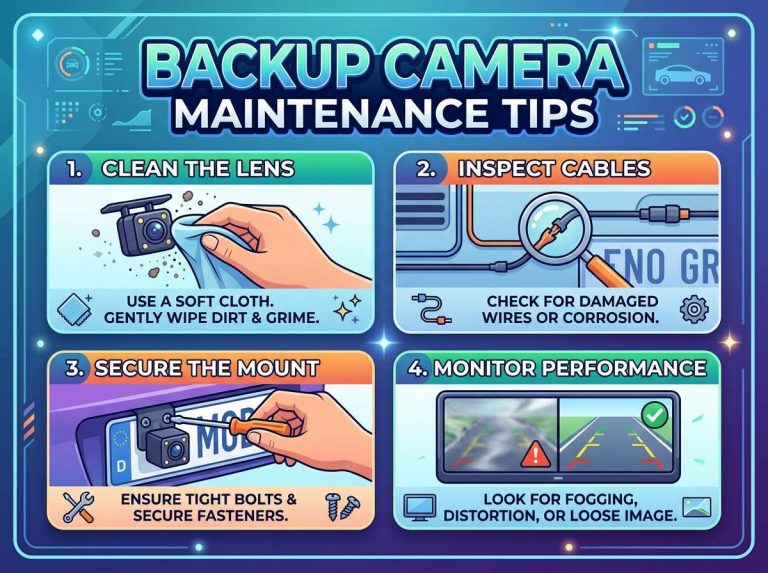
Soft microfiber cloth – This is the most important tool. A microfiber cloth is gentle on camera lenses and won’t scratch the glass. Never use paper towels, tissues, or regular cloths, as these can scratch your camera lens. If you don’t have a microfiber cloth, you can buy one at any pharmacy, electronics store, or online.
Distilled water – Tap water leaves mineral deposits on glass. Distilled water is pure and doesn’t leave spots. You can find distilled water at any grocery store or pharmacy. It’s cheap and very useful to have around your home.
Lens cleaning solution – You can buy lens cleaner made specifically for cameras. Brands like Zeiss, Nikon, and Canon all make good lens cleaning solutions. If you don’t want to buy special cleaner, you can make your own. Mix one part white vinegar with three parts distilled water. This works just as well and costs almost nothing.
Soft brush – A soft brush helps remove dust and debris before you use water. An old toothbrush works, or you can buy a specialized lens cleaning brush. The brush bristles should be very soft so they won’t damage the glass.
Cotton swabs – These help you clean hard-to-reach areas around the camera housing. Use cotton swabs gently to avoid pushing dirt into the camera.
Compressed air – A can of compressed air helps blow away loose dust and particles. You can find this at electronics stores or online. This step is optional but helpful.
Small container – Use a small cup or container to hold your cleaning solution if you’re using a homemade mix.
That’s really all you need. Most of these items cost under five dollars total.
Steps to Clean Your Backup Camera Lens
Now let’s get into the actual cleaning process. Follow these steps and your backup camera will be clean and clear.
Step 1: Turn Off Your Vehicle
Safety first. Turn off your car’s engine and remove the keys from the ignition. You want the car completely powered down. This prevents accidental camera activation and keeps you safe while working on your vehicle.
Wait a few minutes after turning off the car. This allows any electrical components to power down fully. It’s a small step that takes just moments but makes a real difference.
Step 2: Locate Your Backup Camera
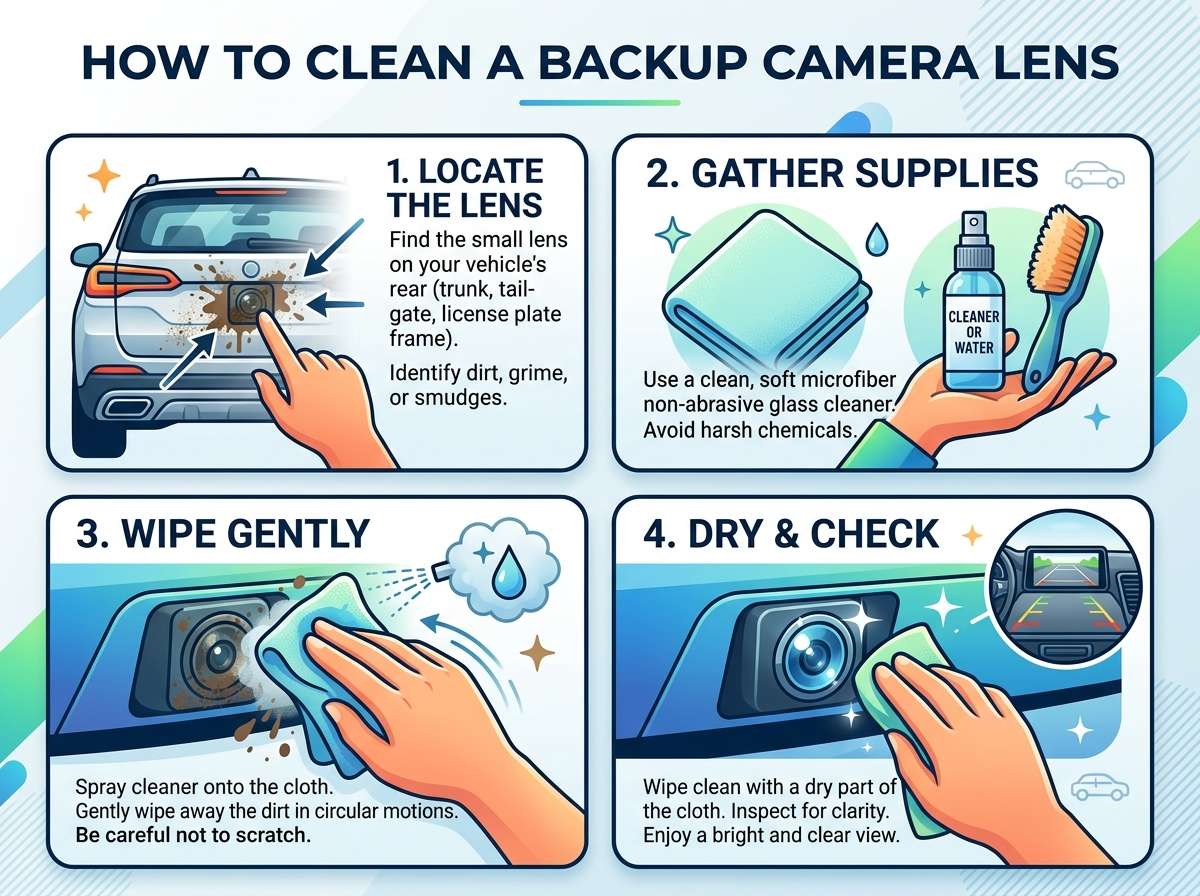
Find your backup camera on your vehicle. Most backup cameras sit on the rear bumper, either centered or slightly to the side. Some cars have cameras mounted above the license plate or integrated into the license plate frame itself. A few luxury vehicles have cameras in the trunk lid or mounted on the rear window.
Look for a small black lens or a camera unit with a protective cover. It’s usually a circle or small rectangular shape. If you’re not sure where your camera is, check your car’s manual or search online for your specific car model.
Once you find it, examine how it’s mounted. Is it flush with the bumper? Does it stick out? Is there a protective lens cover? Understanding how your camera is mounted helps you know what area you need to clean.
Step 3: Use Compressed Air to Remove Loose Debris
Before you use any liquid, remove loose dust and particles with compressed air. Hold the can upright and use short bursts of air. Keep the nozzle about six inches away from the camera lens.
Don’t shake the compressed air can, as this can spray liquid instead of air. Never use your mouth to blow on the lens, as saliva can damage the glass.
Use the compressed air to blow away dust from the camera housing too. Get into crevices and corners where dust likes to hide.
This step is important because wiping away loose dust directly could scratch your lens. You want to remove debris first without making contact with the glass.
Step 4: Prepare Your Cleaning Solution
If you’re using store-bought lens cleaner, skip this part and grab your bottle. If you’re making your own solution, do it now.
Mix one part white vinegar with three parts distilled water in your small container. Stir it gently. The vinegar cuts through dirt and grime while the distilled water prevents spots. You don’t need much solution, just enough to dampen your cloth.
Some people add a single drop of dish soap to the solution for extra cutting power. This helps remove stubborn grime and dried mud.
Step 5: Dampen Your Microfiber Cloth
Pour a small amount of your cleaning solution onto your microfiber cloth. You want the cloth damp, not soaking wet. If liquid drips from the cloth, it’s too wet. Excess liquid can seep into your camera housing and cause electrical problems.
The cloth should be just wet enough that it will clean the lens when you wipe it across the glass.
Step 6: Gently Wipe the Camera Lens
Now comes the main cleaning. Hold your damp microfiber cloth and gently wipe the camera lens in one direction. Use light, circular motions. Don’t press hard or scrub aggressively. You’re not trying to remove stubborn stains through force. Gentle pressure works better.
Wipe from the center of the lens outward. This prevents you from pushing dirt back into the center. Make several passes across the lens until it looks clean.
If you’re dealing with stubborn grime, let the cleaning solution sit on the lens for thirty seconds before wiping. The liquid needs time to break down dried dirt and sap.
Don’t worry about achieving perfection on the first pass. You might need to repeat this step two or three times, especially if your camera is very dirty.
Step 7: Dry the Lens Completely
Use a clean, dry section of your microfiber cloth to dry the lens. Wipe away all moisture completely. Any water left on the lens will leave spots and can damage your camera electronics.
If you used vinegar solution, you might see slight streaks. Use a clean, dry microfiber cloth to buff away these streaks. The goal is a completely dry, clean lens with no water droplets.
Step 8: Clean the Camera Housing
Don’t forget the area around your backup camera. The housing and protective cover also collect dirt and dust. Use a slightly damp cloth to wipe these areas too.
Use cotton swabs to clean tight corners and crevices where your cloth can’t reach. Be gentle around any rubber seals or gaskets, as these keep water out of your camera.
Step 9: Check Your Work
Step back and look at your camera from a distance. The lens should be clear and clean. You should be able to see your reflection on the glass if you look closely.
Now start your car and test your backup camera. Put the car in reverse and look at your dashboard screen. The image should be clear and bright. Colors should look natural. You should see fine details without any graininess.
If the image still looks cloudy or dark, your camera might need another cleaning. Repeat the steps above until you’re satisfied with the results.
Tips for Cleaning Different Types of Backup Cameras
Different cars have different camera setups, and some require slightly different cleaning approaches.
License plate frame cameras – These cameras are mounted inside the license plate frame at the bottom of your car. They’re exposed to road salt and debris more than other cameras. If your camera sits low, rinse the area with water after driving through heavy salt or mud to prevent buildup.
Bumper-mounted cameras – These stick out slightly from the bumper. They’re easier to access for cleaning. Make sure you don’t accidentally knock the camera with your cloth or hand.
Integrated cameras – Some new cars have backup cameras built into the rear window, trunk lid, or body panel. These are protected but still get dirty. Use the same cleaning method but be extra careful not to apply too much pressure.
Cameras with protective covers – Some cameras have plastic or glass protective covers. You might be able to remove this cover to clean underneath it, but only do this if your car’s manual shows how to remove it safely.
Check your car’s manual to see if your camera has any special features or if there are any warnings about cleaning methods.
What to Avoid When Cleaning Your Backup Camera
Just as important as knowing what to do is knowing what not to do. These mistakes can damage your camera.
Never use harsh chemicals – Avoid acetone, paint thinner, or any strong solvents. These can damage the lens coating and harm the camera’s electronics. Stick to gentle lens cleaner or your homemade vinegar solution.
Don’t use abrasive materials – Paper towels, tissues, coffee filters, and rough cloths can scratch your lens. Only use microfiber cloths. Scratches on the lens are permanent and will affect your video quality forever.
Avoid excessive water – Don’t spray your camera with a hose or use running water directly on the lens. Your camera is sealed, but too much water can seep into small gaps and cause electrical damage.
Don’t apply too much pressure – Backup cameras are delicate. Rough scrubbing can damage internal components or misalign the camera. Light, gentle pressure is all you need.
Never use compressed air incorrectly – Shaking the can or holding it upside down can spray liquid propellant onto your lens. Keep the can upright and use short bursts from a safe distance.
Avoid cleaning the camera in direct sunlight – Heat can make lens cleaning solution dry too quickly, leaving streaks. Clean your camera in the shade or on an overcast day.
Don’t ignore electrical components – Keep cleaning solution away from any electrical connectors or cables. These components are sensitive to moisture.
How Often Should You Clean Your Backup Camera
Regular maintenance keeps your backup camera in top shape. Most car owners should clean their backup camera once a month. However, this depends on where you live and your driving habits.
If you live in an area with lots of rain, clean your camera more frequently, maybe every two weeks. Drivers who encounter salty roads in winter should clean their cameras every week during winter months. If you park outside all the time, clean your camera more often than someone who parks in a garage.
If you don’t use your car much, you might only need to clean your camera every two months. Pay attention to how your camera looks. If the image starts to look cloudy, that’s your signal to clean it.
Common Backup Camera Problems and Solutions
Sometimes a dirty lens isn’t the only problem. Let’s talk about other common issues.
Camera won’t turn on – Make sure your car is in reverse gear. Some cameras only activate when you shift into reverse. If the camera still won’t activate, you might have an electrical problem. Check your car’s fuse box or consult a mechanic.
Video feed is upside down – This usually means the camera is installed backward or rotated incorrectly. You’ll need a mechanic to reinstall it properly.
Image is too dark – First, clean the lens thoroughly. If the image is still dark, the camera sensor might be damaged. You might need to replace the camera.
Image has strange colors – A dirty lens can cause color issues. Clean the camera first. If the problem persists, the camera might have internal damage.
Camera has lines or distortions – These lines might be electrical interference or internal damage. Cleaning won’t fix this problem, and you’ll likely need camera replacement.
Protecting Your Backup Camera From Future Damage
Keeping your camera clean is important, but preventing damage is even better. Here are ways to minimize dirt and grime buildup.
Park in a garage when possible – Covered parking keeps rain, bird droppings, and tree sap off your camera.
Avoid puddles and mud – When driving, try to avoid splashing through puddles or driving on very muddy roads. This reduces the amount of debris that hits your camera.
Rinse your car after salty conditions – If you drive on salted roads, rinse the back of your car regularly. Salt buildup is the enemy of backup cameras.
Use a car cover – If you park outside regularly, a car cover protects your camera from the elements.
Keep your camera clear – Do quick visual inspections weekly. If you notice dirt building up, give your lens a quick wipe with a clean cloth.
Avoid automatic car washes – Pressure from car wash brushes can damage your camera. Hand wash the back of your car or use a touchless automatic wash.
Professional Cleaning Services
Sometimes you might want professional help. Some car dealers offer camera cleaning services. Auto detailing shops can clean your backup camera as part of their services.
Professional cleaning is more expensive than doing it yourself, usually costing twenty to fifty dollars. However, pros have specialized equipment and won’t risk damaging your camera.
If your camera is in a hard-to-reach location or if you’re not comfortable doing it yourself, professional cleaning is worth considering.
Troubleshooting: When DIY Cleaning Isn’t Enough
If you clean your camera but the image is still poor, something else might be wrong.
Check if the problem is the camera or the display. Go to the settings on your car’s infotainment system. Sometimes you can adjust the brightness or contrast of the camera image. Increasing brightness might help if the display looks too dark.
Make sure your backup camera is actually activating. Shift into reverse and listen for the camera to engage. Some cars make a beeping sound or show a notification when the camera activates.
If the camera still doesn’t work properly after cleaning, your camera might need replacement. Contact your car’s manufacturer or take it to a mechanic.
Cleaning Your Backup Camera is Easier Than You Think
Your backup camera is a valuable safety feature that helps you drive with confidence. Keeping it clean is simple and takes just a few minutes. Regular cleaning prevents expensive repairs and keeps your camera working perfectly.
You don’t need special skills or expensive tools. With just a microfiber cloth, some distilled water, and a gentle touch, you can have a crystal-clear backup camera that shows you everything behind your car.
Make backup camera cleaning part of your regular car maintenance routine. Clean it monthly or whenever you notice the image getting cloudy. Your camera will thank you with a clear, bright video feed that helps you park safely and avoid obstacles.
Start today. Grab a microfiber cloth, find your backup camera, and give it a gentle cleaning. You’ll be amazed at the difference a clean lens makes. Your backup camera will work like new again, giving you the clear view you need every time you put your car in reverse.
Safe driving starts with the right visibility, and a clean backup camera is an essential part of that. Take five minutes now to keep this important safety feature in top shape. Your future self will appreciate the peace of mind that comes with knowing your backup camera is clean and working perfectly.

Peterson is an automotive safety enthusiast and product reviewer with a passion for helping drivers stay safe on the road. He researches and tests dash cams, backup cameras, TPMS systems, emergency tools, GPS trackers, and other vehicle safety products to provide honest, practical recommendations. Through CarSafeties.com, Peterson shares in-depth reviews, buying guides, and maintenance tips to help drivers make smarter and safer decisions.