Backup Camera Wiring Diagram Explained
If you’ve ever backed out of your garage and wished you could see what’s behind your car, a backup camera is the perfect solution. These handy devices have become incredibly popular because they make parking easier and safer. But if you’re thinking about installing one yourself, the wiring can seem confusing at first. Don’t worry! This guide breaks down the backup camera wiring diagram into simple, easy-to-understand pieces.
In this article
What Is a Backup Camera System?
A backup camera system is basically a small camera mounted on the rear of your vehicle that sends video to a display screen inside your car. When you shift into reverse, the camera turns on automatically and shows you what’s behind you. Pretty simple, right?
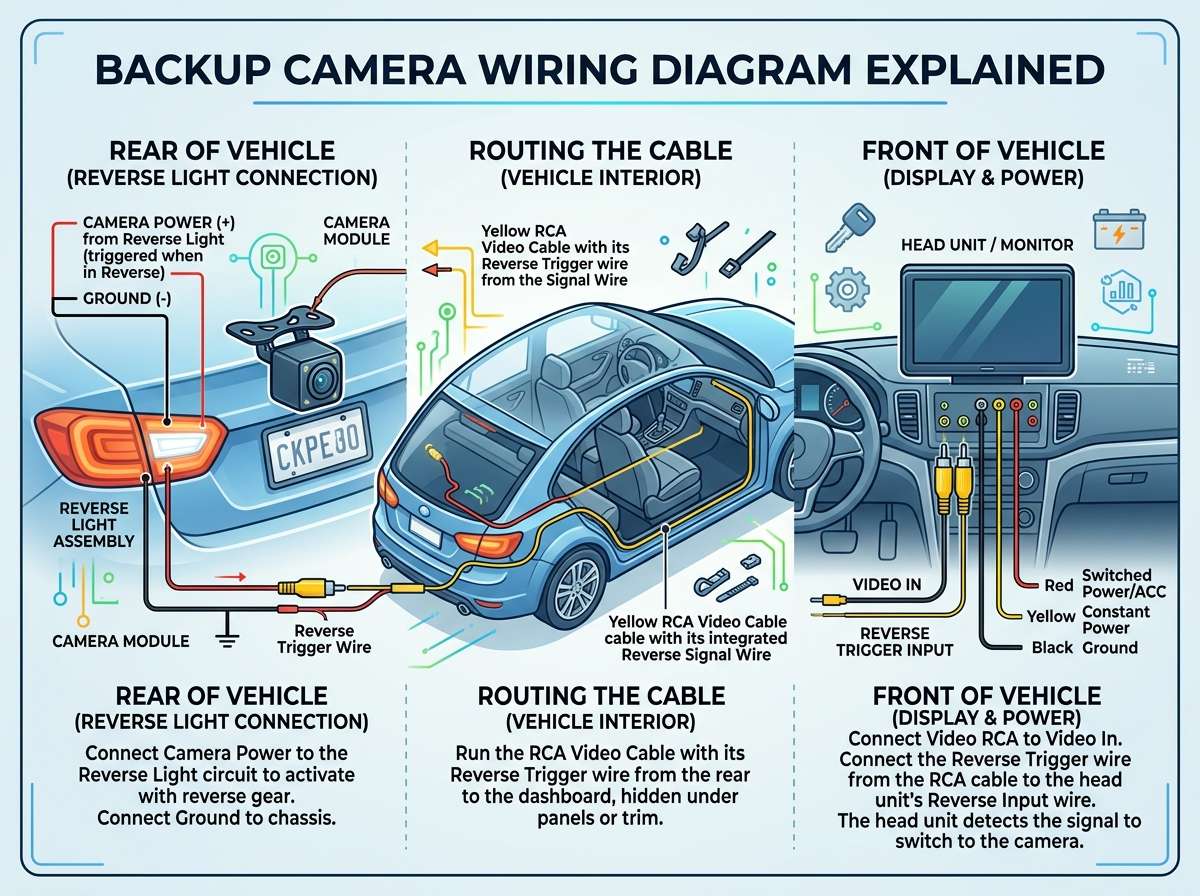
The system has several main parts: the camera itself, wiring that carries power and video signals, a power source, and a display monitor. All these pieces work together through the backup camera wiring diagram, which is like a map showing how everything connects.
Why Understanding Wiring Matters
You might be asking yourself, “Can’t I just plug things in and hope for the best?” Sure, you could try, but proper wiring ensures your backup camera works reliably and safely. Bad connections can drain your battery, damage your camera, or create fire hazards. Learning to read a backup camera wiring diagram takes away the guesswork and helps you install or troubleshoot your system like a pro.
Breaking Down the Basic Backup Camera Wiring Diagram
Let’s start with the foundation. Every backup camera wiring diagram shows connections between key components. Think of it as a blueprint for your backup camera installation.
The Power Source
Your car’s battery is the main power source for the entire backup camera system. In the wiring diagram, you’ll see this represented as a positive (+) and negative (-) connection. The positive wire carries power, while the negative wire completes the circuit back to the battery. This is absolutely crucial for the camera to work.
Most backup cameras draw power in two ways. Some pull constant power directly from the battery, while others tap into your reverse light circuit. The reverse light circuit is smart because it means your camera only gets power when you actually need it—when you’re backing up.
The Camera Unit
The backup camera is the heart of the system. In the wiring diagram, it appears as a rectangular box with labeled connections. These connections typically include power input, ground, and a video output cable. The camera has a lens pointing backward and a mounting bracket that attaches to your vehicle’s rear bumper or license plate area.
When power flows to the camera, it starts recording video immediately. That video signal travels through the video cable to your display screen.
The Video Signal Cable
This is the connection that sends what the camera sees to your monitor. It’s usually a single cable with specific connectors on each end. The video cable carries an analog signal, which is different from your regular power wires. In a backup camera wiring diagram, this cable is often shown in a different color to help you spot it easily.
The video cable can be kind of tricky to route through your car. It needs to go from the rear camera, through your vehicle’s interior (usually along the roof headliner or under the carpet), and into the dashboard where your monitor sits. This routing should also appear in your wiring diagram.
The Monitor or Display Screen
This is what you look at while backing up. The monitor has its own power supply, video input connections, and sometimes reverse signal input. Some monitors are aftermarket units that replace your factory stereo, while others are separate screens mounted on the dashboard.
In the wiring diagram, the monitor shows connections for power (12V), ground, video input, and often a reverse signal input. That reverse signal input is what tells the monitor to turn on and display the camera feed when you shift into reverse.
The Reverse Signal: The Smart Connection
Here’s where things get really clever. The reverse signal wire connects your backup camera system to your car’s reverse light circuit. When you put your car in reverse, the reverse lights turn on, and at the same time, a signal travels through this wire to wake up your backup camera and monitor.
In the wiring diagram, this connection looks simple—just one wire going from the reverse light circuit to your camera system. But it’s powerful because it automates the entire process. You don’t have to do anything special; the camera just knows when it’s time to work.
This reverse signal wire typically carries the same 12V power as your reverse lights. It’s a switched signal, meaning it only activates when you’re in reverse gear.
Ground Connections: Don’t Forget This!
Beginners often overlook grounding, but it’s absolutely vital. Every component in your backup camera system needs a proper ground connection to complete the electrical circuit. Think of ground as the return path for electricity.
In a backup camera wiring diagram, you’ll see ground connections labeled with a negative sign or shown as black wires. These typically connect to the car’s chassis or body. A good ground spot might be a bolt on the frame, a ground stud on the vehicle body, or a dedicated ground wire that ties into your car’s main ground.
Poor grounding causes all sorts of problems: flickering video, cameras that don’t power on, and intermittent system failures. Always make sure your ground connections are clean, tight, and corrosion-free.
Power Considerations and Wire Sizing
Now let’s talk power requirements. Different backup cameras and monitors need different amounts of power. A simple single-camera system might draw only 2-3 amps, while a multi-camera system could need 8-10 amps or more.
Looking at your backup camera wiring diagram, you’ll see wire sizes specified. Wire gauge matters because using wire that’s too thin creates heat and can damage your system or cause fires. Common sizes for backup camera wiring are 18 AWG or 16 AWG for signal wires and 12 AWG or 10 AWG for power distribution.
The wiring diagram also shows you where to place fuses. Fuses protect your system from short circuits and electrical surges. A blown fuse stops power from flowing, which prevents damage to expensive components. You should always install a fuse rated for your system’s power requirements within 18 inches of your battery.
Connecting Multiple Cameras
Some people want to install multiple backup cameras—one in the rear and sometimes one on each side. A multi-camera wiring diagram is more complex because it shows how to connect several cameras to one display system.
The basic principle stays the same, but you now have multiple video signals that need to route to the monitor. Some systems use a camera control module that switches between different cameras automatically, while others show all cameras on a split screen.
Each camera still needs its own power supply, ground connection, and video cable in the diagram. The monitor coordinates all the signals, typically showing the rear camera when you’re in reverse and switching to side cameras if you request them.
Dash Cam and Backup Camera Integration
Many folks want to combine a dash cam with their backup camera system. A combined wiring diagram shows how both systems can coexist without causing problems. They typically share the same power and ground connections, which is fine as long as the total power draw doesn’t exceed what your vehicle’s electrical system can handle.
The key is routing the video cables separately so they don’t interfere with each other. Each camera connects to its own video input on the monitor or recording device.
Common Wiring Mistakes to Avoid
Let’s talk about what not to do. Many DIY installation problems come from wiring mistakes that are totally preventable.
Connecting backwards: Reversing positive and negative can destroy your camera instantly. Always double-check polarity before making connections.
Poor crimping: If you crimp your wire connectors wrong, they create loose connections that fail intermittently. Use a proper crimping tool and practice on scrap wire first.
Running power cables next to video cables: These create electromagnetic interference that makes your video feed look grainy or noisy. Keep power and video cables separated or use shielded video cables.
Skipping the fuse: This is how car fires start. Always install a fuse near your battery.
Using cheap connectors: Quality connectors stay tight and prevent corrosion. Cheap ones fail after a few months.
Forgetting about waterproofing: Your backup camera sits outside where rain and dirt are everywhere. Any exposed connections should be sealed or housed in waterproof connectors.
Different Wiring Configurations
Not all backup camera systems use the same wiring setup. Let me explain the most common configurations you’ll encounter.
Direct Battery Connection
Some systems connect directly to your car’s battery using a main power cable, a fuse, a switch, and the appropriate gauge wire. This gives maximum power and reliability but means you need to run a long cable from your battery to the rear camera. The wiring diagram for this setup shows all these components clearly marked.
Reverse Light Circuit Connection
This is more popular because it’s simpler to install. The wiring diagram shows connections to your existing reverse light circuit, which provides power automatically when you shift into reverse. This setup uses less complex wiring and doesn’t require running cables all the way to your battery.
Combined with Head Unit
Some people integrate their backup camera into their aftermarket head unit (car stereo). The wiring diagram for this setup shows the camera connecting to the head unit’s video input and the head unit handling all the power distribution. This is clean and organized but requires your head unit to have backup camera input capability.
Step-by-Step Wiring Process
Once you understand the diagram, the actual wiring process follows a logical order.
First, locate all your components and verify they match your wiring diagram. Next, disconnect your car battery’s negative terminal to prevent accidental shorts. Plan your cable routes—especially the video cable—before making any permanent connections.
Connect the camera’s power and ground wires according to the diagram. Mount the camera in its final location and run the video cable carefully through your vehicle. Connect the reverse signal wire to your reverse light circuit. Install your monitor and connect all its wires: power, ground, video input, and reverse signal.
Finally, install fuses and test everything before buttoning everything back up. Turn on the ignition, shift into reverse, and verify the camera and monitor both work.
Reading Your Specific Wiring Diagram
Every camera system is slightly different, so your specific wiring diagram is your best resource. Most come with installation instructions that include their diagram. Color-coded wires and clearly labeled components make it much easier to follow.
Some diagrams use symbols: a circle might represent a connection point, a line represents a wire, and boxes represent major components like fuses or switches. The legend at the bottom explains what each symbol means.
Don’t be intimidated by the diagram. Trace each wire slowly with your finger, and soon everything makes sense.
Troubleshooting Common Issues
If your backup camera isn’t working after installation, the wiring diagram helps you troubleshoot.
No power to the camera? Check your fuse, verify your power connections are tight, and trace the power wire back to its source. Verify you have proper ground connections.
Video shows but picture is grainy? You might have electromagnetic interference from power cables running alongside video cables. Separate them or use shielded cables.
Camera works sometimes but not always? This usually indicates a loose connection. Check every crimped connection and every ground point.
Monitor won’t turn on? Trace the power and reverse signal wires. Make sure the reverse signal is actually activating your monitor.
Aftermarket vs. Factory Wiring Diagrams
Factory-installed backup cameras follow the vehicle manufacturer’s wiring diagram, which is usually simpler because it’s built into the car from the start. Aftermarket systems need more complex wiring because you’re adding something the car wasn’t designed for.
Your aftermarket backup camera wiring diagram compensates for this by showing you exactly how to tap into existing circuits, where to mount components, and how to route cables through tight spaces. This complexity is why having the right diagram for your specific system is so important.
Tools You’ll Need
To work with any backup camera wiring diagram, gather these tools: wire strippers, wire crimpers, a screwdriver set, electrical tape, a multimeter for testing, and waterproof connectors. A fish tape helps route cables through tight spaces, and a heat gun helps with shrink tube protection on connections.
Making Connections Permanent and Safe
After you’ve tested everything and confirmed it works, make all connections permanent. Use shrink tubing or electrical tape to cover exposed connections and prevent moisture from causing corrosion. Apply dielectric grease to connector terminals for extra protection.
Secure all cables with zip ties so they don’t move around and rub against sharp edges. Leave enough slack so vibration doesn’t stress your connections.
Final Thoughts on Backup Camera Wiring Diagrams
Backup camera wiring diagrams look complicated at first, but they’re really just organized maps showing how to connect simple components together. Once you understand that each wire has a job—power in, signal out, ground return—everything makes sense.
Whether you’re installing a simple single-camera system or something more complex, taking time to study your wiring diagram before touching a single wire saves time, prevents mistakes, and keeps your vehicle safe. The investment in understanding how your backup camera wiring diagram works pays off immediately through a successful installation and years of trouble-free operation.
Take your time, follow the diagram carefully, and don’t skip important steps like fusing and grounding. Your backup camera will work beautifully, giving you years of safer parking and reversing. Happy installing!

Peterson is an automotive safety enthusiast and product reviewer with a passion for helping drivers stay safe on the road. He researches and tests dash cams, backup cameras, TPMS systems, emergency tools, GPS trackers, and other vehicle safety products to provide honest, practical recommendations. Through CarSafeties.com, Peterson shares in-depth reviews, buying guides, and maintenance tips to help drivers make smarter and safer decisions.