How Do 360 Car Cameras Work?
If you’ve ever worried about hitting something while parking or wanted to see what’s happening around your entire vehicle, you’ve probably heard about 360 degree camera systems. These amazing tools have changed the way we drive and park. Let’s break down exactly how they work in plain English.
In this article
What Is a 360 Car Camera System?
A 360 car camera is a set of cameras mounted around your vehicle. They give you a bird’s eye view of everything around your car. It’s like having eyes in the sky looking down at your vehicle from above.
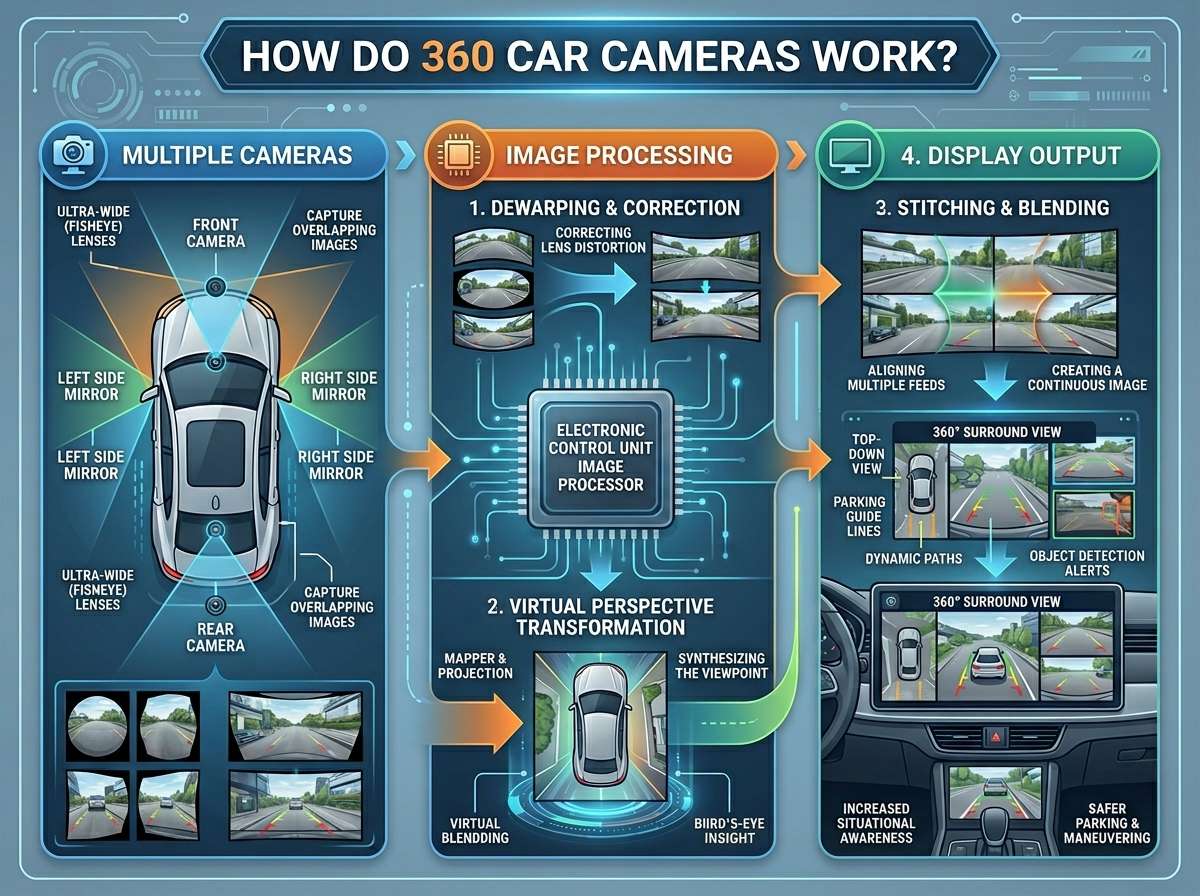
Most 360 camera systems have four cameras total. One sits at the front of your car. One goes at the back. Two more sit on the sides, usually near the side mirrors. These aren’t regular cameras you’d use to take photos. They’re special vehicle cameras built tough to handle rain, dirt, and extreme temperatures.
When you shift into reverse or turn on the system, all four cameras start recording. They send their video feeds to a screen inside your car. Then something magical happens. A computer combines all the video feeds into one seamless image. You see your car from above, almost like you’re floating in the sky.
The Four Cameras That Make It Happen
Let’s talk about each camera and what it does.
The Front Camera
The front camera sits at the bottom of your windshield or on the front bumper. This camera shows you the road directly ahead. It captures everything in front of your vehicle in a wide angle. The wide angle view is crucial. Without it, the camera would only see a narrow strip in front of you.
Most front cameras have a field of view between 120 and 180 degrees. That’s a pretty wide view. Some premium cameras can see even more. This wide perspective helps when driving through tight spaces or approaching obstacles.
The Rear Camera
The rear camera does the opposite job of the front camera. It sits on your bumper at the back of the vehicle. This camera captures everything behind your car. It’s especially helpful when backing up.
Rear cameras often have the widest field of view of all four cameras. This makes sense because you need to see everything behind you when reversing. Many backup camera systems work this way, and a 360 system builds on this proven technology.
The Left Side Camera
The left side camera sits near your left side mirror. It points to the left side of your vehicle. This camera helps you see what’s happening on your driver’s side. You can spot pedestrians, cyclists, or cars in your blind spot.
Side cameras typically have a field of view around 160 to 180 degrees. This wide view helps capture both the front corner and back corner of your vehicle on that side.
The Right Side Camera
The right side camera mirrors the left side camera. It sits near your right side mirror and points to the right. It shows you what’s on the passenger side of your vehicle.
These side cameras are really useful when parking. You can see exactly how close you are to the car next to you without leaning out the window or relying on your side mirror.
How the Magic Actually Happens: The Video Stitching Process
Now here’s where it gets really cool. Each camera sends a video feed to the central processing unit. But these are four separate feeds. How does your car turn four different camera views into one overhead view?
The answer is something called image stitching or video stitching. This is the real magic of the 360 camera system.
Understanding Image Stitching
The processing unit takes all four video feeds. It lines them up and merges them together. Think of it like a jigsaw puzzle. Each camera captures its own puzzle piece. The computer’s job is to make those pieces fit together perfectly.
But wait. The cameras are pointing in different directions. The front camera points forward. The rear points backward. How can you stitch these together?
The system uses something called perspective transformation. The computer bends and adjusts each image. It takes the camera’s wide angle view and transforms it so everything lines up. The front camera view gets rotated to show a top-down perspective. The rear camera does the same. Both side cameras do as well.
Once all four views are transformed, they overlap at the edges. The processing unit blends these overlapping areas together seamlessly. Special software makes sure the overlaps don’t create visible seams or weird distortions.
The Role of Calibration
For stitching to work perfectly, the system needs to know exactly where each camera sits and how it points. This information comes from calibration.
During calibration, the system maps out the exact position of each camera. It learns how much each camera overlaps with its neighbors. It documents the angle each camera points in relation to the vehicle.
This calibration happens at the factory when your car is built. Some systems let you recalibrate if needed. This is important because if cameras get bumped or knocked out of alignment, the 360 view won’t work right anymore.
Real-Time Processing
All this processing happens instantly. You don’t see a delay between what’s actually happening and what appears on your screen. The system processes all four video feeds and creates the stitched image in real-time.
Modern processors handle this easily. The computational power required is less than what most smartphones have. Your car’s processing unit rapidly pulls data from all four cameras, transforms each image, blends the overlaps, and displays the result.
The Display Screen
You can’t use a 360 camera without a screen to show you the image. Most cars have this built right into their dashboard.
Types of Screens
Some vehicles have dedicated small screens for camera displays. Others use the main infotainment touchscreen. Luxury vehicles sometimes have large, high-resolution screens that make everything look crisp and clear.
The best 360 camera systems use high-resolution screens. They show the overhead view clearly. Many systems also let you switch between views. You might start with the 360 bird’s eye view. Then you can tap the front camera view to see what’s ahead. You can switch to the rear camera to see behind. Or pick a side camera for side-by-side close-up views.
Different View Modes
Most 360 camera systems offer several viewing options.
The bird’s eye view is the classic overhead perspective. Your vehicle appears in the center of the screen with everything around it visible. This is the most popular view for parking.
The split-screen view shows multiple camera angles at once. You might see the rear camera on one half and a side view on the other.
The perimeter view draws lines around your vehicle showing distances to nearby objects. Some systems even change the line color from green to yellow to red as you get closer to something.
The 3D view creates a three-dimensional representation of your surroundings. This newer technology helps you understand the actual shapes and distances of objects around your car.
Screen Placement and Size Matters
Where the screen sits and how big it is affects how useful the system is. Screens positioned low on the dashboard are easier to see while driving. Screens in the center console work better when you’re sitting still.
Larger screens show more detail. A tiny screen might make it hard to see fine details. A large screen makes even distant objects visible and easy to identify.
How Cameras See in Low Light Conditions
One challenge for camera systems is seeing in darkness. Your eyes adjust automatically to low light. Cameras need technology to do this.
Night Vision Technology
Many 360 camera systems use infrared or thermal imaging for night visibility. These cameras see heat signatures instead of light. They work well in complete darkness. Your screen shows everything in black and white or with a thermal color scheme.
Other systems use super-sensitive sensors. These sensors capture even tiny amounts of light and amplify it. This technology is called low-light or night mode. It’s the same type used in professional video cameras.
LED Lighting
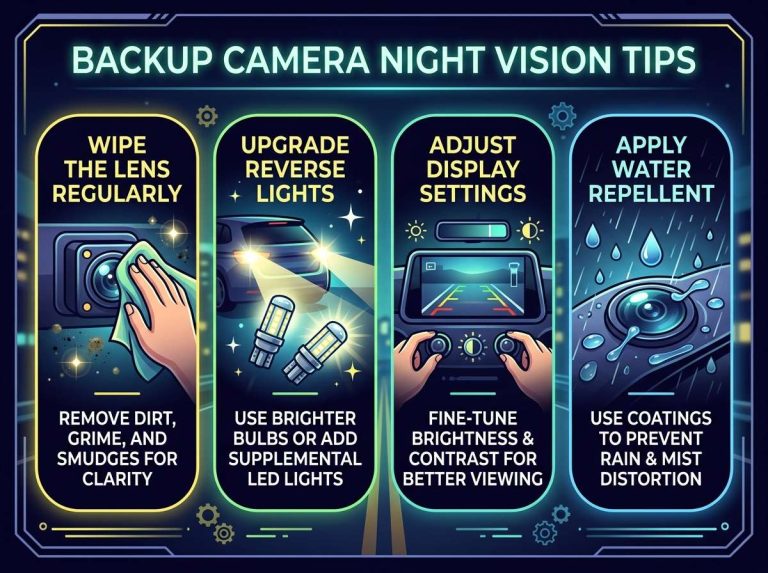
Some 360 camera systems include small LED lights near the cameras. These lights illuminate the area around your vehicle. They’re especially helpful when backing up at night.
Most LED lights automatically turn on and off based on how dark it is outside. Your car’s light sensors detect this automatically. You don’t need to do anything.
Wide Angle Lenses Explained
All four cameras in a 360 system use wide angle lenses. These lenses capture a much broader view than normal camera lenses.
Why Wide Angles Matter
A regular camera lens might see about 50 degrees of view. That’s roughly what your eye sees when looking straight ahead. Wide angle lenses see 120 to 180 degrees. That’s almost as much as your peripheral vision combined with your forward vision.
Wide angle lenses accomplish this through optical engineering. The glass curves in special ways. This curved glass bends light rays so more of them enter the camera sensor. The sensor records all these light rays, creating a super-wide image.
The Downside of Wide Angle Lenses
Wide angle lenses distort the image. The edges of the view look stretched or bent. Objects at the edges appear farther away than they actually are.
This distortion matters less for 360 cameras because the software accounts for it. During calibration, the system learns about each lens’s distortion. When stitching images together, the processing unit corrects for this distortion. By the time you see the image on your screen, it looks pretty normal.
Fisheye Lenses
The most extreme wide angle lenses are called fisheye lenses. These can see 170 to 180 degrees or even more. They’re named fisheye because fish can see almost 360 degrees from their eyes on the sides of their heads.
Fisheye lenses create a bubble-like image. Everything looks curved and warped. Most 360 camera systems use fisheye lenses because they capture so much area. The software correction removes most of the warp you’d normally see.
Color and Image Quality Factors
The quality of your 360 camera view depends on several factors.
Resolution
Resolution refers to how many pixels make up the image. Higher resolution images contain more detail. A 1080p resolution is pretty standard for 360 camera systems. That means the image is 1920 pixels wide by 1080 pixels tall.
Some premium systems offer higher resolution like 2K or 4K. These show finer details. You can see farther away objects more clearly. However, they require more processing power and faster data transfer.
Color Accuracy
The color accuracy of cameras affects how well you can see things. Cheap cameras sometimes produce images with wrong colors. A white car might look blue. This color shift makes it harder to identify objects.
Premium cameras use higher quality sensors and better glass. They reproduce colors more accurately. This helps you judge distances and recognize objects better.
Contrast and Brightness
Contrast is the difference between dark and light areas. Brightness is how light or dark the overall image is.
Good 360 camera systems maintain proper contrast and brightness in all lighting conditions. In bright sunlight, the image doesn’t get washed out. At night or in shadows, the image stays visible and clear.
Cameras accomplish this through something called dynamic range optimization. The sensor measures different parts of the image separately. It adjusts brightness and contrast for each area to create the best overall image.
Weather Resistant Design
Your car’s cameras face harsh conditions. Rain, snow, dirt, and extreme temperatures can damage normal cameras.
Sealed Housing
All 360 camera housings are sealed against water. Water that gets into a camera will destroy the electronics inside.
The seals are made from waterproof rubber and gaskets. These compress when the camera is installed, creating a tight seal. Water can’t get past the rubber even if water is sprayed directly at the camera.
The electrical connectors that carry power and video signals are also waterproofed. They use special connectors designed to prevent water and corrosion.
Protective Glass and Coatings
The lens glass on camera housings is tough and tempered. It resists scratching from dirt and debris. If something does scratch the lens, the glass is recessed slightly. The housing lip protects the lens from direct impacts.
Many premium cameras have water-shedding coatings on the lens glass. These coatings are similar to raincoat material. Water beads up and rolls off instead of sticking to the lens. This keeps your view clear even during heavy rain.
Temperature Tolerance
Cars get extremely hot in direct sun and freezing cold in winter. This temperature change can damage electronics.
Camera systems are rated for specific temperature ranges. Most work from about -10 degrees to +60 degrees Celsius. That covers normal weather conditions in most places.
The electronics inside are potted with epoxy resin. This special plastic compound surrounds the circuits completely. It protects them from moisture and temperature changes.
Power Supply and Wiring
Your 360 camera system needs power and a way to send video signals to the screen.
Power Requirements
Each camera needs power to operate. The system’s main control unit also needs power. Most systems draw less than 10 amps total. That’s less than a single car headlight uses.
Power comes from your vehicle’s battery through the fuse box. The installer runs new power wires from the fuse box to the camera system. The system might use multiple fuses to protect each camera and the control unit.
Video Signal Transfer
Each camera must send its video to the control unit. Older analog systems used standard video cables. Modern digital systems use better connections.
Some systems use Ethernet cables, similar to computer networks. These can transfer high-quality video without losing signal quality. Ethernet also allows the control unit to send power through the same cable.
Other systems use proprietary connectors designed specifically for that brand. These proprietary connectors often combine power and video signals in a single cable. This reduces the number of wires you need to run through your car.
Cable Routing
Running cables from the cameras to the control unit requires careful planning. The installer must route cables through the car without blocking anything important.
Cables typically run along existing harnesses or through conduit tubes. They hide behind trim panels and headliners. A well-installed system has cables completely hidden from view.
Integration with Your Car’s Systems
Modern 360 camera systems integrate with your vehicle’s other features.
Reverse Gear Integration
When you shift into reverse, the camera system automatically turns on. The image appears on your screen. You don’t need to manually switch anything on. Most cars use a switch on the reverse gear signal. The control unit detects this signal and activates the cameras.
Steering Angle Integration
Some systems read your steering wheel angle. They then adjust the camera view to show where you’re heading. If you turn the steering wheel left, the camera shows you what will appear on the left. This feature is really helpful for predicting your car’s path.
Distance and Warning Systems
Many 360 camera systems combine with parking sensor systems. Sensors detect objects and send distance information to the control unit. Your screen might show colored warning zones. Green means plenty of space. Yellow means you’re getting close. Red means stop now.
Installation Process
Adding a 360 camera system to a car that doesn’t have one involves several steps.
Removing Trim Pieces
The installer must remove bumpers, trim panels, and other parts to access the camera mounting areas. This is tedious but necessary work. Each car model requires different trim removal procedures.
Mounting the Cameras
Cameras get mounted in precise locations. The front camera mounts low on the bumper or grille area. The rear camera goes on the rear bumper, often near the center. Side cameras mount near the side mirrors.
Proper mounting is crucial. If a camera sits even slightly out of position, the stitched image won’t align correctly. The installer uses templates and measurements to get each camera in the exact right spot.
Running the Cables
Cables run from each camera to the main control unit. This is the most time-consuming part of installation. The installer threads cables through door frames, along the undercarriage, and through the interior.
Connecting to Power and Display
Power cables connect to the fuse box. Video cables connect to the main control unit. The control unit connects to the display screen. The installer programs the system with your specific vehicle’s configuration.
Final Testing and Calibration
Once everything is connected, the installer tests each camera. They check that all four feeds appear on the screen correctly. Then they calibrate the system so the stitched image aligns properly.
Calibration involves driving slowly through a test area marked with grids or lines. The system learns how the real environment looks and adjusts the image processing accordingly.
Maintenance and Care
Your 360 camera system needs occasional care to keep working well.
Cleaning the Lenses
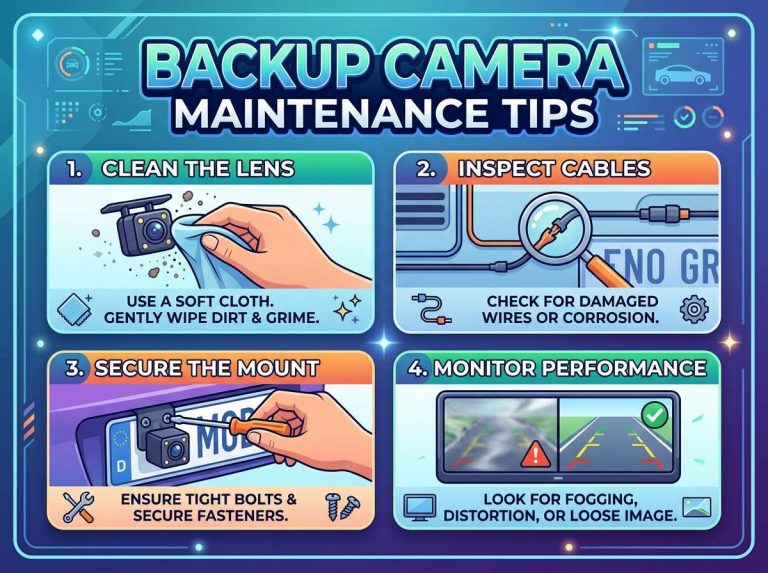
Dirt, mud, and grime buildup on camera lenses reduces image quality. You should clean them regularly with a soft, damp cloth. Be gentle to avoid scratching the lens.
Never use harsh chemicals or abrasive materials. These can damage the lens coating. Regular soap and water works fine for normal dirt.
Checking for Damage
After hitting something or scraping your bumper, check your cameras. Physical damage to a camera housing can affect the seal. Even small cracks can let water inside.
If a camera looks damaged, have a professional inspect it. Replacement cameras aren’t cheap, but a damaged camera won’t work properly anyway.
Software Updates
Some 360 camera systems receive software updates. These updates can improve image processing, add new features, or fix bugs. Check with your car’s manufacturer about available updates.
Common Problems and Solutions
Even the best systems can develop issues.
Image Not Showing Up
If your camera image doesn’t appear when expected, first check if the system is turned on. Some systems have on/off switches. Make sure all power connections are secure.
If the screen shows no image at all, a camera might be disconnected or damaged. A professional can trace the cables and test each camera.
Misaligned or Distorted Image
When the stitched image looks warped or misaligned, calibration might be needed. Temperature changes can sometimes shift the system slightly out of calibration.
Most dealers can recalibrate your system. This usually takes less than an hour.
Dim or Washed Out Image
If the image looks too dark or too bright, the sensor might need adjustment. Some systems have user-adjustable brightness settings in the menu.
If adjusting settings doesn’t help, the camera sensor might be failing. Replacement becomes necessary.
The Cost of 360 Camera Systems
The price varies widely based on the system quality and your vehicle.
Factory-Installed Systems
Buying a 360 camera system when you buy your car costs between $500 and $2000. Luxury brands charge more. Budget brands charge less.
Factory systems are integrated perfectly with your car’s electronics. You get a warranty. Installation quality is guaranteed.
Aftermarket Systems
Adding a 360 camera system later costs between $800 and $4000 total. This includes the equipment and professional installation.
Aftermarket systems vary greatly in quality. Research reviews carefully before buying. Budget brands might look cheap now but fail quickly.
Professional installation costs between $400 and $1200 depending on your vehicle. Some cars are much easier to install in than others.
DIY Installation
Some people install systems themselves to save money. This is possible but risky. A poor installation results in a misaligned image that’s frustrating to use.
The technical knowledge required is significant. You’ll need to understand vehicle wiring, camera calibration, and display system integration. Most people should hire professionals.
The Future of 360 Camera Technology
These systems keep improving.
Artificial Intelligence Integration
New systems use AI to recognize objects. The system can identify other cars, pedestrians, cyclists, and obstacles. It shows this information on your screen with labels and outlines.
AI systems learn over time. The more they’re used, the better they get at recognition.
Higher Resolution and Clarity
Future systems will use higher resolution cameras. 4K and 8K cameras will show incredible detail. You’ll be able to see small hazards you’d miss with current systems.
Enhanced Reality Overlays
Some manufacturers are testing augmented reality features. These systems project information directly onto real camera feeds. You might see a path your car will take when turning or parking. You might see distance measurements in real-time.
Seamless Interior Integration
As vehicles become more autonomous, camera systems become more important. Future camera systems will integrate even more deeply with your car’s safety and driving systems.
Conclusion
A 360 car camera system is a clever combination of hardware and software working together. Four wide-angle cameras capture everything around your vehicle. A powerful computer stitches their feeds into a single overhead view. This view appears on your screen instantly.
The technology isn’t magic. It’s engineering. Understanding how these systems work helps you appreciate the effort that goes into making them. It also helps you maintain them properly and troubleshoot problems when they happen.
Whether you’re parking in a tight space or maneuvering through heavy traffic, a 360 camera system gives you superhuman vision. You see everything around your car from an angle human eyes can’t naturally achieve. That’s the real power of this technology.
As technology improves, these systems become cheaper, better, and more common. They’re no longer luxury features. Soon most vehicles will include them as standard. The day when drivers relied on mirrors and guesswork for parking will seem ancient.

Peterson is an automotive safety enthusiast and product reviewer with a passion for helping drivers stay safe on the road. He researches and tests dash cams, backup cameras, TPMS systems, emergency tools, GPS trackers, and other vehicle safety products to provide honest, practical recommendations. Through CarSafeties.com, Peterson shares in-depth reviews, buying guides, and maintenance tips to help drivers make smarter and safer decisions.