Can You Add a Backup Camera to a Car?
If you’ve ever had to crane your neck while backing up, you know how annoying it is. You can’t see behind your car. You rely on mirrors that give you blind spots. It’s stressful and risky. But here’s the good news: you can add a backup camera to almost any car, even if it didn’t come with one from the factory.
In this article
This guide will tell you everything you need to know about aftermarket backup cameras. We’ll cover why you need one, what types exist, how much they cost, and how to get one installed. By the end, you’ll feel confident making this upgrade.
Why Backup Cameras Matter (And Why More People Are Getting Them)
Let’s be real: backing up is hard. Your car’s mirrors only show you so much. There’s a big blind zone right behind your vehicle. Kids, shopping carts, other cars, pets—they can all hide in that zone.
Backup cameras solve this problem. They show you what’s actually behind your car on a screen inside. You see a live video feed in real time. This gives you so much more visibility when you reverse.
The safety benefits are huge. Parking lot accidents are common. Hitting something while backing up ruins your day. A backup camera helps you avoid these situations. You see obstacles before you hit them.
Backup cameras also make parking easier. Parallel parking becomes less stressful. Backing into tight spaces feels safer. You’re not guessing anymore—you can actually see what you’re doing.
Insurance companies like backup cameras too. Some insurers offer discounts if you install one. It shows that you care about safety. That kind of investment can lower your premiums.
And let’s not forget the resale value angle. Cars with backup cameras are more appealing to buyers. Modern drivers expect this feature. Adding one to an older vehicle makes it more attractive on the market.
Types of Backup Cameras Available
Not all backup cameras are the same. You have several options to pick from. Let’s break down the main types.
Factory-Style Integrated Systems
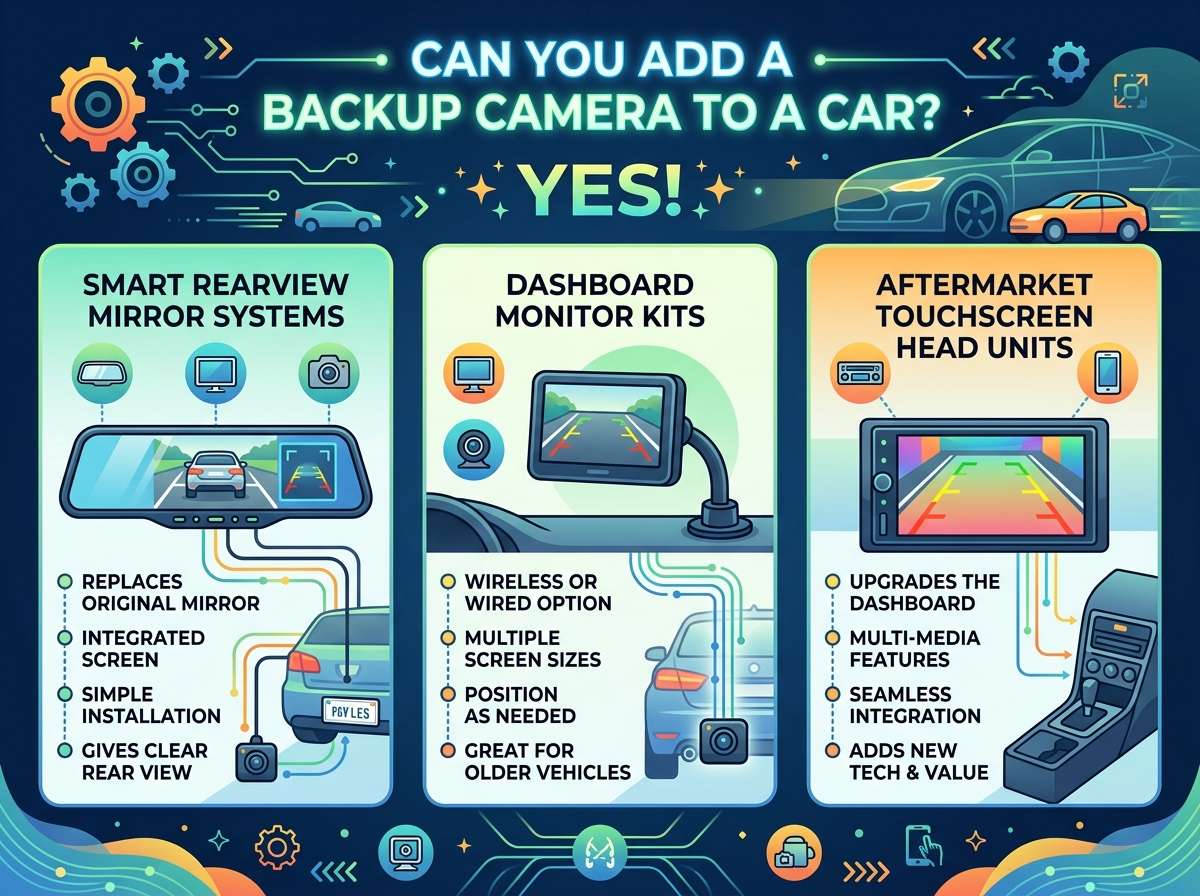
Some aftermarket cameras look and work like factory systems. They integrate into your car’s existing screen or infotainment system. You get a polished, professional look. These systems often include guidelines on the screen that show you where your car will go.
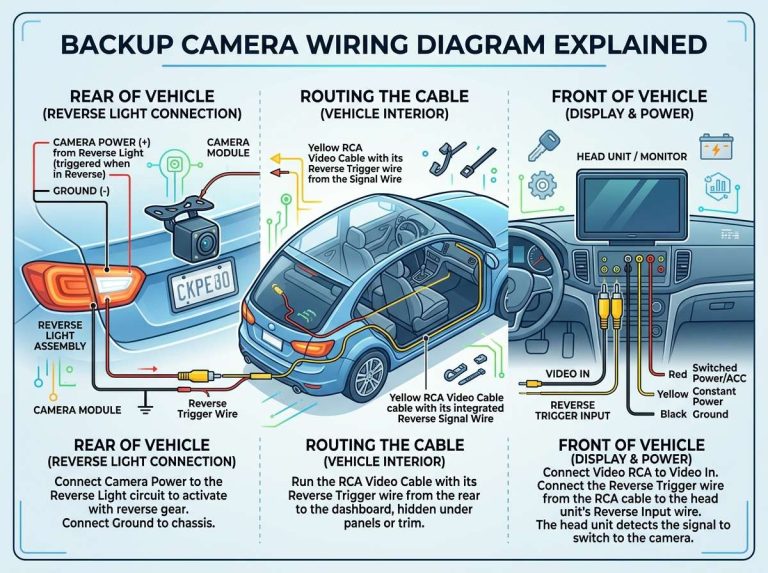
These cameras connect to your car’s reverse light wiring. When you shift into reverse, the camera automatically turns on. The video pops up on your screen. It disappears when you shift out of reverse.
The downside? These systems cost more. They need professional installation. They require knowledge of your car’s electrical system. But if you want a clean, integrated look, this is the way to go.
Aftermarket Monitor Systems
These come with a small display that mounts on your dashboard or windshield. The camera is separate from the monitor. They’re affordable and easy to install yourself.
Many of these systems use wireless technology. The camera sends video to the monitor without wires between them. This makes installation simpler. You don’t have to run cables through your car.
The image quality varies. Cheap systems can look grainy or fuzzy. Good quality systems give you clear, sharp images. The difference in price is worth it for a reliable picture.
Rearview Mirror Replacement Cameras
These are clever. They replace your existing rearview mirror. The mirror itself has a small screen built in. The backup camera video displays on that mirror when you reverse.
This option is sleek. You don’t add any extra hardware to your car’s interior. It looks like a normal mirror. When the camera’s not in use, it just works as a regular mirror.
These systems work well if your factory mirror blocks your view. The camera gives you a clearer picture than your old mirror did. Some models let you adjust the display settings. You can change brightness, color, or flip the image if needed.
Dashcam Combo Systems
Some backup cameras are part of a larger dashcam system. The main camera records while you drive. The backup camera only activates in reverse.
These make sense if you want front and rear video recording. You get complete coverage of your car. You have footage of accidents, parking lot incidents, or anything else that happens while you’re driving or parked.
The price is higher than a standalone backup camera. But you’re getting two cameras for one cost. The value adds up if you value security footage.
What Specifications Matter for Backup Cameras
When you’re looking at backup cameras online or in stores, certain specs matter more than others. Here’s what to pay attention to.
Resolution
Resolution determines how clear your image is. Higher resolution means sharper, more detailed video. A 720p camera gives you decent clarity. A 1080p camera is sharper and clearer.
For a backup camera, 720p is often enough. You’re only looking at the area directly behind your car. You don’t need movie-quality video. That said, spending a bit extra for 1080p removes all doubt. The video is noticeably better.
Some fancy cameras shoot in 1440p or even higher. These are overkill for backup use. You’ll pay more money for quality you won’t notice.
Field of View
This is how wide the camera sees. Measured in degrees, it determines whether you see just directly behind your car or a wider area.
A 120-degree field of view is standard. This shows you the area directly behind your car and some to the sides. A 170-degree field of view is super wide. You see almost everything behind your car at once.
Wider isn’t always better. A very wide field of view can make distances look farther away than they are. This is called fisheye distortion. It can confuse you when you’re backing up.
A 120 to 150-degree field of view is the sweet spot. You get good coverage without too much distortion.
Night Vision
Can the camera see in low light? Night vision matters if you back up in the dark. Many cameras have infrared LEDs that illuminate the area behind your car.
Some cameras shoot in black and white in low light. Others use color night vision and stay in color even when it’s dark. Color night vision is better because you can see more detail.
Not all cameras have night vision. Budget options might skip this feature. If you often back up at night or in dim parking garages, get a camera with good night vision.
Waterproofing
Backup cameras mount outside your car. They’re exposed to rain, mud, and car wash spray. They need protection.
Look for an IP rating. IP67 or IP68 ratings mean the camera can handle water and dust. IP69K is the highest rating. It means the camera can handle high-pressure water jets.
Don’t skimp on this. A camera that fails when it rains is useless. Spend the extra money for proper waterproofing.
Cable Length and Connector Type
Think about where you’ll mount the camera and where your monitor or screen will be. The cable needs to reach from your trunk to the front of your car.
Some cameras come with 20 feet of cable. Others come with 30 or 40 feet. Measure your car before buying. You want enough cable without having tons of extra wire to hide.
The connector type matters too. Different cameras use different connectors. Make sure the connector matches your monitor. Some systems use proprietary connectors. Others use standard RCA connections.
Installation Methods: DIY vs Professional
You have two paths when it comes to installation. You can install it yourself or hire a professional. Each option has pros and cons.
DIY Installation
Many aftermarket backup cameras are designed for DIY installation. The process is usually straightforward.
First, you mount the camera. Most mount to the center of your trunk lid or bumper. You drill a small hole and attach the camera with included brackets. The camera typically points straight down at a slight angle.
Next, you route the cable. This is the annoying part. The cable runs from the back of your car to the front. You typically run it under the floor mats or through the car’s trim panels.
The cable connects to a monitor or display. This might mount on your dashboard, windshield, or replace your rearview mirror.
Finally, you wire the camera to your reverse lights. When you put the car in reverse, the camera powers on. This usually means a simple connection to your reverse light wires.
DIY installation saves money. You don’t pay labor costs. But it takes time and patience. You need to crawl under your car. You might damage trim if you’re not careful. If something goes wrong, you can’t blame an installer.
The upside? You learn how your car works. You save between $100 to $300 in labor costs.
Professional Installation
Car stereo shops and car customization places install backup cameras. They have the tools and experience to do the job right.
A professional will route your cables cleanly. They won’t damage your car’s interior. They know how to tap into your electrical system safely. They’ll test everything to make sure it works.
Professional installation costs money. Plan on $100 to $300 for labor. This is on top of the camera cost.
But you get peace of mind. If something doesn’t work, the shop fixes it. You get a warranty on the installation work. Your car’s interior stays clean and damage-free.
For new cars still under warranty, professional installation makes sense. You don’t risk voiding your warranty by working on electrical systems yourself.
Cost Breakdown: How Much Will This Cost You?
Let’s talk money. How much should you budget for a backup camera?
Budget Options ($50 to $150)
Basic backup cameras are cheap. You can find simple models for $50 to $100. They include a camera, a monitor, and basic cables.
These work fine for basic use. Video quality is okay. The monitor is small, usually 3 to 4 inches. It works but doesn’t blow you away.
Installation is simple with these models. You can definitely DIY it. Total cost with DIY installation: $50 to $150.
Mid-Range Options ($150 to $400)
This is the sweet spot for most people. You get decent video quality, a good-sized monitor, and reliable operation.
You find HD cameras with night vision in this price range. Monitors are bigger and easier to see. The system feels less janky.
These brands have good reviews. You’re not getting cutting-edge tech, but you’re getting something solid that works well for years.
Total cost with DIY installation: $150 to $400. With professional installation, add $100 to $300.
Premium Options ($400 to $1000+)
High-end backup cameras integrate seamlessly with your car’s system. They rival factory installations. Video quality is excellent. Monitors are large and clear.
Some of these systems sync with your phone. You can view the backup camera feed on your smartphone. Some even record to cloud storage.
These systems often require professional installation. The integration is complex. You’re paying for quality and features.
Total cost with professional installation: $500 to $1000 or more.
Labor Costs
As mentioned, professional installation runs $100 to $300. Fancy integrations cost more. Some shops charge flat rates. Others charge hourly.
Call ahead and ask for an estimate. Most places give free quotes. Shop around. Prices vary between installers.
Step-by-Step Installation Guide (DIY Method)
Want to install it yourself? Here’s how.
Gather Your Tools
You’ll need a drill, bits, screwdrivers, electrical tape, wire strippers, and a crimper. You might need panel removal tools if your car has trim you need to remove.
Most backup camera kits come with mounting hardware. They include the brackets and screws. Some include cable clips to help route the wire.
Prepare Your Workspace
Park on a level surface. Open your trunk. Remove anything that’s in the way. You’ll be working in tight spaces, so clear the area.
Some cars need the trunk trim panel removed. Check your specific car online for guides. YouTube has tons of videos showing the process for your car model.
Mount the Camera
Locate where you want the camera. Center of the trunk lid or bumper are popular spots. Mark the spot with a marker.
Drill a small hole. Thread the cable through the hole. Mount the camera bracket and secure it with the provided screws. Make sure the camera points slightly downward.
Test the fit before fully tightening. You want the camera aiming at the ground about 10 feet behind your car. Adjust if needed.
Route the Cable
This is tedious but important. You need to run the cable from your trunk to your dashboard or monitor location.
Tuck the cable under floor mats and rubber trim strips. Use cable clips to secure it. Never leave cables loose where they can get caught or pinched.
If you’re running the cable up to the front of the car, pull the rubber trim that runs along the doors. Tuck the cable underneath. Then push the trim back in place.
Take your time here. A clean installation looks professional and prevents problems later.
Connect to Reverse Lights
Find your reverse light wiring under the hood or inside the trunk. This is the power source for the camera. When you reverse, these lights turn on. Your camera will too.
Use a T-tap connector or splice the wires properly. Twist the wires together and wrap with electrical tape. Some people solder connections for extra reliability.
Connect the ground wire to bare metal on your car frame. This completes the electrical circuit.
Mount the Monitor
Where are you mounting the monitor? Dashboard mounting is common. Windshield mounting works too. Some people mount it on the steering column.
Use the included mount. Secure it firmly. The monitor needs to stay put while you’re driving.
If it’s a wireless monitor, make sure the camera and monitor can connect. Place them in different areas of the car and test the signal. Most have decent range.
Test Everything
Put your car in reverse. Does the camera turn on? Does the monitor show video?
Check the image quality. Is it clear? Can you see at least 10 to 15 feet behind your car?
Test the image at night if possible. Can you see in low light?
If everything works, you’re done. If not, check your connections and wiring.
Final Touches
Hide any extra cable. Tidy up the installation. Make it look clean and professional.
Some people run extra cable in the walls and hide it completely. This takes time but looks amazing when done right.
Common Problems and How to Fix Them
Things can go wrong. Here are common issues and how to solve them.
Camera Won’t Turn On
Check the power connection. Make sure it’s connected to the reverse light wiring. Test the reverse light wiring with a multimeter to confirm it has power.
The fuse might be blown. Check your car’s fuse box. Look for a fuse related to reverse lights or camera. Replace it if it’s bad.
Video Looks Grainy or Blurry
This is often a cable issue. The video cable might not be connected properly. Unplug and reconnect both ends firmly.
Moisture might be getting into the connector. Dry it out and apply dielectric grease. This waterproofing compound protects electrical connections.
The camera itself might be dirty. Wipe the lens clean with a soft cloth.
Monitor Won’t Show Video
This could be a camera problem or a monitor problem. Test the camera by connecting it directly to the monitor with a shorter cable.
Check that the monitor is getting power. Look for indicator lights.
Some monitors have an input selector. Make sure it’s set to the correct input channel.
Signal Drops on Wireless Cameras
Wireless systems lose signal sometimes. Move the camera and monitor closer together to test.
Check for interference. Wireless systems operate on certain frequencies. Other devices might interfere. Move away from those devices.
Ensure the camera battery is charged. A low battery weakens the signal.
Image Gets Darker at Night
This is normal for basic night vision. The camera is trying to see in the dark. The image gets darker as it tries to gather light.
Check your night vision setting if the camera has one. Some allow you to adjust night vision sensitivity.
Make sure the camera is clean. A dirty lens looks darker than it actually is.
Comparing Your Options
Let’s recap the main choices.
Factory-style integrated systems look amazing. They feel like your car came with them. They cost more but give a premium experience.
Aftermarket monitors are affordable and easy to install. They’re your budget-friendly option. They work great if you don’t mind something that looks less integrated.
Rearview mirror replacements are sleek. They don’t add clutter to your dashboard. They cost less than integrated systems.
Dashcam combos give you front and rear video. If you care about recording footage, this makes sense.
For most people, a mid-range aftermarket system hits the sweet spot. You get good quality, reasonable cost, and manageable installation complexity.
Important Legal Considerations
Backup cameras are legal everywhere. Many states now require them on new cars. Adding one to an older car is always legal.
However, there are some things to keep in mind. Make sure your installation doesn’t obstruct your rear view. The camera shouldn’t block your rear window or mirror vision.
Some states have specific rules about monitors. You can’t install a monitor in a location that distracts you while driving. Windshield mounting might be restricted in some places. Dashboard mounting is usually fine.
Check your local laws before installation. Most places are fine with aftermarket backup cameras. When in doubt, ask a local installer.
Maintenance Tips to Keep Your Camera Working
Backup cameras need care to stay reliable.
Keep the lens clean. Your camera gets dusty, muddy, and covered in grime. Wipe it clean monthly with a soft cloth. A clean lens gives better video.
Protect the camera from damage. Be careful when backing up near walls or objects. The camera can get scratched or bumped.
Check connections regularly. Vibration and temperature changes can loosen connections. Every six months, peek at your connections to make sure they’re tight.
Protect the cable from damage. The cable can get pinched or cut. Check that no cable is exposed where it can be damaged by a seatbelt or door.
In very cold climates, the monitor might take a moment to display video in freezing weather. This is normal. The system warms up and works fine.
Final Thoughts: Is It Worth It?
Absolutely. Adding a backup camera to your car makes parking safer and easier. The cost is reasonable. The installation is manageable, whether you DIY or hire a pro.
Modern backup cameras are reliable. They last for years with minimal maintenance. Newer buyers expect this feature. Adding one increases your car’s appeal.
If you’re tired of the stress of backing up, do it. If you’ve ever had a close call, definitely do it. If you want to protect your car from parking lot damage, it’s a smart investment.
There’s no good reason to skip this upgrade. Safety is worth the cost and effort. Your future self will thank you for making backing up safer and easier.
Get out there. Pick a camera that fits your budget. Whether you DIY or hire someone, get it installed. You’ll wonder how you ever backed up without one.

Peterson is an automotive safety enthusiast and product reviewer with a passion for helping drivers stay safe on the road. He researches and tests dash cams, backup cameras, TPMS systems, emergency tools, GPS trackers, and other vehicle safety products to provide honest, practical recommendations. Through CarSafeties.com, Peterson shares in-depth reviews, buying guides, and maintenance tips to help drivers make smarter and safer decisions.