Dash Cam Loop Recording Explained
Dash cam loop recording is a core feature that allows your dash camera to record continuously without running out of storage space. For new dash cam users, knowing about this function is key to ensuring your device captures important footage whenever you drive. This article explains how loop recording operates, why it is essential, and what features work with it.
In this article
You will learn about the automatic file management system that keeps your dash cam recording, even when its memory card is full. The guide also covers common issues to avoid and answers frequently asked questions about this crucial dash cam technology.
Key Takeaways
- Loop recording allows a dash cam to record continuously by overwriting the oldest video files when the memory card is full.
- It saves video in short segments, typically 1 to 5 minutes long, for easier management.
- Important footage can be protected from overwriting through features like G-sensors, parking mode, or manual locking.
- Using a high-quality, formatted SD card is vital for reliable loop recording performance.
What is Dash Cam Loop Recording?
Dash cam loop recording is a fundamental feature that enables a dash camera to record video footage without interruption. It is designed to manage the dash cam’s storage space automatically. This system ensures that the camera always has room to record new events.
When the memory card reaches its storage limit, the dash cam does not stop recording. Instead, it begins to overwrite the oldest, unprotected video files. This continuous cycle means the dash cam is always active and ready to capture incidents on the road.
Continuous Coverage, No Manual Deletion
The primary benefit of loop recording is that it provides continuous coverage. Drivers do not need to manually delete old files to make space for new recordings. The dash cam handles this process automatically. This hands-off approach makes dash cams highly convenient for daily use.
Continuous recording means the dash cam captures every moment of a journey. If an accident or incident occurs, the footage is likely saved. This automatic system removes the burden of constant memory card management from the user.
How Loop Recording Works
Loop recording operates on a simple but effective principle: record new footage by deleting the oldest. This process ensures the dash cam’s memory card is always available for new video. It works by dividing video into manageable segments.
The dash cam constantly monitors the available space on its memory card. When the card is full, it targets the oldest files that have not been marked for protection. These unprotected files are then deleted to make room for new recordings.
Video Files in Short Segments
Dash cams save video footage in short, manageable segments. These segments typically range from one to five minutes in length. Recording in short clips offers several advantages for the loop recording process.
For example, if an incident happens, it is usually contained within one or two short video files. This makes it easier to review and share specific events without sifting through hours of continuous footage. Also, deleting small files is more efficient for the dash cam’s processor than handling very large, long files.
The Overwriting Process
The overwriting process is at the heart of loop recording. When the dash cam’s memory card becomes full, it starts to delete the very oldest video segment. This creates space for the newest segment to be recorded. This cycle repeats indefinitely as long as the dash cam has power.
Only unprotected files are subject to overwriting. Files that have been “locked” or marked as important are skipped by the overwriting process. This ensures critical event footage remains safe on the memory card. The dash cam prioritizes new recordings while preserving important old ones.
Why Loop Recording is Essential
Loop recording is not just a convenient feature; it is fundamental to the purpose of a dash cam. Without it, a dash cam would quickly fill its memory card and stop recording, defeating its primary function. It provides peace of mind through constant vigilance.
This feature ensures that drivers do not have to worry about if their dash cam is actively recording. The system manages itself, allowing the user to focus on driving. It makes the dash cam a reliable witness on the road.
Always Recording, Always Ready
A key benefit of loop recording is that the dash cam is always recording and always ready. From the moment the vehicle starts, the dash cam begins capturing video. This continuous operation means that no event is missed due to a full memory card.
If it is a minor fender bender, an unexpected road hazard, or a significant accident, the dash cam aims to have the footage. This constant readiness is crucial for providing evidence in various situations. It ensures a record exists for review if needed.
Automatic Storage Management
Loop recording provides automatic storage management, which is a significant advantage. Users do not need to manually check the memory card or delete old files. The dash cam handles this task independently. This automation saves time and effort for the driver.
Because of this automatic system, the dash cam maintains optimal recording performance. It ensures there is always free space for new video. This prevents the frustrating situation of needing footage only to find the camera stopped recording earlier due to a full card.
Features That Work With Loop Recording
Several other dash cam features are designed to work alongside loop recording to enhance its effectiveness. These features help protect important video segments from being overwritten. They add an extra layer of security for crucial moments.
These integrated features ensure that while routine footage is eventually overwritten, critical event recordings are preserved. This combination provides a balance between continuous recording and important file retention. It makes the dash cam a more intelligent recording device.
G-Sensor and Event Detection
Many dash cams include a G-sensor, also known as an accelerometer. This sensor detects sudden impacts, harsh braking, or rapid acceleration. When the G-sensor detects such an event, it automatically “locks” the current video segment.
This locked footage is then protected from the loop recording overwrite process. For example, if a vehicle is involved in a collision, the G-sensor activates, saving the video from before, during, and after the impact. This ensures critical evidence is preserved on the memory card. The sensitivity of the G-sensor can often be adjusted by the user.
Parking Mode and Loop Recording
Parking mode is a feature that allows the dash cam to continue monitoring the vehicle even when it is parked and turned off. When parking mode is active, the dash cam typically records in short bursts if an impact or motion is detected. These parking mode recordings are also often protected by the G-sensor.
In practice, if another car bumps your parked vehicle, the dash cam’s G-sensor triggers, and the footage of the incident is saved. This footage is then locked and will not be overwritten by the regular loop recording. Parking mode often requires a hardwire kit to prevent draining the car’s battery.
Manually Locking Important Footage
Dash cams usually offer a way for users to manually lock important video footage. This is typically done by pressing a dedicated button on the dash cam itself. When pressed, the current recording segment is immediately marked as protected.
This manual lock feature is useful for situations that may not trigger the G-sensor but are still important to the driver. For example, if you witness an interesting event on the road, or want to save footage of something you see, you can press the button. This ensures that the specific video clip will not be overwritten by the loop recording function.
Common Issues with Loop Recording
While loop recording is generally reliable, some common issues can affect its performance. These problems often stem from improper setup or using unsuitable accessories. Being aware of these issues can help users maintain their dash cam’s optimal function.
Addressing these potential problems early can prevent loss of important footage. It also ensures the dash cam operates as intended, providing continuous, reliable recording. Simple preventative steps can make a big difference.
Using the Wrong SD Card
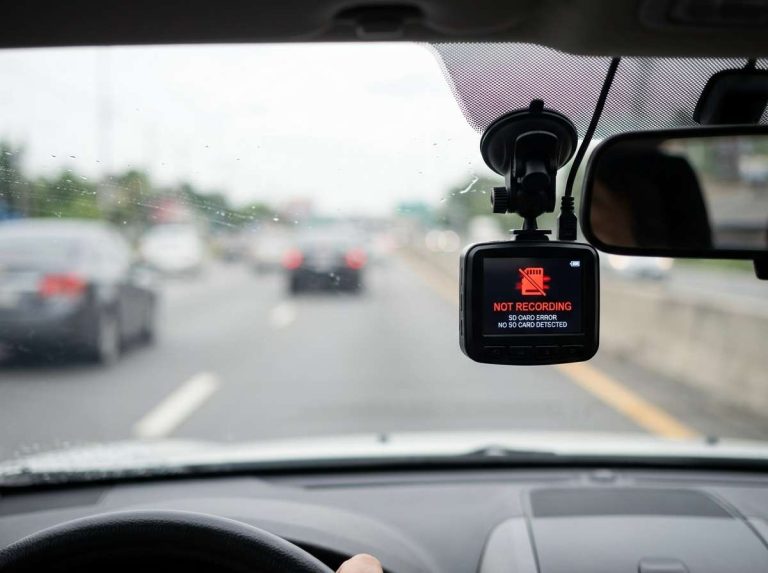
One of the most frequent problems is using an unsuitable SD card. Dash cams require specific types of memory cards designed for continuous, high-intensity writing. Standard consumer-grade SD cards may not be durable enough for the constant read/write cycles of a dash cam.
Using a slow or low-quality SD card can lead to recording errors, corrupted files, or the dash cam freezing. It may also prevent loop recording from functioning correctly, causing the camera to stop recording when the card appears full. Always check the dash cam manufacturer’s recommendations for SD card type and speed rating.
Forgetting to Format the SD Card
Formatting the SD card regularly is crucial for the health and performance of loop recording. Formatting erases all data on the card and prepares it for optimal use with the dash cam. Over time, SD cards can accumulate fragmented files or errors, which can hinder recording.
Many dash cam manufacturers recommend formatting the SD card regularly, or even more frequently. Failing to format can lead to recording issues, such as skipped frames, corrupted files, or the dash cam not recognizing the card. Formatting should always be done directly through the dash cam’s menu, not on a computer.
Common Errors with Locked Files
A common mistake involves misunderstanding how locked files work within the loop recording system. Users sometimes believe that *all* footage is saved permanently, or that locked files are stored indefinitely. This is not always the case.
While locked files are protected from automatic overwriting, they still consume space on the SD card. If too many files become locked, either automatically by the G-sensor or manually, the SD card can still fill up with protected footage. When this happens, the dash cam may stop recording new footage entirely because there is no unprotected space left to overwrite. Users need to periodically review and delete old locked files they no longer need.
How Long Does Dash Cam Footage Stay?
The length of time dash cam footage stays on the memory card depends on several factors. Loop recording means that older, unprotected footage is eventually overwritten. Therefore, there is no fixed duration for how long footage remains on the card.
Important footage, such as event-triggered or manually locked clips, will stay longer. These protected files are not subject to the automatic overwriting process. However, even protected files will eventually fill the card if not managed.
Factors Affecting Recording Time
Several elements influence how much footage a dash cam can store before loop recording starts overwriting. The most significant factor is the **capacity of the SD card**. A larger capacity card, such as 128GB or 256GB, can hold more footage than a smaller 32GB card.
The **resolution and frame rate of the video recording** also play a role. Higher resolution (e.g., 4K vs. 1080p) and higher frame rates (e.g., 60fps vs. 30fps) produce larger file sizes, meaning less recording time on the same size card. The **number of cameras** (front-only, front and rear) also affects storage, as multiple cameras generate more video files. Finally, the **frequency of locked events** will reduce available space for continuous recording.
Frequently Asked Questions
What Happens When the SD Card is Full?
When the SD card is full, the dash cam’s loop recording function begins to overwrite the oldest, unprotected video files. This process creates space for new recordings, allowing the dash cam to continue recording without interruption. Protected files, such as those triggered by a G-sensor or manually locked, are not overwritten.
Can Loop Recording Be Disabled?
Some dash cams allow loop recording to be disabled through their settings menu. However, disabling this feature is generally not recommended for continuous use. Without loop recording, the dash cam would stop recording once the memory card is full, requiring manual deletion of files.
What is the recommended formatting frequency for my Dash Cam’s SD Card?
It is generally recommended to format your dash cam’s SD card periodically. Regular formatting helps maintain the card’s health, prevents file corruption, and ensures optimal recording performance. Always format the card using the dash cam’s own menu system.
Is Loop Recording Standard on All Dash Cams?
Loop recording is a standard and fundamental feature on almost all modern dash cams. It is essential for continuous recording and automatic memory management. Any dash cam designed for ongoing use will include this capability.
What is the Best Loop Recording Length Setting?
The best loop recording length setting often depends on personal preference, but common options are 1, 3, or 5 minutes. Shorter segments (1 minute) can make it easier to isolate specific events. Longer segments (5 minutes) result in fewer individual files to manage. Many users find a 3-minute setting to be a good balance.
Summing It Up
Dash cam loop recording is a crucial feature that ensures continuous video coverage for your vehicle. It works by automatically overwriting the oldest, unprotected video files on the memory card when storage is full. This system saves video in short segments, providing efficient file management.
Features like G-sensors, parking mode, and manual locking work with loop recording to protect important footage from being deleted. To ensure reliable performance, it is important to use a suitable SD card and format it regularly. Knowing about loop recording helps users maximize the benefits of their dash cam for evidence and security.

Peterson is an automotive safety enthusiast and product reviewer with a passion for helping drivers stay safe on the road. He researches and tests dash cams, backup cameras, TPMS systems, emergency tools, GPS trackers, and other vehicle safety products to provide honest, practical recommendations. Through CarSafeties.com, Peterson shares in-depth reviews, buying guides, and maintenance tips to help drivers make smarter and safer decisions.