How Does a Dash Cam Work When Your Car Is Off?
Your car sits in the parking lot. The engine is off. You’re inside a store shopping. But your dash cam keeps recording. How does that work? This question confuses a lot of people. The good news is that the answer is pretty simple. Let’s break down exactly what happens when your dash cam keeps an eye on your vehicle even when the power is off.
In this article
What Is a Dash Cam Anyway?
Before we dive into the parking lot scenario, let’s start with the basics. A dash cam is a small camera mounted on your windshield or dashboard. It records video of the road ahead. Some models also record what happens behind your car. The best dash cameras have wide lenses and clear resolution. They capture everything from bumps to accidents to parking lot vandalism.
Think of a dash cam as your vehicle’s personal bodyguard. When someone hits your car in a parking lot, the camera records it. When another driver causes an accident, you have proof. When someone breaks into your vehicle, you catch them on tape.
The Power Source Question
Here’s the main thing people want to know: how does a dash cam record when the car is off? The answer involves several power sources. Understanding these sources helps you pick the right dash cam for your needs.
Hardwired Power Connections
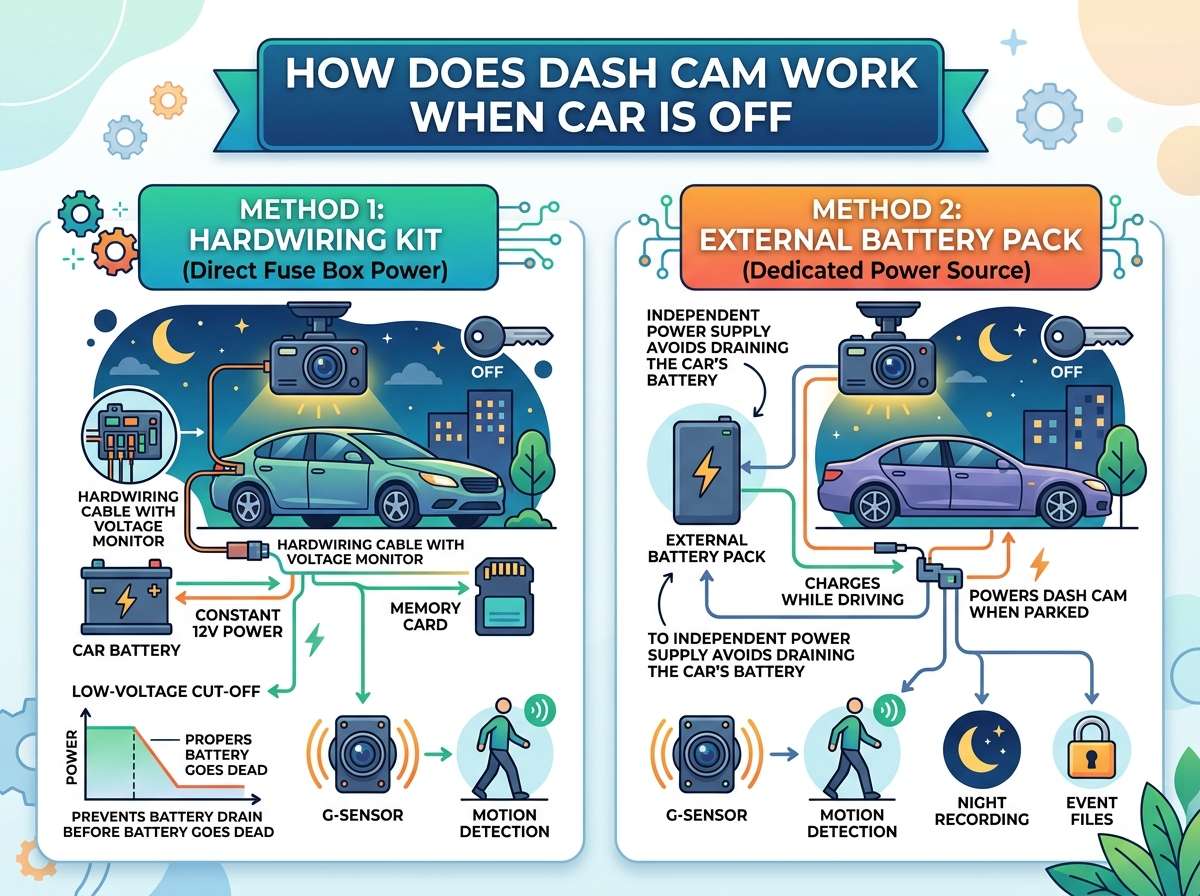
Many dash cams come hardwired directly to your vehicle’s electrical system. A professional installer runs a cable from the camera to your car’s battery. The installation takes about an hour or two. The camera then draws power directly from your car battery whenever it needs it.
This setup sounds convenient. And it is. But there’s a catch. If you leave the camera running all the time, it can drain your battery. That’s why most hardwired dash cams have a feature called parking mode. This feature lets the dash cam record while your car sits idle. It only uses minimal power. The camera stays on alert but doesn’t run the full video recording system constantly.
Built-In Battery Power
Some dash cams have their own batteries. These internal batteries work like the battery in your phone. They charge when the car runs. Then they hold that charge when the engine shuts down. A small battery inside the camera gives it power for a few minutes or hours after the car turns off.
The battery size varies wildly between models. A bigger battery means more recording time with the engine off. A smaller battery might only power the camera for 30 minutes. Some high-end models have batteries that last several hours. This feature is useful if you want recording to continue shortly after you park.
Capacitor Technology
Here’s something clever that some dash cams use: capacitors. These are electronic parts that store electrical energy. Think of them as tiny power banks. When your car runs, the capacitor charges up. When the car shuts off, the capacitor releases that stored energy.
Capacitors don’t hold a lot of power. But they hold enough for the camera to gracefully shut down. This shutdown process is important. It helps the camera save its final footage properly. Without a capacitor, the camera might cut off suddenly. That sudden cut-off can corrupt the video file.
How Parking Mode Actually Works
Parking mode is the real hero here. This feature is what lets your dash cam work when your car is parked and off. Let’s talk about how it works.
Motion Detection Systems
Most dash cams in parking mode use motion detection. Tiny sensors in the camera watch for movement. If someone walks near your car or bumps into it, the sensors detect the change. The camera springs into action. It starts recording right away.
This is brilliant because it saves power. The camera doesn’t record every single second you’re parked. Instead, it waits. The moment something moves, the recording begins. This saves battery power while still protecting your vehicle.
G-Sensor Technology
Another clever feature is the G-sensor. This device detects sudden impacts or vibrations. If someone hits your car, the G-sensor feels the bump. It immediately signals the camera to start recording. The camera also protects the footage from that moment. It locks the file so it can’t be overwritten.
Many G-sensors are adjustable. You can set them to be sensitive or less sensitive. A sensitive setting means even a light bump triggers recording. A less sensitive setting only records when there’s a hard impact. You choose what level of protection you want.
Time-Lapse Recording
Some dash cams use time-lapse recording during parking mode. Instead of recording every frame like normal, the camera takes one photo every few seconds. It then combines these photos into a video. This uses way less power than regular recording. You still see what happened, but the camera uses only a fraction of the battery.
A time-lapse video at one frame per second uses about ten times less power than normal video. This means your camera can record for hours instead of minutes. It’s a smart trade-off between quality and battery life.
Battery Drain Concerns
Okay, let’s be real. Parking mode does drain your car battery. The question is: how much?
A typical dash cam uses about 0.5 to 1 amp of power in parking mode. Your car battery holds about 40 to 100 amps. That sounds like a lot. But there’s a problem. Most car batteries only provide usable power until they drop to about 50% capacity. Below that, your car won’t start.
So if you leave parking mode running for several days, you might come back to a dead battery. Some people leave their cars parked for weeks. In those cases, parking mode drain becomes a real issue.
Battery Cutoff Protection
Smart manufacturers built in protection. Many hardwired dash cams have a low voltage cutoff feature. This feature is a safety measure. When your battery voltage drops to a certain level (usually around 11.6 volts), the dash cam automatically shuts off. This protects your car battery from getting too drained.
The cutoff happens automatically. You don’t have to do anything. The camera monitors voltage constantly. When it dips too low, the protection kicks in. Your car battery has enough juice to start the engine. The dash cam shuts down silently in the background.
Comparing Different Recording Methods
Let’s look at the main ways dash cams can record when your car is off.
Method One: Hardwired With Parking Mode
This is the most popular setup. A professional runs a wire from the camera to the battery. The camera has parking mode with motion detection. When movement happens, it records. When nothing moves, it waits quietly.
Pros: Full video quality, works great for catching thieves and hit-and-runs, lasts a long time
Cons: Battery drain risk, professional installation required, higher cost
Method Two: USB Power Bank Connection
Some people use a separate USB power bank. They connect the camera to the power bank instead of the car battery. The power bank charges whenever the car runs. Then it powers the camera during parking mode.
Pros: Cheaper, less drain on car battery, portable
Cons: Limited recording time, battery runs out faster, you have to remember to charge the power bank
Method Three: Capacitor-Only Setup
Some basic dash cams use only a capacitor for parking mode. No battery. The capacitor gives them a few minutes of power to shut down gracefully.
Pros: Very cheap, almost no drain on car battery, simple design
Cons: Almost no recording time with engine off, only useful for shutdown purposes
Method Four: Built-In Large Battery
High-end dash cams come with large internal batteries. These give hours of recording time. Some even include solar panels to trickle-charge the battery during the day.
Pros: No car battery drain, works anywhere, very convenient
Cons: Very expensive, heavy cameras, battery replacement costs a lot
The Role of SD Cards
Here’s something many people overlook: the SD card. Even if your dash cam has power, it needs storage space to save video. An SD card is like the camera’s hard drive. It stores all the video files.
Most dash cameras use microSD cards. These cards are tiny but hold a lot of data. A 64GB card holds about 8 to 10 hours of video (depending on resolution). A 256GB card can hold 40 to 50 hours.
When your camera runs in parking mode, it fills up the SD card with footage. Once the card is full, the camera does something clever. It deletes the oldest footage and records new footage on top of it. This looping process means the camera never runs out of space.
The SD card doesn’t need power to hold data. Unlike your car battery, the SD card keeps files safely stored without electricity. This is why the SD card is so important. Even if your camera loses power, the videos on the SD card stay safe.
How Long Can Parking Mode Actually Run?
This depends on several factors. Let’s look at the big ones.
Camera Resolution and Settings
Higher resolution uses more power. A 4K dash cam pulls more amps than a 1080p model. If you want to save power, choose a lower resolution. If you want crystal-clear footage, accept the higher power draw.
The frame rate also matters. Recording at 30 frames per second uses less power than 60 frames per second. Some cameras let you adjust this. Lower frame rates mean longer battery life but slightly choppier video.
Battery Size and Capacity
This one is obvious. A bigger battery lasts longer. A dash cam with a 5,000mAh battery runs longer than one with 2,000mAh. Check the specs before you buy.
Parking Mode Type
Time-lapse recording lasts much longer than regular recording. Motion-only recording lasts longer than continuous recording. If your camera does both, choose the one that matches your situation.
Ambient Temperature
Cold weather is brutal for batteries. A battery rated for 4 hours might only last 2 hours in freezing temps. Hot weather also reduces battery life. Moderate temperatures are best.
Real-World Performance Numbers
Let’s get concrete. Here’s what you can expect from typical setups.
Hardwired with motion detection: 12 to 24 hours of sporadic recording before battery cutoff kicks in. The actual time varies based on how much motion happens. Lots of movement means more recording. No movement means almost no drain.
Internal battery (mid-size): 3 to 8 hours of continuous recording. With motion detection, maybe 12 to 20 hours of coverage.
Time-lapse recording: 48 to 72 hours of coverage before battery cutoff. That’s several days of protection.
Capacitor only: 2 to 5 minutes of power. Just enough to save the current video and shut down cleanly.
Installation Tips for Parking Mode
If you decide to hardwire your dash cam, here’s what matters.
Professional Installation
Most people hire a professional. They know where to tap into the electrical system safely. They hide the wires behind the headliner. They route cables out of sight. A messy installation looks bad and can cause problems.
A professional installation usually costs $80 to $200 depending on your area. It’s worth it. They do it right.
DIY Installation Risks
You can install it yourself if you’re handy. But there are risks. Tapping the wrong wire can cause electrical problems. A sloppy installation can cause shorts. You might damage your car’s wiring.
If you go the DIY route, research your specific vehicle first. Watch multiple videos. Take your time. When in doubt, ask a professional.
Wire Gauge and Fuses
If you install it yourself, use the correct wire gauge. The thicker the wire, the safer it is. Most dash cams need 18 to 20 gauge wire. Never skip the fuse. The fuse protects your car’s electrical system. It’s cheap insurance.
Protecting Your Investment
You’ve installed a dash cam and set up parking mode. Now protect it.
Deterrent Signs
A simple sticker saying “Recording” on your windshield is powerful. Thieves often skip cars with cameras. They know they’re likely to get caught. A visible camera or sign makes them think twice.
Proper Positioning
Position your camera so it captures clearly. Mount it high for a better view of the road and surroundings. A poorly positioned camera captures useless footage. A well-positioned camera shows faces and license plates clearly.
Regular Maintenance
Dust and condensation can cloud your lens. Clean it monthly. Check the SD card for errors every few months. Make sure everything still works. Small maintenance saves you from big problems later.
Common Parking Mode Problems
Let’s talk about issues you might face.
Battery Dead on Arrival
You come back to your car and it won’t start. The dash cam drained the battery. This happens with cheaper models that lack low voltage cutoff. Install a camera with this feature.
Overheating Issues
Dash cams sitting in the sun all day get hot. Extreme heat damages batteries and electronics. Tint your windows or park in shade when you can. Some cameras have overheat protection that automatically shuts them down.
Missing Footage
You come back to find no recording. Maybe the battery died hours ago. Maybe the SD card was full. Maybe the camera malfunctioned. Check your footage weekly. Replace full SD cards immediately.
False Triggers
A tree branch waving in the wind triggers recording. A passing car light triggers recording. Sensitive motion detection means lots of false alarms. Adjust the sensitivity to reduce false triggers.
Choosing the Right Camera for You
Different people need different setups.
Street parkers: You park on the street overnight. Get a hardwired camera with motion detection and low voltage cutoff. You need maximum protection.
Driveway parkers: You park at home where you can monitor things. A battery-powered camera might work fine. Lower cost, no installation needed.
Apartment dwellers: You can’t hardwire anything. Get a battery-powered or power-bank-connected camera. Convenience matters more than 24-hour coverage.
Road trippers: You’re always moving. A simple battery-powered camera with good daytime quality is enough. You rarely park for long.
The Technology Behind the Scenes
Let’s peek under the hood at the tech side.
Microcontroller Chips
The camera’s brain is a tiny computer chip called a microcontroller. This chip tells the camera what to do. It monitors the motion sensor. It checks the battery voltage. It tells the storage system when to record. When the car battery voltage drops too low, the chip shuts everything down gracefully.
Power Management ICs
Power management integrated circuits (ICs) control where electricity goes. They decide if power goes to the video processor or the storage system. They optimize power use. They make sure your camera runs as long as possible.
Wireless Connectivity
Many modern dash cams have WiFi. This lets you check on your car from anywhere. You can download footage directly to your phone. You can change settings without touching the camera. Some even send alerts when motion is detected.
Emerging Technology Trends
The dash cam industry keeps improving.
Solar panels: Some new cameras have tiny solar panels. They trickle-charge the battery during the day. This extends recording time without draining your car battery more.
Cloud storage: Instead of relying only on SD cards, cameras upload important footage to the cloud. If someone steals the SD card, you still have backups online.
AI detection: Smart cameras use artificial intelligence. They know the difference between a person, a car, and a falling leaf. This reduces false triggers dramatically.
5G connectivity: Future cameras will use 5G networks. They’ll upload footage faster and send real-time alerts quicker.
Legal Considerations
Before you install a dash cam, know the laws. Some places regulate dash cameras. Some have privacy laws about recording. Most areas allow dash cams, but restrictions exist on audio recording in some states.
Always check your local laws. If something is illegal in your area, don’t do it. The risk isn’t worth it.
Maintenance and Care
Your dash cam needs care to last long.
Cleaning the Lens
Dust and condensation cloud your footage. Clean the lens monthly with a soft cloth. A clear lens captures sharp video. A dirty lens captures blurry, useless footage.
Checking Connections
Loose wires cause problems. Every few months, check that everything is connected properly. Vibration from driving can loosen things over time. Tighten what needs tightening.
SD Card Health
SD cards wear out. Frequent writing and deleting deteriorates them. Replace your SD card every 1 to 2 years. It’s cheap insurance. A failed SD card means lost footage when you need it most.
Battery Replacement
If your camera has an internal battery, it eventually dies. Most batteries last 2 to 3 years. When performance drops, replace the battery. It’s usually cheaper than buying a new camera.
Final Thoughts
Dash cams are incredible tools for vehicle protection. They work even when your car is off. They capture evidence of accidents, theft, and vandalism. Understanding how they work helps you choose the right model for your needs.
The key is having power. Whether that comes from your car battery with hardwiring, an internal battery, or a USB power bank, the camera needs juice to record. Parking mode features like motion detection make that power last longer. Low voltage cutoff protects your car battery from getting too drained.
Pick a camera that matches your lifestyle. Install it properly. Maintain it regularly. Then you’ll have the peace of mind that comes with 24-hour recording. Your dash cam sits there on your windshield, always watching, always ready. Even when the engine is off and you’re miles away.
That’s the power of modern dash cam technology. Simple, smart, and incredibly effective.

Peterson is an automotive safety enthusiast and product reviewer with a passion for helping drivers stay safe on the road. He researches and tests dash cams, backup cameras, TPMS systems, emergency tools, GPS trackers, and other vehicle safety products to provide honest, practical recommendations. Through CarSafeties.com, Peterson shares in-depth reviews, buying guides, and maintenance tips to help drivers make smarter and safer decisions.