How Do Dash Cams Work?
So you’ve seen those videos on social media. A car drives down the road and captures the craziest accident. The footage is crystal clear. The driver has proof of what happened. You might be wondering: what is that camera? How does it actually work?
In this article
That camera is a dash cam. And honestly, it’s simpler than you might think.
What Exactly Is a Dash Cam?
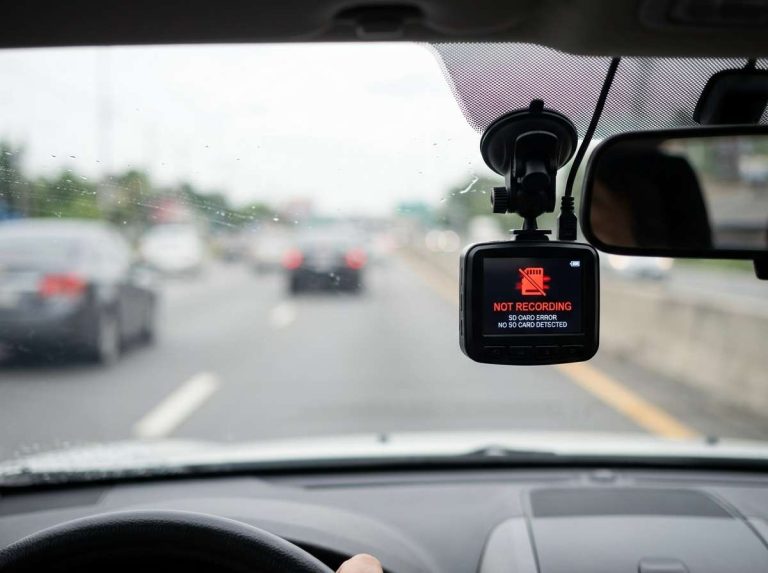
Let’s start with the basics. A dash cam is a small video camera that sits on your dashboard or windshield. It points forward through your windshield at the road ahead. The camera runs while you drive. It records video the entire time your car is moving.
The real name is a “dashboard camera” or “dashboard mounted camera.” But everyone just calls it a dash cam.
Think of it like having a witness in your car. Except this witness never sleeps. It never forgets. It never changes its story.
These cameras have become super popular. That’s because they protect you. If you get in an accident, you have video proof of what really happened. Insurance companies love this. Police officers appreciate it too. And the law is starting to favor drivers who have dash cam footage.
The Basic Parts of a Dash Cam
Every dash cam has a few key parts. Let’s break them down so you understand what you’re actually buying.
The Lens
The lens is what captures the image. It’s like the eye of the camera. Most dash cams have a wide-angle lens. This gives you a broad view of the road. You might see 140 to 170 degrees in front of you.
Why so wide? Because accidents don’t just happen straight ahead. A car might swerve into your lane from the side. Another vehicle might merge into you. You need to see what’s happening all around you.
The lens quality matters. A good lens is clear and sharp. A bad lens is fuzzy and dark.
The Sensor
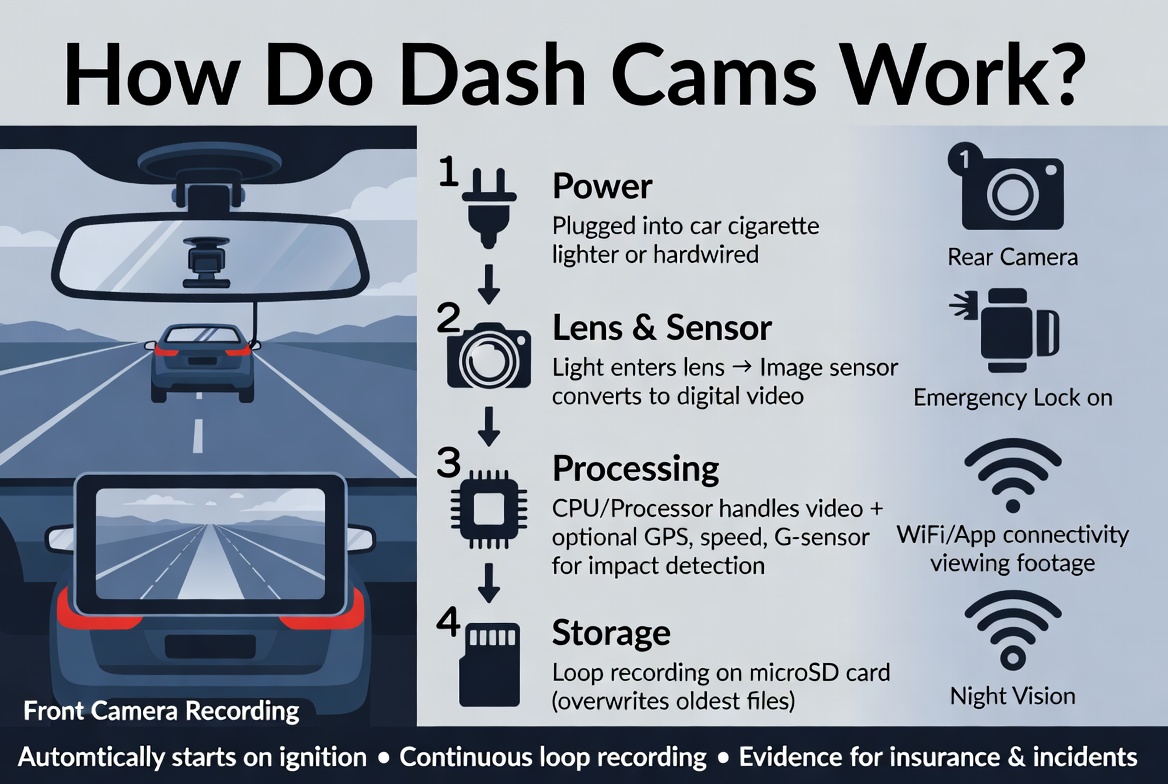
Behind the lens sits the sensor. This is an electronic chip that captures the light coming through the lens. It converts that light into digital information. That digital information becomes a video file.
Think of the sensor like film in an old camera. Except it’s electronic and much more complex.
Sensors come in different sizes. Bigger sensors usually capture better video. They handle low light better. They show more detail.
The Processor
The processor is the brain of the dash cam. It takes the information from the sensor and turns it into a video file. It also handles all the extra features. Should the screen show the time? Should the camera record audio? The processor makes these decisions.
A fast processor means smooth video. A slow processor means choppy, jumpy footage.
The Memory Card
The camera needs somewhere to store the video. That’s the memory card. Most dash cams use a microSD card. These are tiny cards that hold gigabytes of data.
Here’s the cool part. Most dash cams record in a loop. When the card gets full, the oldest video gets deleted. New video takes its place. This keeps your dash cam recording 24 hours a day without running out of space.
The Power Connection
Your dash cam needs power to run. Most dash cams plug into your car’s 12-volt power outlet. Some hook into your car’s wiring. Others use batteries.
The power connection matters. A good connection means your dash cam stays on. A loose connection means it keeps shutting off.
The Screen
Most dash cams have a small screen. You can see what the camera is recording. You can change settings. You can review videos.
Some dash cams have no screen at all. They’re even smaller and cheaper. But you can’t see what you’re recording. You have to hook them to a phone or computer to review footage.
How the Recording Process Works
Let’s talk about what happens when you press the power button.
First, the power flows to the processor. The processor boots up the entire system. This takes a few seconds. Then the sensor comes to life and starts capturing light.
The sensor reads the light thousands of times per second. Each reading gets converted into data. The processor takes all this data and puts it together into frames. These frames stack on top of each other. When you play them back, they create the illusion of motion. That’s how video works.
Your dash cam probably records 30 frames per second. Some nicer ones record 60 frames per second. More frames means smoother video.
The video gets compressed. This makes the file smaller. Compression is like squeezing information. You remove some details to make the file tiny. A smaller file uses less storage space.
The compressed video goes to your memory card. This all happens in real time. The whole process is invisible to you.
Most dash cams record continuously in loops. They divide your memory card into chunks. Let’s say each chunk holds 5 minutes of video. When chunk number one fills up, the camera keeps recording into chunk number two. When chunk number two fills up, the next recording goes into chunk number three.
Once you run out of memory card space, the camera deletes the oldest chunk. Chunk number one gets erased. The newest video goes into that empty space. This cycle continues forever. You always have the most recent footage.
Video Resolution and Quality
You’ll hear people talk about resolution. It sounds complicated. It’s not.
Resolution is just the number of pixels in the image. More pixels mean more detail.
A 1080p camera captures 1920 pixels wide by 1080 pixels tall. This is the standard. Most dash cams record at 1080p.
A 2K camera captures 2560 pixels wide by 1440 pixels tall. This is better. You see more detail.
A 4K camera captures 3840 pixels wide by 2160 pixels tall. This is the best. You see tiny details. You can read license plates from far away.
But here’s the catch. Better resolution needs bigger files. Bigger files need more memory card space. A 4K dash cam might run out of storage space in 6 hours. A 1080p dash cam might last 48 hours on the same memory card.
So you need to balance quality with storage.
Light Sensors and Night Vision
Dash cams record day and night. But night recording is tough.
When it’s dark, very little light hits the sensor. The sensor struggles. It tries to amplify the little light it gets. This creates noise. The video looks grainy and unclear.
That’s why dash cam makers add special night vision features.
Some cameras use larger sensors. Bigger sensors catch more light.
Some cameras use faster lenses. Fast lenses let more light through.
Some cameras use special processing tricks. The processor boosts the brightness of dark areas. It pulls out details from shadows.
Some cameras add infrared lights. You can’t see these lights. But the sensor can detect them. They bounce off objects and come back to the camera. This creates extra light information. The processor uses this to create a clearer picture.
None of these methods are perfect. Night video is always worse than daytime video. But they help a lot.
The Role of G-Sensors
Most modern dash cams have a G-sensor. This detects movement and impacts.
When you hit the brakes hard, the G-sensor feels the sudden deceleration. When you get in a crash, the G-sensor feels the impact.
When the G-sensor detects a significant impact, it does something important. It protects the video file. The camera marks that file as important. It moves the file to a special folder. The loop recording won’t delete this file. Even if the memory card fills up, that video stays safe.
This is huge. If you’re in an accident, the footage from that exact moment gets locked away. You don’t lose it when the camera loops back and records over old files.
G-sensors help you keep evidence. They help you prove what happened.
WiFi and Connectivity
Many dash cams have WiFi. This lets you connect to your smartphone.
When you connect your phone to the dash cam, you can review videos on your phone. You can download videos. You can watch live feeds from the camera while driving (though you shouldn’t actually look at your phone while driving).
WiFi is convenient. It saves you from pulling out the memory card. It saves you from carrying your camera into your house every time you want to check a video.
Some dash cams upload video to the cloud. This means your footage goes to a computer server on the internet. If something happens to your camera, your footage is still safe in the cloud.
Audio Recording
Most dash cams record audio too. They have a small microphone. It picks up sounds inside your car.
This can be useful. If someone hits you, you hear it. You might hear the other driver yelling. You might hear the crunch of metal. You might hear yourself saying what happened while the event is fresh in your mind.
But audio brings privacy concerns. Some people don’t like recording conversations. Some places have laws about recording without permission.
Because of this, you can usually turn off audio recording. You flip a setting in the menu. The camera still records video, but the microphone stays silent.
Parking Mode
Here’s a cool feature. Many dash cams have parking mode.
When you park your car and turn off the engine, the dash cam doesn’t completely shut down. It goes into a special mode. The camera stays alert.
If someone bumps your car, the G-sensor detects the movement. The camera starts recording. If someone walks up to your car, the motion sensor notices them. The camera starts recording. Someone breaks into your car? The camera records the whole thing.
This protects you even when you’re not in the car. You get footage of parking lot dings. You catch package thieves. You identify break-in culprits.
Parking mode uses very little power. But it still drains your battery if you park for days. Some cameras get power from the battery directly. Others use a capacitor that holds a small charge.
Loop Recording Explained
We touched on this earlier, but it deserves its own section. Loop recording is what makes dash cams practical.
Without loop recording, you’d need a huge memory card. You’d run out of space after a few hours. You’d have to delete old videos manually to make room for new ones.
With loop recording, your camera is self-cleaning. It automatically deletes old footage and replaces it with new footage.
Here’s how it works in practice:
Let’s say you have a 32GB memory card. Let’s say you record at 1080p. Let’s say your dash cam uses about 3GB of data per hour.
The memory card can hold about 10 hours of video. So as you drive, you always have the last 10 hours of footage. When you drive for 11 hours, the first hour gets deleted. You now have hours 2 through 11.
This continues indefinitely. You always have a rolling window of recent footage. Most of the time, this is perfect. If you get in an accident today, you have footage from the last 10 hours. That’s way more than you need.
How Files Get Saved
When something important happens, you want to keep the footage.
With your dash cam’s menu, you can press a button. This button says “Save” or “Lock” or “Protect.” When you press it, the camera protects the current video file.
Protected files don’t get deleted during loop recording. They stay on the memory card. Even if the memory card fills up completely, these protected files stay safe.
You can also pull out the memory card. You can put it in your computer. You can copy video files to your hard drive. Now the footage is backed up in two places.
Some cameras let you email videos directly. Some let you upload them to cloud storage. Some let you share them on social media straight from the camera.
Common Features You’ll See
Modern dash cams have lots of features. Let’s go through the popular ones.
Time and Date Stamp: The camera puts the current time and date on every frame. If you need to tell the insurance company exactly when something happened, you can prove it.
GPS Logging: The camera records your location using GPS. It knows exactly where you were when the video was recorded. Later, you can see the location on a map.
Speed Stamp: Some cameras measure your speed. They put your speed on every frame. This is controversial. If you were speeding, the footage proves it.
Dual Camera Setup: Some systems have two cameras. One points forward. One points backward or to the side. You get coverage of the front, back, and sides of your car.
Voice Control: You can tell your dash cam to record. You can tell it to save video. You can tell it to stop recording. You don’t have to look away from the road.
Night Mode: The camera knows when it’s getting dark. It automatically switches to special settings that work better in low light.
Emergency Recording: If your car is parked and a motion sensor detects something, the camera automatically starts recording.
Installation and Setup
Setting up a dash cam is straightforward.
First, you pick a location. The windshield is best. It’s high up. It gets a clear view of the road. Most people stick the camera on the driver’s side of the windshield. This gives an angled view of the road ahead.
You clean the spot on your windshield where the camera will go. You remove any dust. You make sure it’s dry.
You peel off the adhesive backing on the camera’s mounting bracket. You stick the bracket to the windshield.
You insert the memory card into the camera. You make sure it’s fully pushed in until it clicks.
You plug the power cable into the camera. You route the cable down your windshield. You hide the cable behind the headliner and dash trim. You plug it into your 12-volt outlet.
You turn on the camera. You wait for it to boot up. You check the screen. If the video looks good, you’re done.
The whole process takes 10 minutes.
Legal Considerations
Dash cameras are legal in most places. But there are some rules.
In some areas, you can’t block the driver’s view with the camera. The camera can’t be too big or positioned in the center of the windshield.
In some places, recording audio is restricted. You need permission from everyone in the car.
In some countries, dash cam footage is admissible in court as evidence. In other countries, it’s not.
The laws vary by location. Before you buy, check your local laws. Make sure you’re following the rules.
The Bottom Line
Dash cams are simple devices that do one job really well. They record video while you drive. They protect you when accidents happen. They give you proof of what really occurred.
Inside, they have a lens that captures light. A sensor that converts light to data. A processor that turns data into video files. A memory card that stores everything. And some clever software that decides what to keep and what to delete.
The technology isn’t magic. It’s straightforward electronics and smart engineering.
If you’re thinking about getting a dash cam, here’s what you need to know: They work. They’re reliable. They’re affordable. And they can save you thousands of dollars if something goes wrong on the road.
Every driver should have one.
Frequently Asked Questions
How long do dash cams record?
Dash cams record continuously while your car is on. They keep recording until you turn off the engine. Most people leave their dash cams plugged in permanently. So they record every time you drive.
Can dash cameras record when the car is off?
Some can. This is called parking mode. The camera goes into a low-power state. It watches for movement or impacts. If it detects something, it starts recording. But this drains your battery. Most people only use parking mode for short periods.
What should I look for in a dash cam?
Look for good video quality (1080p minimum). Look for a wide-angle lens (at least 140 degrees). Look for reliable build quality. Look for good customer reviews. Look for features like GPS and G-sensors if you want them.
How much storage do I need?
Most people use a 64GB or 128GB memory card. This gives you plenty of storage without taking up much space in your car.
Are dash cams worth it?
Yes. The peace of mind alone is worth it. Plus, they often pay for themselves by protecting you in one accident.
Can I use my dash cam footage in court?
In most places, yes. But check your local laws. Some places have restrictions.
Will a dash cam affect my car’s insurance?
Not negatively. Some insurance companies give discounts to drivers with dash cams. They see it as responsible driving.
How do I protect my privacy with a dash cam?
Turn off audio recording if you’re uncomfortable recording conversations. Be aware that people outside your car might see the camera. Store your footage securely.
A dash cam is a simple tool that does important work. It watches the road. It captures what happens. It protects you when things go wrong. Understanding how it works helps you use it better and appreciate why it’s such a valuable addition to any vehicle.

Peterson is an automotive safety enthusiast and product reviewer with a passion for helping drivers stay safe on the road. He researches and tests dash cams, backup cameras, TPMS systems, emergency tools, GPS trackers, and other vehicle safety products to provide honest, practical recommendations. Through CarSafeties.com, Peterson shares in-depth reviews, buying guides, and maintenance tips to help drivers make smarter and safer decisions.