How Do You Install a Dash Cam?
A dash cam is one of the best investments you can make for your car. It records everything that happens on the road. This video footage can protect you if you get into an accident. You’ll have clear proof of what happened. Insurance companies love dash cams too. They help speed up claims. But the real question is: how do you actually install one?
In this article
The good news is that installing a dash cam is way easier than you might think. You don’t need special tools. You don’t need to be a mechanic. Most people can get it done in less than an hour. We’ll walk you through every single step. By the end of this guide, you’ll know exactly what to do.
Why You Really Need a Dash Cam
Before we jump into the installation process, let’s talk about why dash cams matter so much.
A dash cam is a small video camera that sits on your windshield or dashboard. It records video while you drive. Every moment on the road gets captured. This creates a clear record of events.
Think about accidents. When two cars collide, there’s always a question about who was at fault. With a dash cam, there’s no debate. The footage shows exactly what happened. You can prove you weren’t responsible. This saves you money on insurance claims. It also protects you from false accusations.
Dash cams help in other ways too. They catch hit-and-run drivers. They record theft. They document road rage incidents. They can even help prove your innocence in traffic court.
The cost of a dash cam is small. A decent one runs between $100 and $300. Compare that to a single accident claim. One accident can cost thousands of dollars. A dash cam can save you from financial disaster.
What You’ll Need Before You Start
Getting ready for installation is the first step. You need to gather a few things before you begin.
The Dash Cam Itself
Obviously, you need a dash cam. There are many options out there. You’ll find budget-friendly models. You’ll find fancy cameras with every feature imaginable. For beginners, a mid-range model works great. Look for one with 1080p resolution at minimum. Higher resolution is even better.
A Power Source
Your dash cam needs power to work. It draws electricity from somewhere. Most dash cams plug into a 12V power outlet. You know the cigarette lighter outlet that’s in most cars? That’s a 12V outlet. Your dash cam either plugs directly into that, or you use a USB power adapter that plugs into it.
Some people like using the USB ports that come with their car. This works fine. Just check if your car has USB ports available.
The Cables
Your dash cam comes with a power cable. This is the cord that brings electricity from the outlet to the camera. Some cams have USB cables. Others have barrel connectors. The cable that came in the box is what you’ll use.
A Mount or Bracket
Your dash cam needs to attach to your car somewhere. Most come with a suction cup mount. This uses suction to stick to the windshield. Others have adhesive pads. These stick to the dashboard. The box should include one of these.
Optional Items
You might want some extras. Electrical tape is handy. It helps hide wires. A wire routing tool makes running cables easier, but your fingers work just fine. Rubbing alcohol cleans the windshield so your mount sticks properly.
Where Should You Put Your Dash Cam?
Location matters. You want your dash cam to see the road clearly. You also want it hidden enough so it doesn’t get stolen.
The Windshield
The windshield is the most common spot. Usually, you mount the camera near the top center. This gives the best view of the road ahead. The dash cam can see what’s coming. It captures everything in front of you.
Make sure the camera doesn’t block your view. Mount it high up on the windshield. Keep it behind the rearview mirror if possible. This keeps it out of your line of sight. You can see the road. The camera can see the road. Everyone wins.
The Dashboard
Some people prefer the dashboard. This means mounting the camera on the actual dashboard instead of the windshield. A dashboard mount uses an adhesive pad. It sticks permanently to the dash.
This works well if your car has a curved windshield. Suction cups don’t stick as well to curved glass. The dashboard is also less visible from outside the car. This can deter thieves.
The downside is that dashboard mounting blocks a bit of your view. You need to position it carefully.
Dual Cameras
Some people use two cameras. One faces forward. One faces backward. This gives you complete coverage. You see what’s in front of you and what’s behind you.
Front cameras are most common. Rear cameras are optional but helpful. If someone hits your parked car, a rear camera catches it. If you’re in an accident from behind, you have proof.
Preparing Your Car
Before you start mounting anything, get your car ready. This takes just a few minutes.
Clean the Windshield or Dashboard
Your mount needs a clean surface. If you’re using a suction cup, the windshield must be spotless. Dirt and dust prevent good suction.
Use a microfiber cloth. Wipe the area where you’ll mount the camera. If the windshield is really dirty, use glass cleaner first. Let it dry completely.
If you’re using an adhesive mount, clean the dashboard the same way. Rubbing alcohol works great for this. It removes oils and dust. Let it dry for a couple of minutes.
Pick Your Exact Spot
Stand back and look at your windshield. Where would you mount the camera? Don’t guess. Test it out.
Hold your dash cam up to the windshield. Position it where you think it should go. Look from the driver’s seat. Can you see the road over it? Does it block your view? Move it around until you find the sweet spot.
Mark the location. You can use a small piece of tape. This keeps you from second-guessing yourself later.
Installing a Suction Cup Dash Cam
Most people use suction cup mounts. They’re simple and removable. Let’s walk through the installation.
Attach the Mount to the Windshield
Look at your suction cup mount. Find the main cup. This is the part that sticks to the glass.
Position the cup at your marked spot. Push the cup firmly against the windshield. Press hard. You want good contact with the glass.
Now engage the suction mechanism. Most suction cups have a lever. Push or pull this lever to activate the suction. You’ll feel the cup grip the windshield tightly.
Give it a tug. Does it hold firm? If the cup slips, reposition and try again. A good suction cup stays put even if you shake the car.
Attach the Camera to the Mount
Your dash cam has a connector. This connector fits onto the mount’s ball joint. The ball joint is a rounded piece that allows movement.
Slide the camera’s connector onto the ball joint. You might hear a click. This means it’s seated properly.
Adjust the angle. Point the camera at the road. You want it looking straight ahead, maybe slightly upward. This captures the road and the sky. That gives context to your footage.
Tighten any adjustment knobs if your mount has them. You want the camera stable. It shouldn’t move or vibrate while you drive.
Installing an Adhesive Mount Dash Cam
If you’re using an adhesive mount, the process is different.
Prepare the Adhesive Pad
Your adhesive mount comes with a sticky pad on the back. This pad is strong. Once you put it down, moving it is hard.
Before you stick anything, make absolutely sure you’ve picked the right spot. Test everything again. Hold the camera in position. Check the angle. Verify it doesn’t block your view.
Clean the Surface Again
Even though you already cleaned the area, do it once more. Adhesive works best on perfectly clean surfaces. Use rubbing alcohol. Wipe thoroughly. Let it dry completely.
Apply the Mount
Remove the backing from the adhesive pad. This exposes the sticky side.
Position the mount on your chosen spot. Press down firmly. Use your whole hand. Apply pressure for 30 seconds or so. Make it stick.
Now let it cure. Most adhesive mounts need a few hours to set properly. Don’t touch it for at least two hours. Some recommend waiting overnight. Check your mount’s instructions.
Attach the Camera
Once the mount is set, attach the camera. The process is the same as with a suction cup. The ball joint accepts the camera’s connector. Slide it on and tighten.
Running the Power Cable
Now your camera is mounted. It needs power. You need to run the cable from the camera to a power source.
Plan Your Cable Route
Look at your dashboard setup. Your power outlet is probably the 12V outlet. This is usually somewhere near the center of the dashboard or on the side.
Trace a path from your camera to the outlet. You want the shortest route possible. The cable should stay hidden. You don’t want it visible dangling down the windshield.
Hide the Cable Along the Headliner
The headliner is the fabric that covers the ceiling inside your car. You can tuck the cable up there. It stays hidden.
Starting at your camera, gently push the cable up toward the headliner. You’ll find a gap where the windshield meets the headliner. Tuck the cable into this gap.
Run the cable along the top of the windshield. Follow the headliner toward the power outlet. The cable naturally hides along this path.
Drop Down to the Outlet
Once your cable reaches the area where your power outlet is, drop it down. You can tuck it along the side of the dashboard. It runs down to the outlet.
Use your fingers or a small tool to tuck the cable into crevices. You want it hidden as much as possible. Exposed cables look messy.
Plug Into the Power Outlet
Find your 12V outlet. Some cars have the outlet covered with a cap. Remove this cap.
Plug your dash cam’s power cable into the outlet. It should fit snugly. You’ll usually hear a soft click when it’s seated properly.
If your power cable is a USB connector, you might need an adapter. A USB-to-12V adapter plugs into the 12V outlet. Your USB cable then plugs into the adapter.
Test the Connection
Turn on your car. Does the dash cam power up? Most cameras have a light or indicator. This shows they’re getting power.
Look at the camera’s display if it has one. You should see the video feed. The camera is recording. You’re all set.
Running a Rear Camera Cable (If You Have One)
If you installed a rear camera, you need to run its cable too. This takes a bit more work.
Plan the Cable Route
Your rear camera is usually mounted on the back windshield. The power cable needs to reach from there to your power source.
The cable goes through the interior of your car. You’ll run it along the headliner. Then down the side. Then through the back seat area. Finally, it connects to your power source in the front.
Route Along the Headliner and Down the Sides
Start at the rear camera. Tuck the cable into the headliner. Run it forward along the roof. You’re following the same path as the front camera.
When the cable reaches the front, drop it down the side. Tuck it into the door frame gap. Use electrical tape to secure it if needed.
Through the Back Seat
Some people run the cable through the back seat area. This works fine. Just tuck it neatly along the sides. You don’t want it visible in your back seat.
Run the cable to the front and connect it to the same power source as your front camera. You might need a splitter if your 12V outlet only has one port.
Test Everything
Turn on your car. Check that both cameras power up. Your front camera should show. Your rear camera should show. Some systems let you switch between them.
Everything working? You’re done.
Securing Everything and Final Touches
Your cameras are installed and powered. Now let’s make sure everything is secure and looks good.
Check All Connections
Give your power cables a gentle tug. Are they secure? They shouldn’t slip out easily.
Check your camera mounts. Are they tight? The cameras shouldn’t move when you touch them.
Look at all your cables. Are they hidden and neat? Are there any loose pieces dangling?
Hide Excess Cable
You probably have extra cable length. You don’t want this visible.
Coil up the excess cable neatly. Tuck it under the headliner or along the sides. Use electrical tape to hold it in place if needed.
This makes everything look professional. It also protects the cable from wear and tear.
Secure Cable with Tape or Clips
Electrical tape works great. Wrap it around cable bunches. This keeps everything together. It stops cables from moving around while you drive.
You can also buy adhesive cable clips. These small clips stick to your interior. They hold cables in place.
Test Everything One More Time
Take a short drive. Does the camera stay in place? Does the power cable stay connected? Does the video record smoothly?
Pull over safely and check your camera’s footage. Does it look good? Is the angle right?
Adjust if needed. Once everything is perfect, you’re truly done.
Camera Settings You Should Know About
Your dash cam probably has settings. Let’s cover the important ones.
Video Resolution
Higher resolution means better video quality. 1080p is standard. 2K and 4K are better. They capture more detail.
Higher resolution uses more storage. You might need a larger memory card. Most modern dash cams handle this automatically.
Loop Recording
Loop recording means your camera keeps recording. When the memory card fills up, it overwrites the oldest footage. This is perfect for continuous use.
Make sure loop recording is on. You want your camera always recording. You don’t want to worry about deleting old videos.
G-Sensor
The G-sensor detects impacts. When you get in an accident, the sensor feels the force. It automatically protects that footage from being deleted.
The protected video stays safe even if your camera overwrites other footage. This is hugely helpful. Even if you don’t check your camera for weeks, accident footage is always preserved.
Time and Date Stamp
Your camera should stamp the time and date on all video. This proves when footage was recorded. It’s important for insurance claims and legal matters.
Make sure this is enabled. Check that the time is correct. Incorrect time stamps look suspicious to insurance companies.
Night Vision or Infrared
Some cameras have night vision. This helps them record in low light. Infrared lights illuminate the road at night.
This is helpful for night driving. It ensures you have usable footage even in darkness.
Memory Card Setup
Your dash cam needs a memory card. This stores all your video.
What Size Do You Need?
Memory cards come in different sizes. For dash cams, bigger is usually better.
A 64GB card is decent. It holds many hours of video. A 128GB card holds even more. Some people use 256GB cards.
Higher capacity means you don’t need to empty the card as often. With loop recording, you probably never need to empty it manually. The camera handles it.
Format the Card in Your Camera
Don’t just insert the memory card and go. Format it using your camera. This sets up the card to work perfectly with your dash cam.
Insert the card. Go to settings. Find the option to format or initialize the card. Follow the prompts.
Formatting erases any existing data. Make sure you don’t need anything on the card first.
Check Compatibility
Most dash cams work with standard memory cards. But always check your camera’s manual. Some cameras have specific card requirements.
Using an incompatible card can cause problems. The camera might not record properly. Footage might be corrupted.
Use cards that match your camera’s specifications. This ensures everything works smoothly.
Safety Tips for Dash Cam Ownership
Once your dash cam is installed, keep these safety tips in mind.
Don’t Drive Distracted
Your dash cam records everything. But don’t get so focused on it that you neglect driving. Keep your eyes on the road. Drive safely. Let the camera do its job.
Respect Privacy Laws
In some places, recording audio without consent is illegal. Dash cams often record both video and audio.
Check your local laws. Some areas have restrictions. Know what’s legal in your region before you use footage in legal proceedings.
Mount It Safely
A loose dash cam is dangerous. It could fall and hit someone. Make sure your mount is absolutely secure. Test it regularly. Replace the mount if it gets weak.
Clean the Lens Regularly
Dust builds up on your camera’s lens. This makes video blurry. Clean the lens every week or so. Use a soft microfiber cloth. Gently wipe the lens.
Never use rough materials. You’ll scratch the lens and ruin the footage quality.
Check Your Footage Sometimes
Every now and then, review your recorded footage. Does it look good? Is the angle right? Does the time stamp match reality?
Catching problems early lets you fix them. You don’t want to discover issues when you need your footage for a claim.
Troubleshooting Common Problems
Camera Won’t Power On
Check that the power cable is plugged in firmly. The 12V outlet might be dead. Try a different outlet if available.
Some outlets only power up when the car is running. Turn on your car. Try again.
The power cable itself might be damaged. Inspect it for cuts or damage. If damaged, contact the camera manufacturer for a replacement.
Video Looks Blurry or Dark
The lens probably needs cleaning. Dust accumulation makes video quality drop. Clean it gently.
Check your camera’s exposure settings. Maybe the camera is set for bright conditions. Adjust for your typical lighting.
The camera might be mounted at a bad angle. Adjust it. Point it straight ahead at the road.
Camera Falls Off the Mount
Your suction cup probably isn’t making good contact. Remove the camera. Clean both the cup and the windshield.
Press the cup firmly against the glass again. Activate the suction mechanism fully.
If the cup is old, it might not work anymore. Suction cups wear out. Replace it with a new one.
Power Cable Keeps Disconnecting
The cable might not be seated properly in the outlet. Remove it completely. Inspect both the cable end and the outlet.
Clean any dirt or lint from the outlet. Plug the cable back in firmly. Push until you feel it seat completely.
If this keeps happening, the outlet itself might be loose or damaged. Have a mechanic check it.
Final Thoughts on Dash Cam Installation
Installing a dash cam is genuinely simple. Millions of people have done it. Most had zero technical experience.
You don’t need to be a car expert. You don’t need special skills. You just need patience and attention to detail.
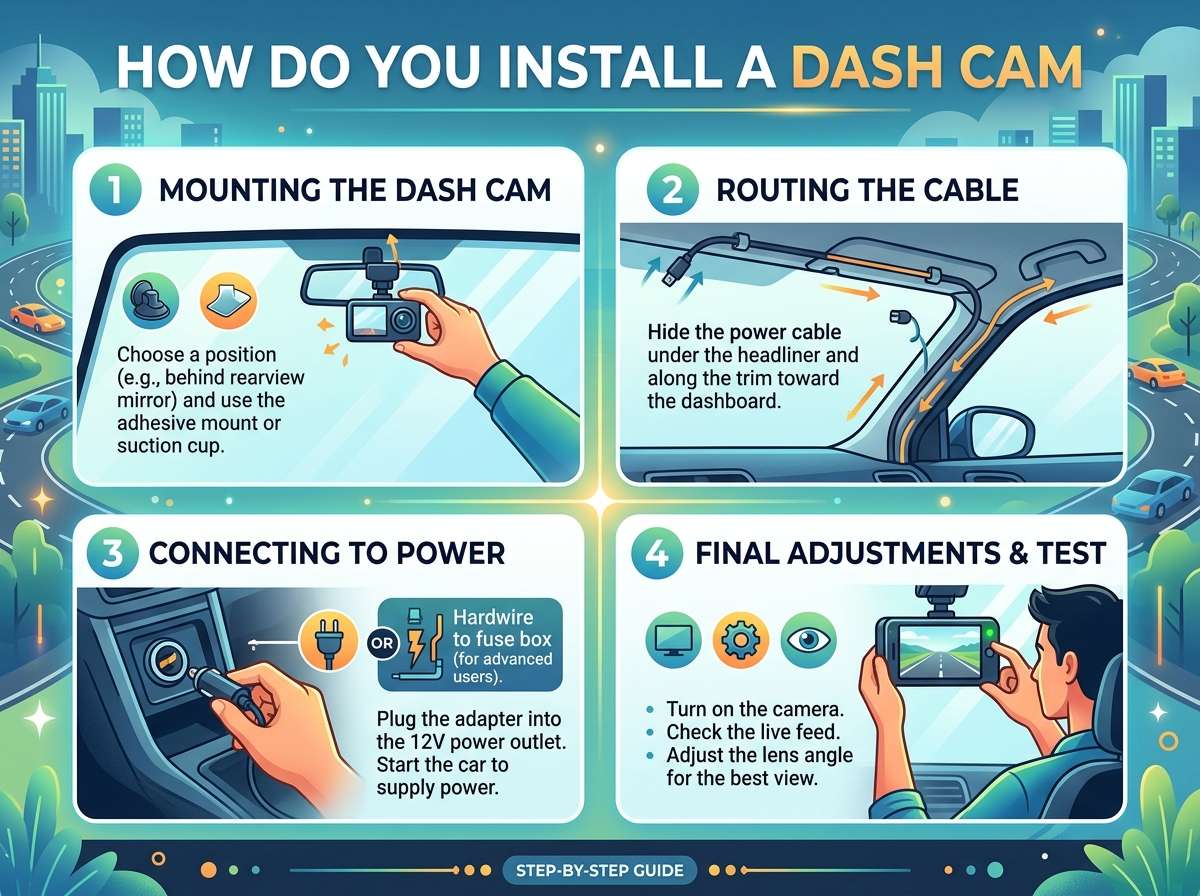
The steps are straightforward. Mount the camera. Hide the cable. Power it on. Test it. Done.
The benefits are huge. You get protection. You get peace of mind. You get proof if something goes wrong on the road.
A dash cam is one of the smartest investments any driver can make. Now that you know how to install one, there’s no reason to wait. Get your dash cam. Install it today. Drive confidently knowing you’re protected.
The road is unpredictable. But with a dash cam mounted in your car, you’re always covered. You have evidence. You have protection. You have power.
That’s what a dash cam really gives you. Not just video. Power.
Ready to install your dash cam? Pick one up today. Follow this guide. You’ll have it set up faster than you think. Drive safe.

Peterson is an automotive safety enthusiast and product reviewer with a passion for helping drivers stay safe on the road. He researches and tests dash cams, backup cameras, TPMS systems, emergency tools, GPS trackers, and other vehicle safety products to provide honest, practical recommendations. Through CarSafeties.com, Peterson shares in-depth reviews, buying guides, and maintenance tips to help drivers make smarter and safer decisions.