How to Hardwire a Dash Cam?
A dash cam is one of the best investments you can make for your vehicle. It records everything that happens on the road. This video footage becomes your evidence if you get into an accident. It protects you from insurance fraud. It helps prove you were not at fault in a collision.
In this article
But here’s the thing: most people plug their dash cameras into the cigarette lighter socket. This works, sure. But it’s not ideal. The power cord hangs down from your dashboard. It looks messy. It takes up space in your car. Plus, the cigarette lighter port can get loose over time.
Hardwiring your dash cam is the professional way to set it up. When you hardwire it, you hide the power cord inside your car’s walls. The camera stays clean and out of sight. Your car looks neat. The power supply becomes permanent and reliable.
The best part? Hardwiring is not as hard as you might think. You don’t need to be a car mechanic. You don’t need special training. If you can follow simple steps, you can do this yourself.
What You’ll Need Before You Start
Before you grab your tools and start working, make sure you have everything ready. Gathering your supplies now saves you time later. You don’t want to be halfway through the job and realize you forgot something.
The Tools You Need:
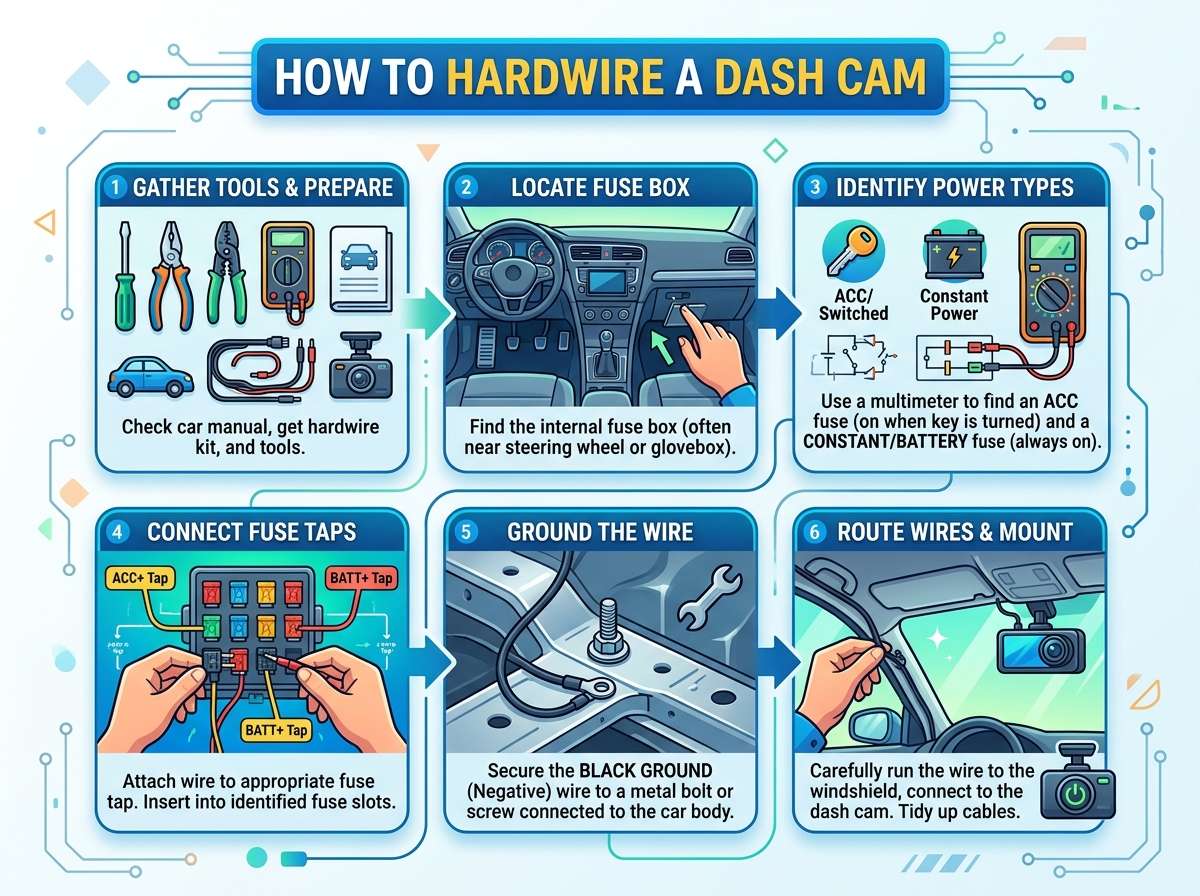
You need a basic toolkit to complete this job. Grab a flathead screwdriver. Get a Phillips head screwdriver too. Find a panel removal tool. This tool pops off plastic panels without breaking them. It costs just a few dollars at any auto parts store.
You’ll also want a crimper tool. This tool connects wires together without needing solder. It makes everything cleaner and easier. A wire stripping tool helps you remove the plastic coating from wires. A multimeter tests your electrical connections. It tells you if power is flowing correctly.
Finally, get some electrical tape. This tape protects your connections. It keeps moisture out. It prevents short circuits.
The Supplies You Must Have:
Your dash cam comes with a USB cable or power cord. This is usually a standard cigarette lighter adapter. You need a hardwire kit for your specific camera model. This kit converts the standard adapter into something you can hide inside your car.
You’ll need a fuse tap. This little device plugs into your car’s fuse box. It draws power from an existing fuse without damaging it. Get a fuse that matches your car’s specifications.
Grab some connectors and crimps. You’ll use these to join wires safely. Some people prefer to use heat shrink tubing instead. This plastic tube shrinks when you heat it. It protects your wire connections.
You might want to get a cable management kit. This helps you hide wires along the headliner. Your vehicle’s manual is super helpful too. It shows you where the fuse box is located. It tells you which fuses you can safely tap into.
Understanding Your Car’s Electrical System
You don’t need a degree in electrical engineering to understand this. But knowing the basics helps you work safely.
Your car runs on a 12-volt electrical system. Everything in your car uses this power. Your lights use it. Your radio uses it. Your windshield wipers use it. Your dash cam needs it too.
Power flows through wires to different parts of your vehicle. These wires connect to a fuse box. The fuse box is the control center for all electrical power. It looks like a plastic box with a bunch of little plugs in it.
Inside the fuse box, you’ll see little colored cylinders. These are fuses. Each fuse protects a different circuit. When too much power flows through a circuit, the fuse blows. This breaks the circuit and stops the power flow. This prevents fires and electrical damage.
Your car also has a battery. The battery stores electrical energy. When you turn on the engine, the alternator charges the battery. The battery powers everything when the engine is off.
When you hardwire a dash cam, you tap into the fuse box. You draw power from a circuit that’s already there. You want to find a circuit that has power only when your car is on. This saves your battery from draining when the car is parked.
Some people want their dash cam to record even when the car is off. For this, you’d tap into a different circuit. This circuit stays powered all the time. Just know that your battery will eventually drain if the car sits unused for days.
Finding Your Fuse Box and Choosing the Right Fuse
Every car has a fuse box. The location depends on your vehicle model. Some are under the driver’s side dashboard. Others sit in the engine compartment. Your car’s owner manual tells you exactly where.
Pop open the door to your fuse box. You’ll see a diagram. This diagram shows what each fuse controls. Some fuses power the cigarette lighter. Others power the accessory outlet. Look for a circuit that powers something you don’t mind sharing. Many people tap into the accessory circuit.
Make sure the fuse you choose has enough power capacity. You want at least 10 amps available. Your dash cam probably uses 2 to 5 amps. This leaves plenty of room.
Don’t tap into circuits that power critical safety features. Never use the circuit for your airbags. Don’t use the circuit for your ABS brakes. Don’t tap into the circuit for your power steering. These systems need reliable, uninterrupted power.
Once you pick the right fuse, grab a fuse tap. A fuse tap is a small device. It has a slot on top. Your original fuse slides into this slot. Then the whole thing plugs back into the fuse box. This clever design lets you draw power without replacing the original fuse.
Planning Your Wire Route Before You Start
Before you cut any wires, plan your route. Look at your car’s interior carefully. You need to get power from the fuse box to your dashboard. You’ll do this by running a wire along the vehicle’s interior.
The wire should travel along the headliner. The headliner is the fabric covering on your car’s ceiling. From there, it runs down your dashboard to where your camera mounts.
Avoid areas where seat belts run. Stay away from moving parts. Don’t let the wire cross sharp edges. Sharp edges can cut through the insulation and cause electrical problems.
Look for existing wire pathways. Your car already has cables running through these spaces. Your new wire can follow the same route. This keeps everything organized and hidden.
Think about where your camera mounts too. Most people mount cameras on the windshield. Some mount them on the dashboard. Your wire needs to reach that location without stretching tight or sagging loose.
You might need to remove some plastic panels to run the wire. This is normal. Car panels pop off easily if you know where the clips are. Use your panel removal tool to pop them gently.
Step-by-Step Instructions for Hardwiring Your Dash Cam
Now comes the actual work. Follow each step carefully. Don’t rush through this. Taking time means better results.
Step 1: Disconnect Your Battery
Your first job is to disconnect your car’s battery. This protects you from electrical shock. It prevents accidental short circuits that could damage your car.
Open your hood. Find the negative terminal on your battery. This is the black wire. Loosen the nut that holds it in place. Pull the negative terminal off the battery post. Wait a few minutes before proceeding. This lets the electrical system fully discharge.
Step 2: Locate and Access Your Fuse Box
Consult your owner’s manual to find your fuse box. Open the fuse box cover. Look at the diagram on the back of the cover. Find the circuit you want to tap into.
Pull out the existing fuse for that circuit using a plastic fuse puller. Some people use needle-nose pliers, but a fuse puller is safer. Insert the fuse tap into the fuse box slot. Slide your original fuse into the top of the fuse tap. The fuse tap now has wires sticking out of it. These wires carry the power you’ll use.
Step 3: Strip and Prepare Your Wires
Use your wire stripping tool to remove about half an inch of plastic coating from the fuse tap wires. This exposes the bare copper inside.
Use your wire stripping tool on the dash cam power cord too. Remove the same amount of coating.
Take your crimper tool. Attach a connector to the end of each wire. These connectors join wires safely. Some people solder wires together, but crimping is easier and safer for beginners.
You’ll have a red wire and a black wire from your fuse tap. The red wire carries positive power. The black wire is the ground. Make sure you connect them correctly. Red connects to red. Black connects to black.
Step 4: Run the Power Wire Through Your Car
This is where your planning pays off. Start at your fuse box. Gently push the wire bundle into the gap where your dashboard meets your door. The wire will travel along the side of your car.
Remove the plastic trim panels along the route. Use your panel removal tool to pop them off. The wire travels behind these panels. This hides it from view.
Continue running the wire forward. Head toward the front of your car. Push it along the headliner. The wire follows the path you planned earlier.
As you thread the wire, make sure it doesn’t get pinched. Pinched wires can damage the insulation. This causes electrical problems down the road.
Remove the panels you need to remove, but only as you go. This keeps your car organized and prevents confusion.
Step 5: Connect to Your Dash Camera
Once the wire reaches your camera location, connect it to the camera power cable. Use your connectors and crimper tool. Red wire connects to red. Black connects to black.
Cover your connection with electrical tape. This keeps moisture out. It protects the connection from physical damage.
You can also use heat shrink tubing if you prefer. Slide the tubing over the connection. Use a heat gun to shrink it tight. Heat shrink looks cleaner than tape.
Step 6: Secure the Wire in Place
Your wire needs to stay in one spot. It shouldn’t move around or rattle. Use zip ties to secure the wire to existing cables and structures inside your car.
Make sure the wire doesn’t touch hot surfaces. Your car’s engine area gets very hot. Keep wires away from anything that might damage them.
Run the wire along the same paths as your car’s factory wiring. This looks professional. It keeps everything organized.
Step 7: Test Everything Before You Finish
Reconnect your car battery. Put the negative terminal back on the battery post. Tighten the nut firmly.
Turn on your car. Check if your dash cam turns on. Look for indicator lights. Listen for any sounds that seem wrong.
Use your multimeter to check voltage at different points along the wire. Make sure power is flowing correctly. If something seems off, turn off your car and check your connections.
Step 8: Put Your Car Back Together
Snap all the plastic panels back into place. Make sure they sit flush against the car. They should click into place.
Tuck any remaining exposed wire into the gaps. Your car should look like nothing was changed.
Run your dash camera and verify it works properly. Check the video quality. Make sure the camera captures good footage.
Dealing With Common Problems
Things don’t always go perfectly. That’s okay. Most problems have easy solutions.
The Camera Won’t Turn On
If your camera stays dark, check your connections first. Make sure the red and black wires are connected to the right terminals. Check the power at your fuse tap using your multimeter.
Verify that you chose the right fuse. Some fuse circuits only power up when the ignition is on. If your fuse circuit only powers when the car is parked, your camera won’t turn on while driving.
Loose or Vibrating Connections
If your connections feel loose, tighten them. Remove the wire bundle. Reseat all connectors. Make sure everything fits snugly.
If a wire keeps moving around, use more zip ties to secure it. Run the wire along a sturdy path inside your car.
The Camera Cuts Out While Driving
Cutting out means the power connection has a loose spot somewhere. Follow the entire wire route. Look for any point where the wire might get pinched or bent at a sharp angle.
Wiggle the wire while the car is on. If the camera flickers, you found the problem spot. Reposition the wire or add support in that area.
Your Battery Drains When the Car Is Off
This happens when you tap into a circuit that stays powered all the time. Your dash cam draws a small amount of current even when not recording. Over days or weeks, this drains your battery.
The solution is to tap into a different circuit. Choose one that only powers up when the ignition is on. Your car’s manual shows which circuits work this way.
Alternatively, you could install a battery disconnect switch. This switch lets you cut power to your dash camera when you park. It’s more work, but it solves the battery drain problem completely.
Wire Damage or Exposed Copper
If you accidentally cut into the wire insulation, don’t panic. Cut off the damaged section if possible. Strip fresh wire ends. Reconnect using your crimper tool.
If you can’t remove the damaged section, cover it with electrical tape. Wrap it tightly. Use heat shrink tubing on top of the tape for extra protection. This isn’t ideal, but it works for small damages.
Safety Tips You Should Know
Electrical work requires respect and caution. Follow these safety rules every single time.
Never work on your car’s electrical system without disconnecting the battery first. This prevents shocks and protects your vehicle from short circuits.
Use insulated tools. Metal tools can conduct electricity. Insulated tools have plastic handles that protect you.
Never force wires or connectors. If something doesn’t fit, you’re probably doing it wrong. Stop and rethink your approach.
Keep water away from electrical connections. Water causes corrosion and electrical problems. Keep your work area dry. Cover connectors with heat shrink or tape.
Don’t tap into circuits you don’t understand. Always consult your owner’s manual. When in doubt, ask a professional mechanic.
Work during daylight or use a good flashlight. Poor lighting leads to mistakes. You can’t see what you’re doing in the dark.
Let your car cool down before you start. Engine compartments get extremely hot. Wait until your engine has been off for at least an hour.
Professional Installation vs. DIY
Hardwiring a dash cam yourself saves money. You won’t pay labor costs. Most people can complete this job in one to three hours.
Professional installation costs between $100 and $300. This covers labor only. You still buy the dash cam separately. The advantage is that professionals know your vehicle inside and out. They work fast. They handle any unexpected problems.
If you’re not comfortable working with electricity, hiring a professional makes sense. If you enjoy learning new skills and want to save money, doing it yourself is very rewarding.
Maintaining Your Hardwired Dash Camera
Once you’ve hardwired your camera, keep it in good shape. Check it occasionally to make sure everything still works.
Every few months, verify that your dash camera powers on correctly. Look for any loose wires. Check that your connections feel tight.
Clean your camera lens regularly. Dust and dirt build up over time. Use a soft cloth to wipe the lens gently. This keeps your video footage clear.
Update your camera’s firmware if the manufacturer releases updates. New firmware often improves performance and stability.
Keep your memory card clean. Format it occasionally. This prevents file corruption. It keeps your camera running smoothly.
Listen for any unusual sounds when your car is running. Strange noises might mean a wire is loose or rubbing against something. Track down the sound and fix it.
Frequently Asked Questions
Can I hardwire any dash cam?
Most dash cameras can be hardwired. You need a hardwire kit designed for your specific camera model. Check the manufacturer’s website. They usually sell hardwire kits or recommend compatible ones.
How long does this job take?
Most people finish in one to three hours. If you’re careful and methodical, it might take longer. That’s fine. It’s better to work slowly and do it right than to rush and make mistakes.
Will hardwiring void my car’s warranty?
In most cases, no. You’re just adding an accessory. You’re not modifying any factory parts or systems. Check your vehicle’s warranty paperwork to be sure.
Can my car battery drain with a hardwired camera?
It can if you tap into the wrong circuit. Choose a circuit that only powers when the ignition is on. Your camera will only draw power while you’re driving or when the car is starting.
Is it better to hardwire or use the cigarette lighter?
Hardwiring looks better and is more reliable. The power supply is permanent. The wire is hidden. The cigarette lighter method is simpler but looks messy. Both work fine for recording video.
What if my fuse box is in the engine compartment?
The process is the same. You’ll just be working in the engine area instead of the cabin. The wire still needs to travel to your dashboard. Run it along existing cables and pathways.
Can I splice into an existing wire instead of using a fuse tap?
You can, but it’s not recommended. A fuse tap is safer. It protects the existing circuit. Splicing into a wire weakens it. It can cause problems down the road.
Do I need a relay for my dash camera?
Most dash cameras don’t need a relay. They draw very little power. A relay is useful if you’re powering multiple devices or high-power equipment.
Final Thoughts
Hardwiring your dash cam might seem complicated at first. But once you understand the basic steps, it becomes straightforward. You just need patience, the right tools, and a willingness to learn.
This project saves you money. It makes your car look professional. It gives you a reliable, permanent power solution for your dash camera. The investment in time and effort pays off every single day.
You’ve got this. Take your time. Follow the steps carefully. Don’t hesitate to ask for help if you get stuck. Once you finish, you’ll feel proud of what you accomplished.
Your dash camera is now ready to protect you on the road. Every drive is recorded and backed up by your hardwired system. You’ve made a smart choice for your vehicle and your safety.
Happy installing, and drive safely out there!

Peterson is an automotive safety enthusiast and product reviewer with a passion for helping drivers stay safe on the road. He researches and tests dash cams, backup cameras, TPMS systems, emergency tools, GPS trackers, and other vehicle safety products to provide honest, practical recommendations. Through CarSafeties.com, Peterson shares in-depth reviews, buying guides, and maintenance tips to help drivers make smarter and safer decisions.