Backup Camera Screen Goes Black
A black backup camera screen can be confusing and a little worrying. The rear view should show what is behind the car when you shift into reverse. This article covers common causes, simple checks to try first, and when to call a professional.
You do not need special tools or technical skills to understand the basics. Most causes fall into a few groups: power problems, wiring issues, a dirty lens or a software glitch. Sorting the problem into one of these groups makes it easier to narrow down.
Key Takeaways
- A blank backup camera screen is often caused by power, fuse, wiring or signal issues.
- Simple checks, like confirming the input source and cleaning the lens, can solve some problems.
- A dirty lens or a stuck software screen can look like a broken camera.
- Repeated failures or any sign of damaged wiring should be checked by a professional.
Why a Backup Camera Screen Goes Black
A backup camera screen usually goes black because the power or signal it needs is interrupted. The camera, wiring and screen all play a part. If one stops working, the picture may disappear.
In many cases the car is not broken. The screen may be set to the wrong input, or a small fault is blocking the image.
Quick Checks You Can Do First
Start with the easiest checks before opening any panels. Make sure the car is in reverse and that the gear selector works normally. Some systems only show the camera when they receive the correct signal.
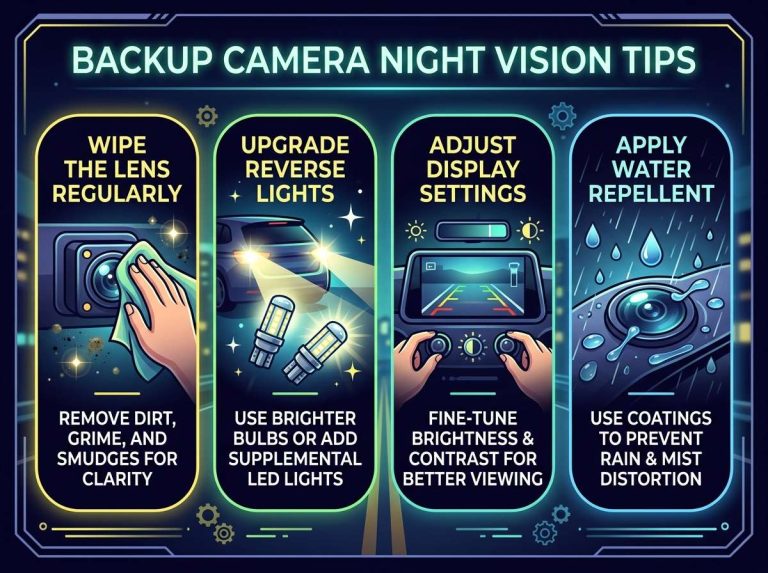
Next, look at the camera lens. Mud, rain, snow or road grime can make the image look black or dark. Wipe the lens gently with a soft cloth and check again.
When to Call a Professional
Call a professional if the screen stays black after basic checks, or if it works only sometimes. Problems with wiring, fuses behind panels or the head unit often need proper tools and training. A technician can also check if the car’s computer systems are involved.
Get help right away if you notice burning smells, melted plastic or exposed wires. These signs point to a safety issue that should not be ignored.
What a Backup Camera Does and How the Screen Works
A backup camera is a small camera mounted at the rear of a vehicle. It records the area behind the car and sends that picture to a display. The goal is to help the driver see obstacles, people and objects that are hard to see when reversing.
The system works as a chain. The camera captures the image, the wiring carries it, and the screen shows it. When every link works, the picture appears as soon as the car goes into reverse.
The Parts Involved: Camera, Wiring, and Display
The camera is usually fitted near the license plate area or the rear handle. Most cameras are built to handle weather and road conditions.
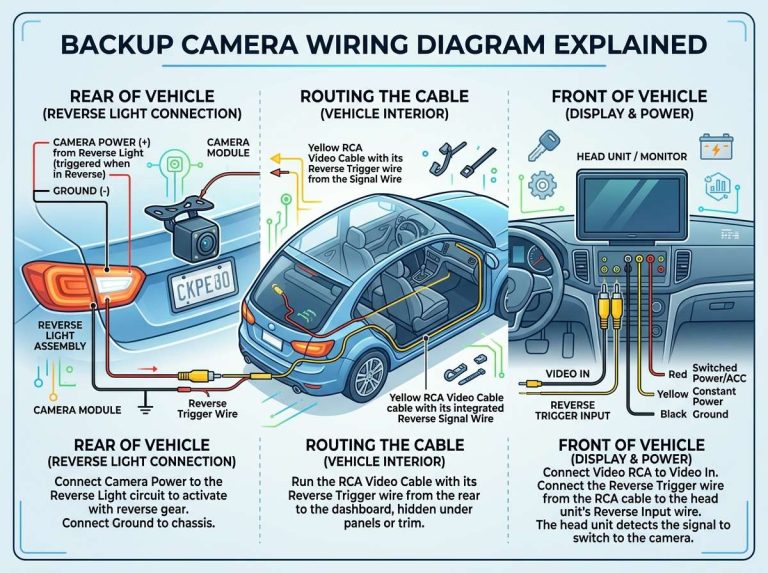
The wiring, often called a wire harness, connects the camera to the car’s electrical system and the display. The display may be part of the rearview mirror, the dashboard or the main infotainment screen.
How the Image Gets to Your Dashboard Screen
When the camera is powered, it sends a video signal along the wire to the head unit, the main control unit for audio and display. The head unit then shows the picture on the screen.
Some vehicles use a switch or control module to decide when the picture appears. The gear selector and other sensors can affect the display as a result.
Why the Screen Turns On When You Shift to Reverse
Most systems watch the reverse gear signal. When the transmission enters reverse, the car sends a signal that tells the camera and screen to switch on. This is often called an automatic trigger.
If this signal is weak or missing, the screen may stay black even though the camera has power. A reverse signal problem can look like a camera failure when the camera itself is fine.
Common Reasons a Backup Camera Screen Goes Black
Several common causes can make a backup camera screen go black.
They fall into a few groups: power, fuses, wiring, the reverse signal, the lens and software. Knowing these groups helps you narrow down the problem.
Loss of Power to the Camera or Monitor
The camera and screen both need steady electrical power. If the battery is weak or the supply is interrupted, one or both parts may shut off.
Blown Fuses and Relay Problems
A fuse protects the circuit by cutting power when something goes wrong. If the camera fuse blows, the picture will not appear. A faulty relay, a small electrical switch, can also stop power from reaching the camera.
Loose, Damaged, or Corroded Wiring
Wires can loosen, rub through or get damaged over time. Moisture and road salt can corrode connectors. Even a small break in the wire can interrupt the signal.
Faulty Reverse Light Signal
Many systems rely on the reverse light circuit to know when to turn on. If the reverse light bulb is out or its wiring is faulty, the camera may not activate, and the screen can stay black when you shift into reverse.
Dirty or Blocked Camera Lens
A dirty lens can make the picture look black, grey or very dark. Mud, snow, water spots and dust are common culprits. A quick cleaning often solves this.
Software Glitches in the Head Unit or Infotainment System
The head unit runs software that controls the display. A glitch can freeze the screen or stop it from switching to the camera view. Restarting the system often clears the issue.
Simple Steps to Troubleshoot a Blank Backup Camera Display
You can work through a few simple steps before calling for help. Start with the easiest checks and move toward the more involved ones.
Check the Screen Settings and Input Source
Some screens have a separate input setting for the camera. If the display is set to another source, the camera picture will not show. Select the camera input in the settings menu if needed.
Test the Reverse Gear Signal
Shift into reverse and check that the reverse lights come on. If they do not, the reverse signal may be the cause. Check the reverse light bulbs first, since this is a simple, inexpensive fix.
Inspect the Fuse Box and Replace Blown Fuses
Your owner’s manual shows where the fuse box is and which fuse controls the camera. Look for a fuse with a broken metal strip. Replace it only with a fuse of the same rating.
Clean the Camera Lens and Check the Mounting
Wipe the lens with a soft cloth and mild cleaner. Check that the camera is firmly attached and not tilted or loose. A shifted camera may show an odd angle or a dark image.
Restart the Infotainment System
Turn the car off, wait briefly, and start it again. Some systems also have a reset option in the settings. A restart can clear a temporary software problem.
Wiring and Connection Checks for Beginners
Only inspect connections that are easy to reach and safe to check. If a wire looks damaged, leave the repair to a professional.
Locating the Camera Wire Harness
The camera wire usually runs along the trunk or hatch area and into the interior. Look for a bundle of wires with a plastic cover. Your owner’s manual or a service guide can show the exact route.
Spotting Damaged Connectors and Corrosion
Look for cracked plastic, bent pins, or green or white powder on metal contacts. These signs suggest moisture or corrosion. A loose connector may also cause an intermittent picture.
Safety Tips Before Touching Any Wiring
Turn the car off and remove the key before touching any wiring. If you work near the battery, disconnect the negative terminal first. Never cut or splice wires unless you are trained to do so.
Examples of Black Screen Problems and What They Usually Mean
Patterns can offer clues about the cause. The timing of the problem often points toward a likely source. These examples are general and do not guarantee the exact fault.
Screen Goes Black Only in Cold Weather
Cold weather can weaken a battery and affect connections. Condensation can also form inside wiring or connectors. If the screen works after the car warms up, a power or connection issue is a likely suspect.
Screen Goes Black After Washing the Car
Water can enter connectors or the camera housing during a wash. This may cause a short or temporary failure. Letting the area dry fully and checking the connections is a sensible first step.
Screen Is Black Only at Night or in Low Light
Many cameras rely on light to form a clear image. In dim conditions, the picture may look very dark. This is usually a camera limitation, though a dirty lens can make it worse.
Screen Flickers Then Goes Black While Driving
Flickering often points to a loose connection or a failing part. Road vibration can move a poorly seated wire. Because the problem can worsen over time, it is worth having it checked.
Comparing Wired and Wireless Backup Camera Systems
Backup cameras come in wired and wireless versions, each with its own strengths and weak points. Knowing the difference helps you find the cause.
How Wired Systems Can Fail
Wired systems use a physical cable from the camera to the screen. A damaged or corroded cable can interrupt the picture. Because the wiring runs through the car, finding the break can take time.
How Wireless Systems Can Lose Signal
Wireless systems send the picture through the air to a receiver. Interference from other electronics or a weak transmitter can cause the screen to go black. Moving the receiver or checking its power may help.
Which Type Is Easier to Troubleshoot
Wireless systems often have fewer wires to check, which can make basic tests simpler. Wired systems offer more direct paths to inspect but may require more work to reach. Both types can be easy or hard to fix, depending on the cause.
When a Black Backup Camera Screen Is a Safety Concern
A blank screen reduces your view behind the car. This matters most when reversing near people, pets, curbs or other vehicles. Treat a black screen as a reason to slow down and take extra care.
Why Rear Visibility Matters
Low objects and small children are hard to see behind a car. A backup camera helps cover these blind spots. Without it, you rely more on your own judgment.
Using Mirrors and Sensors as a Backup Plan
Mirrors and turning your head remain the safest backup methods. Parking sensors, if your car has them, can also help. Do not depend on sensors alone, since they may not detect everything.
Frequently Asked Questions
Why does my backup camera screen go black only when I reverse?
The screen usually turns on from the reverse signal. If that signal is weak, missing or delayed, the picture may not appear. A faulty reverse light circuit can also cause this pattern.
Can a dead car battery cause the backup camera screen to go black?
Yes, a weak or dead battery can cut power to the camera and screen. Charging or replacing the battery and then checking the system is a good step.
Is it safe to drive with a black backup camera screen?
Driving with a blank screen is possible, but it reduces your view behind the car. Rely on mirrors, turning your head and any parking sensors. Get the system checked as soon as you can.
Can I fix a blank backup camera screen myself?
Some causes are simple, such as a dirty lens, a wrong input setting or a blown fuse. Wiring and head unit problems are harder and may need professional tools. If you are unsure, ask a technician for help.
How much does it usually cost to repair a backup camera?
Repair costs vary widely depending on the cause, the car and local labor rates. A fuse or cleaning costs very little, while a camera or head unit replacement costs much more. A local shop or dealer can give you a quote after an inspection.
Conclusion
A black backup camera screen usually has a clear cause, such as power loss, a blown fuse, damaged wiring, a weak reverse signal, a dirty lens or a software glitch. Simple checks like confirming the input source, cleaning the lens and restarting the system can solve many problems.
If the screen stays black, flickers or shows signs of wiring damage, have a professional take a look. Until the system is fixed, stay alert and rely on your mirrors when reversing.

Peterson is an automotive safety enthusiast and product reviewer with a passion for helping drivers stay safe on the road. He researches and tests dash cams, backup cameras, TPMS systems, emergency tools, GPS trackers, and other vehicle safety products to provide honest, practical recommendations. Through CarSafeties.com, Peterson shares in-depth reviews, buying guides, and maintenance tips to help drivers make smarter and safer decisions.