Dash Cam For Rideshare Drivers
A dash cam for rideshare drivers is a small camera mounted behind the windshield that records video while you drive. Many drivers for ride-hailing apps use one to keep a record of their trips. It can help with safety, disputes and insurance questions.
This article explains what these cameras do and which features matter most. It also covers platform rules, installation basics and common mistakes. By the end, a beginner should know what to look for and how to use a dash cam well.
Key Takeaways
- A rideshare dash cam records the road and sometimes the cabin, which can help document trips.
- Continuous loop recording and reliable storage matter more than extra features.
- Check your platform’s policy and local recording laws before you record passengers.
- Mount the camera where it does not block your view of the road.
- Review footage and back up important clips regularly.
What Is a Dash Cam for Rideshare Drivers?
A dash cam sits on or near the dashboard or windshield. It records the road ahead, and some models also record behind the car or inside the cabin. Because it runs automatically, you do not need to hold anything or press a button.
The footage can show traffic events, road conditions and interactions with other drivers.
How a Dash Cam Differs from a Phone Camera
A phone camera needs someone to hold it and start recording. A dash cam starts when the engine runs and keeps recording without help from you.
Dash cams also manage storage by overwriting old files as the memory card fills. A phone would likely run out of space or battery before a full shift ends.
Why Rideshare Drivers Use Dash Cams
Rideshare drivers spend many hours on the road with strangers. A dash cam creates a neutral record if a passenger or another driver later disagrees about events.
Drivers also use dash cams to document collisions, road hazards and aggressive driving by others. The footage can support an insurance claim or a police report, giving you a factual account instead of relying on memory.
How a Rideshare Dash Cam Works
Most dash cams are simple once you understand a few basic parts. They record video in short segments, store the files on a memory card and protect important clips.
Front-Facing, Rear-Facing and Dual-Channel Setups
A front-facing camera records the road ahead and covers most traffic events. A rear-facing camera records behind the car, which helps if someone hits you from the back.
A dual-channel system uses two cameras, usually front and rear, that work together. Each added camera usually means more storage needs and more wiring.
Recording Loops, Storage and Memory Cards
Dash cams use loop recording. The camera saves video in short files, often a few minutes long. When the card is full, it deletes the oldest unlocked file to make room for new footage.
The camera manual lists which memory card sizes and speed classes it supports. A card that is too small or too weak can lose footage or fail to record properly.
Parking Mode and Impact Detection
Impact detection uses a motion sensor, called an accelerometer, to spot sudden shocks. When it senses a hard bump or collision, it locks the current clip so it is not overwritten.
Parking mode lets some cameras keep watch while the car is off. It usually needs a hardwired connection or a battery pack, and it can drain a car battery if it runs too long. Features vary by model, so read the product details first.
Key Features to Look For in a Rideshare Dash Cam
Feature lists can be long, so focus on the few that matter most for rideshare work. Video clarity, night performance and a steady power supply usually come first.
Video Resolution and Night Vision
Resolution describes how much detail the video holds. Higher resolution makes it easier to read license plates and road signs. Many drivers look for high definition or better.
Night vision matters because many rideshare trips happen after dark. Glare from headlights and streetlights can still affect video, so check sample footage from the maker.
Field of View and Mounting Position
Field of view is how wide the camera sees. A wider view captures more lanes and nearby vehicles, but it can make objects look smaller. A balanced view is often more useful than the widest possible one.
Mounting position affects what the lens sees. A spot near the top of the windshield, out of your sightline, often works well.
Power Source and Continuous Recording
Most dash cams plug into the car’s power port and work while the engine runs. A hardwired kit connects to the fuse box and can support parking mode.
Continuous recording means the camera stays on for the full shift. If power drops, you may lose footage from that period.
Cabin-Facing Cameras and Privacy Settings
A cabin-facing camera records the inside of the car. Rideshare drivers sometimes use it to document passenger behavior or damage, but it raises privacy questions.
Many cabin cameras let you turn audio on or off and change how long files are kept. Use these settings only in ways that follow your platform and local law.
Rideshare Platform Rules and Dash Cam Use
Recording while you drive for a ride-hailing app is not always simple. Each platform sets its own camera and footage policies, and these can change, so check them regularly.
Checking Your Platform’s Policy on Recording
Start by reading your app’s driver terms and support pages. Look for sections on cameras, recording devices and passenger privacy. Some platforms allow dash cams, while others ask drivers to notify riders.
If a policy is unclear, contact driver support in writing and keep the reply on record.
Local Laws on Audio and Passenger Privacy
Recording laws vary by country, state and city. Some places require consent before audio is recorded, especially in private spaces. Others allow video in public areas but have strict rules about the inside of a vehicle.
Check local guidance or ask a legal professional. Turning off audio is a common step drivers take to reduce risk.
Step-by-Step Guide to Installing a Dash Cam
Most beginners can handle installation in under an hour. Always follow the instructions that come with your model.
Picking a Mounting Spot Without Blocking Your View
Place the camera where it does not block your view of the road. Many drivers mount it just behind the rearview mirror, clear of airbags and sensors.
Clean the windshield spot before attaching the mount, since dust and oil weaken adhesive. Press the mount firmly and let the adhesive hold before adding the camera.
Routing the Power Cable Safely
Run the power cable along the windshield edge, behind the trim and along the headliner, then down the A-pillar to the lighter socket or fuse box. Keep it away from the pedals, gear shifter and seat, and secure it with clips.
Formatting the Memory Card and Testing the Camera
Format the memory card inside the camera before first use. This prepares the card for the camera’s file system and clears old data.
Start the car and confirm that the camera powers on. Record a short test clip and play it back to check the view, focus and audio. Adjust the angle if the road is cut off or glare is strong.
Tips for Using Your Dash Cam Every Shift
A dash cam only helps if it works when you need it. A few simple habits keep it reliable and prevent lost footage.
Checking Footage Regularly
Check that the camera is recording at the start of each shift. A quick look at the indicator light or screen is often enough. Review a clip now and then to confirm the image is still clear.
Look for dirt on the lens and loose mounts. Wiping the lens with a soft cloth can improve clarity.
Keeping Recordings Safe and Backed Up
Save important clips to a separate location as soon as possible. Loop recording can overwrite older files, so waiting too long can lose footage. Copy files to a phone, computer or cloud storage.
Keep clear notes on the date, time and trip details for saved clips. Store them securely and limit who can access them.
Knowing When to Save or Share Footage
Save footage after any collision, near miss, dispute or safety concern. Keep these clips until you know they are no longer needed.
Share footage only with people who have a legitimate need to see it, such as your platform’s support team, an insurer or the police. Posting it on social media can create privacy and legal problems.
Comparing Dash Cam Types for Rideshare Use
Dash cams come in several styles, each suited to different budgets and needs.
Basic Single-Lens Models
A basic single-lens camera records only the road ahead. It is usually the simplest to install and the least expensive option.
The trade-off is limited coverage. It does not show what happens behind the car or inside the cabin.
Dual-Lens and Cloud-Connected Models
Dual-lens cameras record both the front and rear, and some add a cabin view. This gives a fuller picture of each trip but requires more storage and careful wiring.
Cloud-connected models can upload clips to an online account, which can ease backup. This usually depends on a data plan and a subscription, so check the terms and costs first.
Built-In Versus Aftermarket Systems
Some newer cars come with built-in camera systems. Their features and access to footage depend on the manufacturer.
Aftermarket dash cams are separate devices you install yourself. They offer more choice in features and price, but you must manage installation, memory cards and backups.
Common Mistakes Beginners Make
New drivers often run into the same few problems. Knowing them ahead of time can save frustration. Most of these mistakes are easy to avoid.
Mounting in the Wrong Place
A camera that blocks the view of the road can be unsafe and may break local rules. Placing it too low or too far to one side can cut off useful detail. Test the angle before you finish the install.
Ignoring Storage Limits and Card Wear
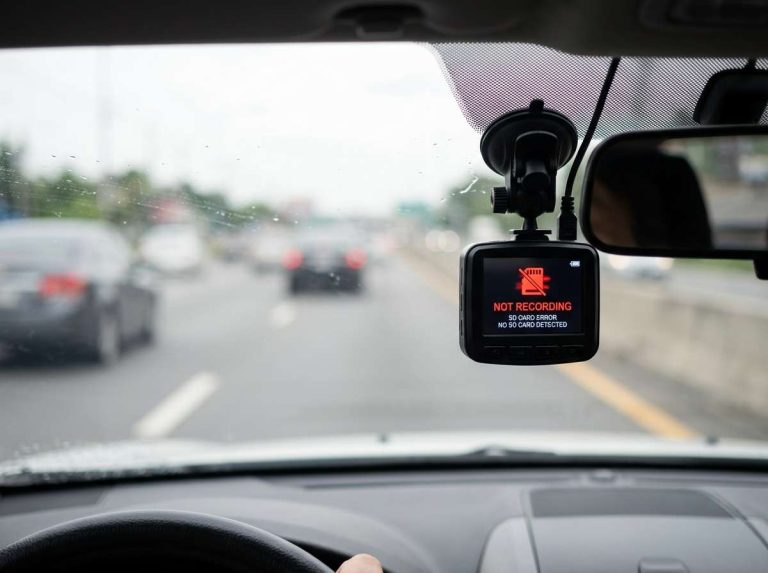
Memory cards wear out over time, especially when they record constantly. Rewriting can cause a card to fail without warning. Check the card regularly and replace it when the camera shows errors or the footage looks broken. Choose a card rated for continuous recording.
Frequently Asked Questions
Do rideshare drivers need a dash cam?
No law requires a dash cam for rideshare work in most places. Many drivers use one anyway to keep a factual record of their trips. Your platform, your area and your needs determine if it suits you.
Can a dash cam record passengers inside the car?
Some cabin cameras can record passengers, but the rules vary. Check your platform’s policy and local recording laws before you turn one on. Many drivers turn off audio to reduce privacy risk.
Will a dash cam lower my insurance costs?
A dash cam does not guarantee lower insurance costs. Some insurers may consider footage when reviewing a claim, but policies differ. Ask your insurer directly how they treat dash cam evidence.
How long does dash cam footage stay on the memory card?
Footage stays until the card fills and the camera overwrites the oldest unlocked files. Card size and video quality affect how long that takes. Locked clips, such as those from impact detection, usually stay saved until you delete them.
Can I use a dash cam in any car?
Most dash cams work in cars that have a power port and room behind the windshield. Hardwired parking mode may need a specific kit or fuse box connection. Check the compatibility notes for your model before you buy.
Conclusion
A dash cam can record trips, support disputes and document incidents for rideshare drivers. Its value depends on clear video, reliable power and sound storage habits. Checking your platform’s rules and local laws matters as much as the hardware.
Mount the camera carefully, check it often and back up important clips. With these basics in place, a beginner can use a dash cam with confidence.

Peterson is an automotive safety enthusiast and product reviewer with a passion for helping drivers stay safe on the road. He researches and tests dash cams, backup cameras, TPMS systems, emergency tools, GPS trackers, and other vehicle safety products to provide honest, practical recommendations. Through CarSafeties.com, Peterson shares in-depth reviews, buying guides, and maintenance tips to help drivers make smarter and safer decisions.