How Do Backup Cameras Work
Key Takeaways
- A backup camera shows a live view of the area behind a vehicle on a screen when the car is in reverse.
- The main parts are the camera, the display and the wiring that carries power and video.
- Analog systems send video through wires, while digital and wireless systems send data in a different form.
- Guide lines help estimate distance, but they do not replace careful driving and looking around.
- A clean lens, a working connection and regular checks keep the system useful.
What Is a Backup Camera and Why Does It Matter?
A Simple Definition for Beginners
A backup camera is a small camera mounted at the rear of a vehicle. It records the area behind the car and shows that view on a screen inside the cab, often on the dashboard or in the rearview mirror.
Low objects such as curbs, toys or posts can be hard to see from the driver’s seat. A camera can show them more clearly. People also call it a rearview camera or a reverse camera.
Common Uses in Cars, Trucks and Trailers
Backup cameras appear in passenger cars, pickup trucks, SUVs and vans. Larger vehicles often benefit most, because the area behind them is harder to judge. Some drivers add cameras to trailers to see the hitch while backing up.
The camera works best alongside mirrors and a look over the shoulder.
The Basic Parts of a Backup Camera System
Every backup camera system has a few core parts that work together. Most systems share the same basic layout, even when the brand or design differs.
The Camera Lens and Image Sensor
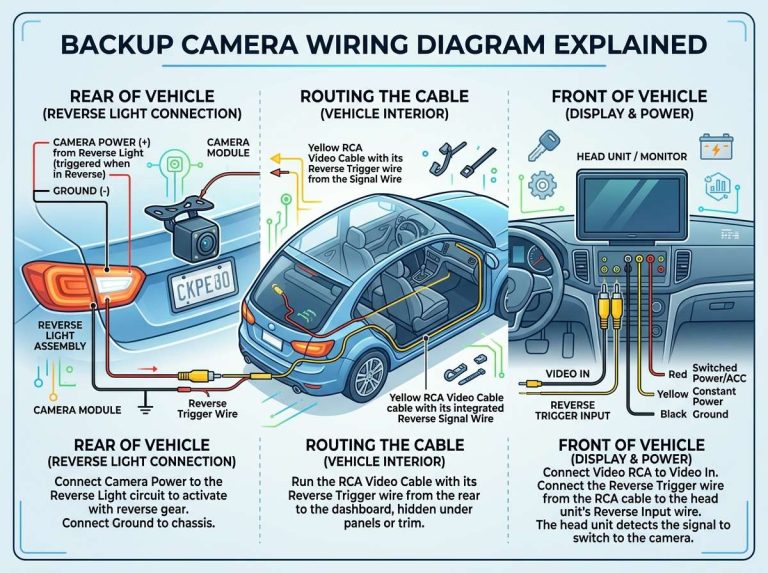
The lens sits at the front of the camera and gathers light from the scene behind the vehicle. It focuses that light onto a small chip called an image sensor, which turns the light into the signals that form the picture.
The lens also sets the camera’s field of view, which is how wide an area it can capture. Many backup cameras are mounted near or above the license plate, usually behind a protective plastic or glass cover.
The Video Display or Rearview Monitor
The display is the screen that shows the camera’s picture to the driver. It may be a small screen in the rearview mirror, a dashboard panel, or part of a larger infotainment unit. Many systems switch on automatically when the car enters reverse.
The Wiring and Power Connection
Wiring connects the camera to the display and to the vehicle’s power. Power usually comes from a fuse tied to the reverse light circuit or a similar source, so the camera turns on when the car is in reverse.
Loose, damaged or corroded wires are a common reason a system stops working. Cables should be fastened and protected from water and road debris.
How Does a Backup Camera Work Step by Step?
The process happens in a few quick stages, and each one depends on the last. Following the sequence makes the whole system easier to understand.
What Happens When You Shift into Reverse
When the driver moves the gear selector into reverse, the transmission sends a signal to the vehicle’s electrical system. This switches on the camera and display. No button press is needed.
In most vehicles, the screen shows the camera view within a second or two. Some models also display guide lines.
How the Camera Captures and Sends the Image
Once powered, the image sensor collects light through the lens and converts it into video data. A small processing chip prepares that data for the screen.
The video then travels along wiring or through a wireless link. The signal moves quickly so the driver sees the scene as it happens.
How the Screen Shows the View to the Driver
The display decodes the video signal and draws each frame on the screen. Frames replace one another many times per second, which creates smooth motion.
The image may be mirrored so left and right match what the driver expects from a mirror. When the car leaves reverse, the system usually returns the screen to its normal display.
Analog and Digital Backup Cameras Explained
Backup cameras use two main signal types: analog and digital. The difference affects how video travels and how clear it looks. Both can work well for everyday backing up.
How Analog Signals Travel Through Wires
An analog signal stores video as a continuous electrical wave that changes in strength and timing to represent the picture. A coaxial or similar cable carries it to the display.
Analog systems are simpler and often less costly to build. Picture quality can drop with long cables or interference.
How Digital and Wireless Systems Send Video
A digital system turns the picture into numbers. These numbers are packed into data packets and sent by wire or radio, and the display rebuilds the image from them.
Digital systems often produce sharper pictures and handle interference more reliably. Wireless models send video without a physical cable.
Wired Versus Wireless Backup Cameras
Wired and wireless setups differ in installation, reliability and cost. Both serve the same purpose, so the trade-offs matter most.
Pros and Cons of Wired Connections
- Pros: a steady connection, fewer signal dropouts and usually no separate power source at the camera.
- Cons: installation can take longer because cables must run through the vehicle body.
- Cons: a damaged cable can stop the whole system.
Pros and Cons of Wireless Connections
- Pros: fewer cables to route, which can simplify installation.
- Pros: useful for trailers, where a cable would cross the hitch area.
- Cons: distance, walls, metal parts and other radio sources can affect the signal.
- Cons: the camera may need its own battery or power link, depending on the design.
Wired systems favor stability, while wireless systems favor convenience. The best fit depends on the layout of the car or trailer.
Guidelines Lines and Camera Views Explained
Many backup cameras show colored lines on the screen called guide lines. They help the driver judge distance and steering. They are a visual aid, not a precise measurement, so the driver should still check the area directly.
What Static and Dynamic Guidelines Show
Static guidelines stay fixed on the screen and usually mark a set distance behind the vehicle. They help the driver notice how close an object is getting.
Dynamic guidelines move when the steering wheel turns. They show the expected path of the rear wheels, which can help with lining up the car.
Why Camera Angle and Field of View Matter
The camera angle decides how much ground the picture covers. A wider view shows more of the sides, but objects can look smaller and farther away. A narrower view shows less area but can look more natural.
Objects may appear closer or farther than they really are. Low objects near the bumper may be hidden entirely, so the driver should know these limits before relying on the screen alone.
Practical Tips for Using a Backup Camera Safely
A backup camera works best alongside good habits. It is one tool among several, and these simple steps help the system do its job.
Keeping the Lens Clean and Clear
Dirt, mud, snow and water spots can blur the picture. Wipe the lens cover with a soft cloth, especially after driving in bad weather.
Knowing the Limits of Blind Spots and Low Light
A backup camera cannot show everything behind a vehicle. Tall objects near the sides and items very close to the bumper may fall outside the view. Drivers should still look over their shoulder and check the mirrors.
Low light can make the picture grainy. Drivers should move more slowly and use headlights when backing up at night.
Checking the System Regularly
A quick check at the start of each day helps catch problems early. Put the car in reverse and confirm that the picture appears and the guide lines are visible. Look for flicker, color changes or missing sections of the image.
Common Problems and Simple Troubleshooting
Most backup camera issues have simple causes. A few basic checks can often solve them. If a problem continues, a qualified technician should take a look.
Blurry or Dark Images
A blurry picture is often caused by a dirty lens. Clean the cover gently and check again. A dark image may come from low light or a camera that has moved out of position.
No Picture on the Screen
If no picture appears, check the fuse that supplies power to the camera. Make sure the display is set to show the camera input. Loose or damaged wiring at the connectors is another common cause.
Interference and Signal Dropouts
Wireless systems may lose the signal when the vehicle is far from the receiver or when metal objects block the path. Wired systems may flicker if the cable is damaged or runs near noisy electrical parts. Moving the vehicle or checking the cable routing often helps.
Backup Cameras Compared with Parking Sensors and Mirrors
Backup cameras are not the only aid for reversing. Mirrors and parking sensors also play a role, and each shows something different.
Mirrors show reflected views of the sides and rear and need no power. Parking sensors beep to warn of nearby objects but show no picture. A camera shows the scene itself, which can make an object’s shape easier to judge.
Many drivers use these tools together, since each covers gaps the others leave.
Frequently Asked Questions
Do Backup Cameras Turn On Automatically?
In most vehicles, the camera and display switch on when the car is shifted into reverse, with no button press needed. Some systems show a short message or delay before the picture appears.
Can a Backup Camera Work at Night?
Many backup cameras show a picture in low light, often with built-in lights or a night mode. The image is usually less detailed than in daylight. Drivers should still move slowly and use the vehicle’s lights after dark.
Do Backup Cameras Replace Looking Over Your Shoulder?
No. A backup camera is an aid, not a replacement for careful driving, and it cannot show everything around the vehicle. Looking over your shoulder and checking the mirrors remain important habits.
Can I Add a Backup Camera to an Older Vehicle?
Many older vehicles can have an aftermarket camera system installed. The process depends on the vehicle layout and the display chosen. A professional installer can confirm what is practical for a specific car or truck.
How Long Do Backup Camera Systems Usually Last?
Lifespan varies with part quality, climate and care. Water, heat and road vibration can wear components over time. Regular checks help spot wear before the system fails.
Conclusion: What to Remember About How Backup Cameras Work
A backup camera captures the view behind a vehicle and sends it to a screen when the car is in reverse. The lens, sensor, display and wiring each play a clear role. Analog and digital systems, along with wired and wireless designs, offer different trade-offs.
Guide lines and camera views help with judging distance, but they have limits. Keeping the lens clean, knowing the blind spots and checking the system regularly all support safe use. The camera works best as one part of careful, attentive driving.

Peterson is an automotive safety enthusiast and product reviewer with a passion for helping drivers stay safe on the road. He researches and tests dash cams, backup cameras, TPMS systems, emergency tools, GPS trackers, and other vehicle safety products to provide honest, practical recommendations. Through CarSafeties.com, Peterson shares in-depth reviews, buying guides, and maintenance tips to help drivers make smarter and safer decisions.