How to Read Longitude and Latitude on Your Dash Cam?
Your dash cam is recording more than just video. It’s also tracking exactly where you are on the map. Sounds cool, right? The numbers that show up on your footage are called coordinates. They tell you the precise location of your vehicle. But those numbers can look pretty confusing at first. Let me break it down for you in a way that makes sense.
In this article
What Are Coordinates Anyway?
Think of the Earth like a giant grid. Lines run across it in two directions. One set of lines runs from top to bottom. The other set runs from left to right. These lines give every spot on Earth a unique address.
That address has two parts. The first part is called latitude. The second part is called longitude. Together, they tell you exactly where something is. Your dash cam uses these numbers to log your exact position as you drive.
Understanding Latitude
Latitude tells you how far north or south you are. Imagine a line running around the middle of the Earth. That’s the equator. Everything north of it has a positive latitude number. Everything south of it has a negative latitude number.
Latitude goes from 0 to 90 degrees. Zero degrees is the equator. 90 degrees north is the North Pole. 90 degrees south is the South Pole.
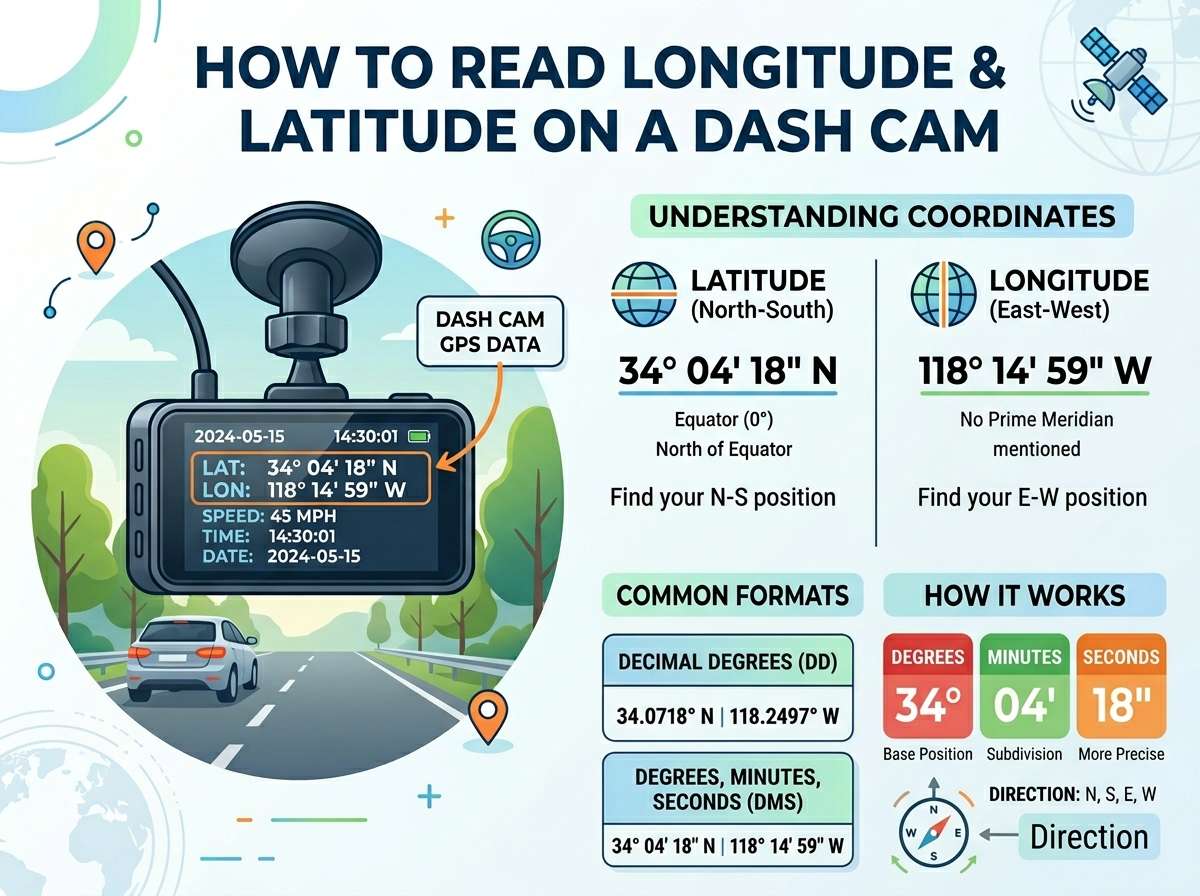
Your dash cam shows latitude as a decimal number. It might look like 40.7128. That means 40 degrees and part of another degree. The numbers after the decimal point are fractions of a degree. They get more precise as you add more digits.
The higher the latitude number, the closer you are to the North Pole. The lower the number, the closer you are to the South Pole. If you see a minus sign or an N and S label, the minus means south. The N means north.
Understanding Longitude
Longitude tells you how far east or west you are. Think of lines running from the North Pole to the South Pole. These lines divide the Earth into east and west sections.
Longitude goes from 0 to 180 degrees. Zero degrees runs through Greenwich in England. This line is called the prime meridian. Everything east of it has a positive longitude number. Everything west of it has a negative longitude number.
Your dash cam shows longitude as a decimal number too. It might look like 74.0060. That means 74 degrees and part of another degree. Just like latitude, the decimal digits give you more precise information.
If the longitude number is positive, you’re east of the prime meridian. If it’s negative, you’re west of the prime meridian. Some dash cams use E and W labels instead of plus and minus signs.
Reading Your Dash Cam Display
Most dash cams show coordinates in a corner of the video. Usually, you’ll see two lines of numbers. One line is latitude. The other is longitude. The order can vary by brand, but it’s often latitude first, then longitude.
The display might show: Latitude: 40.7128 Longitude: -74.0060
Or it might show them in one line like this: 40.7128, -74.0060
The numbers look complex, but they’re just telling you the exact spot where your dash cam was at that moment in time.
GPS and Your Dash Cam
Your dash cam has a tiny GPS receiver inside. GPS stands for Global Positioning System. It’s a network of satellites floating in space around the Earth. Your dash cam talks to these satellites to figure out where you are.
The GPS system calculates your location by measuring signals from multiple satellites. The more satellites your dash cam can reach, the more accurate the coordinates become. In open areas like highways, you get better accuracy. In cities with tall buildings, you might lose some accuracy.
This is why dash cams sometimes take a few seconds to lock onto your position when you first turn them on. The GPS receiver is searching for satellite signals. Once it finds enough satellites, it can give you your coordinates.
How Precise Are Dash Cam Coordinates?
The decimal numbers you see matter. The first digit after the decimal point is accurate to about 11 kilometers. The second digit is accurate to about 1.1 kilometers. The third digit gets you within about 110 meters. The fourth digit is within 11 meters. The fifth digit is within 1.1 meters.
Most dash cams give you coordinates with at least four decimal places. That means they’re accurate to within about 10 meters. Some expensive models offer more decimal places for better accuracy.
For regular drivers, this level of precision is plenty. You can tell which road you were on. You can identify which intersection. You can even tell which side of the street. That’s useful information if you need to prove where an accident happened.
Format Variations Across Different Dash Cam Brands
Not all dash cams display coordinates the same way. Some brands are a bit different from others.
Some dash cams show coordinates as degrees, minutes, and seconds instead of decimals. This is an older format. It looks like 40° 42′ 46.1″ N. The degree symbol comes first. Then you see the minutes symbol. Then seconds. The letter at the end shows north, south, east, or west.
Other dash cams stick with decimal format, which is what we’ve been talking about. This is easier for most people to understand.
A few premium dash cams let you choose your format. You can switch between decimal degrees and degrees, minutes, and seconds in the settings. Check your manual to see which format your dash cam uses.
The important thing is knowing what you’re looking at. Once you understand the format your dash cam uses, reading those numbers becomes second nature.
Why Your Dash Cam Logs Coordinates
You might wonder why your dash cam even bothers recording location data. There are several good reasons.
First, it helps prove where accidents happened. If someone claims you hit them at a different location, the coordinates prove otherwise. Insurance companies love this data because it removes guesswork.
Second, it helps police investigate accidents and crimes. If your dash cam captured an incident, the location data backs up your story.
Third, it can help you remember where things happened. Maybe you witnessed something unusual or saw a bad driver. The coordinates let you pinpoint exactly where it occurred.
Fourth, some dash cams use location data to mark dangerous roads. If lots of accidents happen at the same coordinates, the data can show which roads need better safety measures.
Checking Your GPS Signal Strength
A weak GPS signal means less accurate coordinates. Most dash cams show a signal strength indicator. Look for a small GPS icon or signal bars on your display.
Full bars mean your GPS is working well. Weak bars mean your signal is spotty. No signal means your coordinates might not be recording.
Several things can block your GPS signal. Tunnels block it completely. Thick trees can interfere. Tall buildings in cities might cause issues. Heavy cloud cover rarely blocks GPS, but it can slow down the signal lock.
If you go through a tunnel, your coordinates might pause. Once you exit, your dash cam reconnects and continues logging your position. This is normal and nothing to worry about.
Converting Coordinates to an Address
Those numbers mean nothing to most people. But they can be converted into a real street address. Free tools online let you do this instantly.
Just take your coordinates and paste them into a mapping tool like Google Maps. Google Maps accepts coordinates in decimal format. Paste them in and click search. It shows you the exact location on a map.
This is helpful if you’re reviewing footage later. Instead of trying to figure out where those numbers are, you get a real address. You might even see the actual street view of the location.
For example, if your coordinates were 40.7128, -74.0060, Google Maps would show you a spot in New York City. You can see exactly where your dash cam was.
Using Coordinates for Accident Documentation
If you’re in an accident, those coordinates are gold. They provide undeniable proof of your location at that exact moment.
When police arrive, you can tell them your dash cam has the coordinates. Later, when you pull your footage, you have concrete evidence. Insurance adjusters see this data and know you’re credible.
Never delete or modify footage that has coordinates. Some insurance claims rely on this timestamped, location-verified data. It’s your best defense if someone disputes what happened.
Many dash cam owners now bring coordinates into conversations with police. Officers appreciate the precise data. It makes their reports more accurate.
Privacy Concerns with Coordinates
Some people worry about privacy. They don’t want their location recorded constantly. This is a valid concern worth thinking about.
Dash cam footage stays on your memory card. It’s not uploaded to the internet unless you choose to do that. The coordinates are safe as long as you keep the footage secure.
Never share raw dash cam footage publicly with coordinates visible. If you post something online, consider blocking out or removing the coordinates first. This protects your privacy and your patterns of travel.
Some dash cams let you turn off GPS logging in settings. Check your manual if this matters to you. Just remember that you lose the location benefits if you disable it.
Reading Coordinates While Parked
Your dash cam might record coordinates even when you’re parked. Some dash cams have parking mode. They keep recording when your car is off.
These coordinates can help identify hit-and-run incidents. If someone hits your parked car, your dash cam records their location. Combined with the video, you have proof of where the collision happened.
The parking mode coordinates work the same way as regular ones. They’re just logged when your car isn’t moving. This is actually a great feature for protecting your vehicle.
Timestamp and Coordinates Together
Your dash cam usually adds both a timestamp and coordinates to your video. The timestamp tells you when something happened. The coordinates tell you where.
Together, they create a complete record. You can say exactly when and where an incident occurred. This combination is powerful for insurance claims and legal situations.
Make sure your dash cam has the correct time and date set. Wrong timestamps make the video less credible. Most dash cams sync time automatically through GPS, so check that this is working.
Comparing Different Dash Cam GPS Accuracy
Not all dash cams have the same GPS accuracy. Budget models might only record coordinates every few seconds. Premium models record multiple times per second.
This matters if you’re documenting a high-speed incident. More frequent recordings give you more data points and better accuracy of your route.
Read the specs before buying a dash cam. Look for the GPS update frequency. Once per second is standard. Twice per second is better. Check how many decimal places the coordinates show.
For most drivers, standard accuracy is fine. For delivery drivers or rideshare drivers, more accuracy might be worth the extra cost.
Common Mistakes People Make with Coordinates
Many people misread their dash cam coordinates. The most common mistake is mixing up latitude and longitude. Always check which number is which on your specific model.
Another mistake is not knowing which direction the numbers point. Negative numbers for latitude mean south. Negative numbers for longitude mean west. If you don’t account for this, you might end up pointing to the wrong location entirely.
Some people also ignore coordinate precision. They think 40.71 and 40.7128 point to the same place. Actually, that extra precision matters. It’s the difference between a 1.1-kilometer area and an 11-meter area.
How to Verify Your Dash Cam’s Coordinates
Want to make sure your dash cam is giving you accurate information? Here’s how to check.
Drive to a location you know well. Maybe it’s a famous landmark or a distinctive building. Record a few minutes of footage. Then pull the coordinates from that footage.
Paste the coordinates into Google Maps. See where it points. If it’s right where you were, your dash cam is accurate. If it’s off by more than 30 meters, your GPS might need adjustment.
Some dash cams let you improve accuracy through settings. Check if you need to calibrate your GPS. Some models do this automatically over time.
Tips for Better GPS Performance
You can help your dash cam get better GPS signals. Keep the GPS antenna clean. Dust and dirt can interfere with satellite signals.
Make sure your dash cam has a clear view of the sky. Don’t mount it behind tinted glass or under a sunshade. These things block GPS signals.
If possible, leave your dash cam on for a few minutes before driving. This gives it time to lock onto satellites and give you better initial coordinates.
In areas with bad GPS signals, drive in patterns that help your dash cam recover. Don’t go from one tunnel to another immediately. Give it time between obstacles to reacquire satellites.
Using Coordinates in Insurance Claims
Insurance companies appreciate dash cam footage with coordinates. It removes doubt about your location during an incident.
When you file a claim, mention that you have GPS coordinates. The insurance adjuster will be impressed. Coordinate data helps them verify your story quickly.
Never edit or crop coordinates out of your evidence. Insurance investigators know about GPS data. They expect to see it. Removing it might even raise suspicion about your claim.
Protecting Your Footage
Your dash cam footage with coordinates is valuable evidence. Store it safely. Back it up to a cloud service or external hard drive.
If you’re in an accident, immediately save the footage separately. Don’t overwrite it by continuing to use your dash cam. Most dash cams loop and record over old footage.
Keep a record of your GPS data too. Write down the coordinates from important drives. If something happens weeks later, you still have the data.
Understanding GPS Errors
GPS isn’t perfect. Sometimes your coordinates might be off by a bit. This is normal. GPS errors usually come from satellite signal reflections.
Tall buildings can bounce GPS signals. This causes your dash cam to think you’re somewhere slightly different. The error is usually small, but it’s worth knowing about.
In open areas, GPS is very accurate. In cities, expect slightly less precision. This doesn’t mean your dash cam is broken. It’s just how GPS works.
The Future of Dash Cam Location Tracking
Technology keeps improving. Newer dash cams offer better GPS accuracy. Some combine GPS with other sensors for even better location data.
A few advanced models use multiple satellite systems. They don’t just use GPS. They also use GLONASS, Galileo, or other systems. This gives them better accuracy in cities and areas with obstacles.
As technology improves, dash cam coordinates will become even more reliable. Expect more decimal places and faster update rates in future models.
Quick Reference Guide
Here’s a simple guide to remember:
Latitude tells you how far north or south you are. It ranges from 0 to 90 degrees. North is positive. South is negative.
Longitude tells you how far east or west you are. It ranges from 0 to 180 degrees. East is positive. West is negative.
Decimal places matter. More decimal places mean more precision.
Your dash cam gets this data from GPS satellites.
You can convert coordinates to an address using free online tools.
Coordinates help prove where accidents happened.
Keep your footage safe and back it up.
Final Thoughts
Reading longitude and latitude on your dash cam isn’t as hard as it looks. Once you understand the basics, those numbers make sense.
Your dash cam is working hard to record not just what happened, but exactly where it happened. That’s powerful data in your corner if anything goes wrong.
Take time to understand your specific dash cam model. Know which number is latitude and which is longitude. Learn what the numbers mean. Understand the precision level.
This knowledge gives you confidence. If you’re ever in an accident or need to document something, you know exactly what those coordinates prove.
Your dash cam with location data is one of the best safety tools you can have. Those confusing numbers on your screen? They’re actually your best friend. They’re proof. They’re evidence. They’re your story, told by GPS satellites orbiting Earth.
Now when you see those coordinates rolling across your dash cam screen, you’ll know exactly what you’re looking at.

Peterson is an automotive safety enthusiast and product reviewer with a passion for helping drivers stay safe on the road. He researches and tests dash cams, backup cameras, TPMS systems, emergency tools, GPS trackers, and other vehicle safety products to provide honest, practical recommendations. Through CarSafeties.com, Peterson shares in-depth reviews, buying guides, and maintenance tips to help drivers make smarter and safer decisions.