How to Use an OBD2 Scanner?
Your car’s check engine light just came on, and you’re staring at it wondering what went wrong. The engine sounds fine. The car drives fine. So what’s the deal? This is where an OBD2 scanner becomes your best friend. These handy devices let you read the codes your vehicle’s computer is sending out, giving you real insight into what’s actually happening under the hood. Let’s break down everything you need to know about using one.
In this article
What Is an OBD2 Scanner and Why Should You Care?
An OBD2 scanner is a diagnostic tool that talks directly to your car’s onboard diagnostic system. Every vehicle sold in North America since 1996 has this system built in. Think of it as a health monitor for your car. When something isn’t quite right, your vehicle’s computer detects it and logs a trouble code.
Without a scanner, you’re basically flying blind. You might take your car to a mechanic and pay them to plug in a scanner and tell you what’s wrong. Or you could spend money on repairs that might not actually fix the problem. An OBD2 scanner puts that power in your hands.
The best part? These devices come in all price ranges. You can grab a basic one for under thirty dollars, or invest in a more advanced diagnostic tool with extra features. Most car owners find that a simple, straightforward scanner does everything they need.
Types of OBD2 Scanners You Can Buy
Not all OBD2 scanners are the same. Knowing the different types helps you pick the right tool for your situation.
Basic Code Readers These are the entry-level scanners that read and clear diagnostic trouble codes. They’re simple, affordable, and perfect if you just want to know why that check engine light is on. You plug them in, they show you the code, and you can look up what that code means. Done.
Handheld Diagnostic Scanners Step up from a basic code reader, and you get more features. These handheld scanners show you live data from your vehicle’s sensors. You can watch real-time information like engine temperature, fuel pressure, and oxygen sensor readings while your car is running. This information helps you understand what’s happening in the moment.
Wireless and Bluetooth Scanners If you don’t want to deal with cables, wireless scanners connect to your car and transmit data to your smartphone or tablet through a Bluetooth connection. You run an app on your device, and it displays all the diagnostic information. Many people like these because they’re less cluttered and easier to move around.
Professional Diagnostic Tools The heavy-duty scanners that professional mechanics use can do almost anything. They reprogram modules, clear codes, run comprehensive tests, and access deep vehicle data. These aren’t necessary for most car owners, and they’re significantly more expensive.
For most people just starting out, a basic code reader or a mid-range handheld scanner does the job perfectly well.
Where to Find the OBD2 Port on Your Vehicle
Before you can use a scanner, you need to find where to plug it in. Good news: this part is easy.
The OBD2 port is a small rectangular connector that your scanner plugs into. It looks kind of like a big computer port from the 1990s. Every car made after 1996 has one in the same general location: under the dashboard on the driver’s side.
Start by getting down and looking under the steering wheel. You’ll see the port mounted on a bracket. It’s typically positioned between the steering column and the door, but sometimes it might be a bit to the left or right. Some cars have a plastic cover over it, which you can simply flip or pop off to access the port.
Still can’t find it? Check your owner’s manual. It will tell you exactly where the port is located on your specific vehicle. Manufacturers don’t hide these ports, so you’ll definitely find it once you know what you’re looking for.
Step-by-Step Instructions for Using Your OBD2 Scanner
Using an OBD2 scanner is straightforward once you know the basic process. Here’s how to do it:
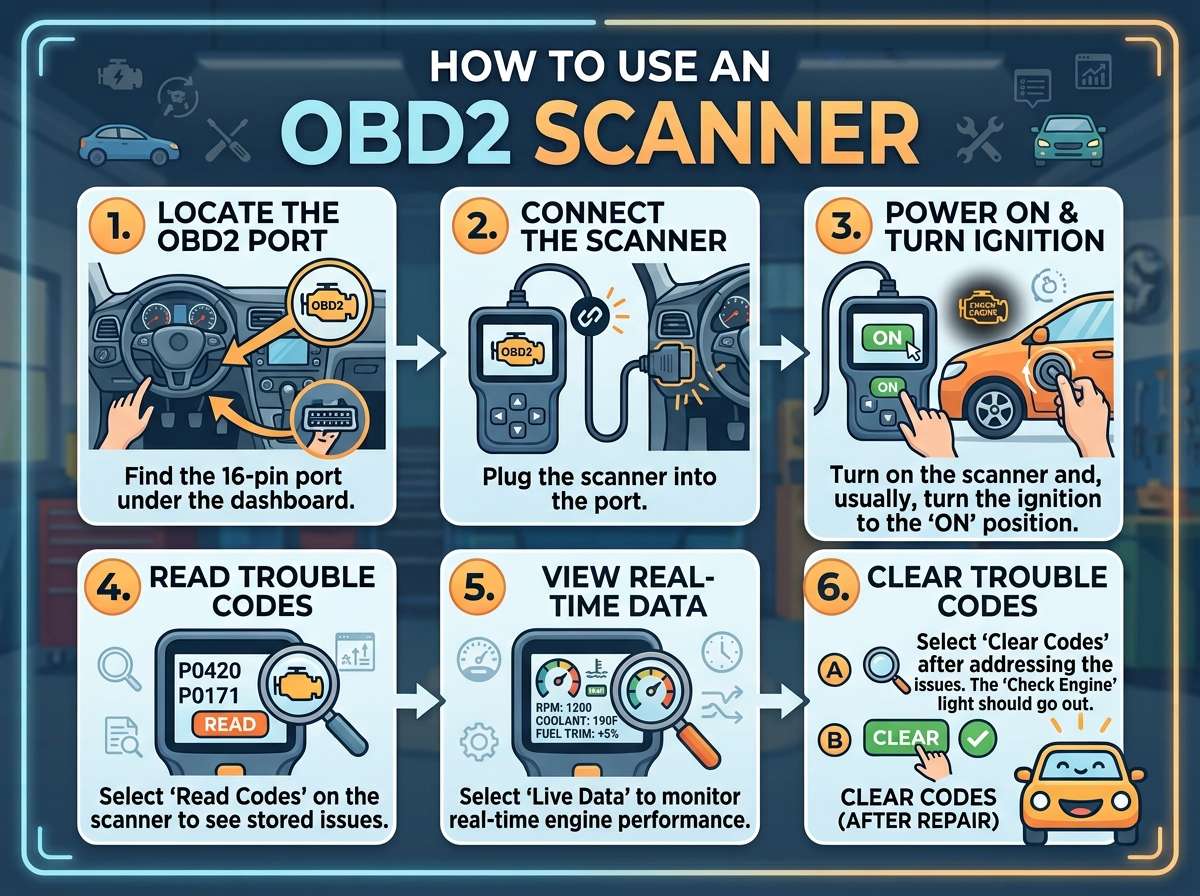
Step One: Gather Your Tools and Prepare First, get your scanner ready. If it needs batteries, install them now. If it’s a wireless model, charge it fully before you start. Sit in your driver’s seat and locate the OBD2 port under the dashboard. Make sure you have good lighting. Using a flashlight helps you see what you’re doing.
Step Two: Insert the Scanner Connector Grab the connector cable attached to your scanner and push it firmly into the OBD2 port. You’ll feel a slight click when it’s fully seated. Don’t force it; it should go in smoothly. If you’re using a wireless scanner, skip this step and make sure your device is paired with your car.
Step Three: Turn On Your Vehicle Turn your car’s ignition to the “On” position. You don’t need to start the engine, but many scanners work better when the engine is running. Some diagnostic functions require the engine to be running, so start it up if you’re planning to check live data. Keep the engine at idle once it’s running.
Step Four: Power Up Your Scanner Press the power button on your scanner. It should wake up and display a menu. You might see a welcome screen or a series of options. Different scanners have different interfaces, so take a moment to get familiar with the buttons and navigation. Some use arrow keys, others use touchscreens, and some use app-based menus on your phone.
Step Five: Connect to Your Vehicle Your scanner needs to establish a connection with your car’s computer. Most scanners do this automatically, but some ask you to select your vehicle’s year, make, and model first. Follow the on-screen prompts. This process usually takes just a few seconds.
Step Six: Read the Diagnostic Codes Once connected, navigate to the option that lets you read codes or read diagnostics. Your scanner will display all the trouble codes stored in your car’s computer. Codes typically look like “P0301” or “P0401.” Each code corresponds to a specific problem. The scanner might give you a brief explanation, or you might need to look up the code online.
Step Seven: Write Down the Codes Make a note of every code your scanner displays. Some cars have multiple codes. Write them down in your phone or on a piece of paper. Don’t rely on just remembering them. You’ll need these codes to research what’s actually wrong with your car.
Step Eight: Check Live Data (Optional) If your scanner has live data capability, you can select this option to watch your vehicle’s sensors in real time. This shows you values like engine speed, coolant temperature, fuel pressure, and more. Live data helps you understand how your car is running at this moment. It’s especially useful if you’re trying to track down a problem that comes and goes.
Step Nine: Clear the Codes (If Appropriate) Some scanners let you clear the trouble codes from your vehicle’s computer. Don’t clear codes just yet. First, you need to understand what they mean and fix the actual problem. Clearing codes without addressing the issue means the check engine light will just come back on.
Step Ten: Disconnect and Power Down When you’re done, turn off your scanner and remove the connector from the OBD2 port. Turn off your vehicle’s ignition. You’re all set.
Understanding OBD2 Trouble Codes
Reading a code off your scanner is one thing. Understanding what it means is another. Here’s what you need to know about OBD2 codes.
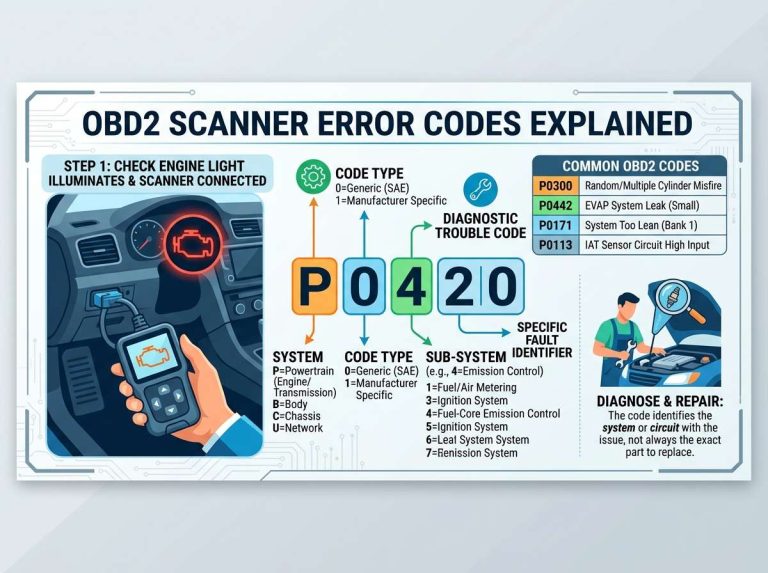
Trouble codes follow a simple format. They always start with a letter followed by four numbers. The letter tells you what system the code relates to. A “P” code is about the powertrain, which includes the engine, transmission, and drivetrain. “B” codes relate to the body. “C” codes are about the chassis. “U” codes deal with network communication issues.
The first number after the letter breaks it down further. A “0” means the code is standardized across all vehicles. A “1” means it’s manufacturer-specific. The remaining numbers identify the exact problem.
For example, a P0301 code means a random cylinder misfire. This code is standardized, so every car using OBD2 will use the same code for this problem. A P0303 means cylinder three specifically is misfiring. It’s the same type of problem but in a different cylinder.
Some common codes you might see include:
- P0171 is a system too lean code, usually pointing to fuel system issues or vacuum leaks
- P0128 involves coolant temperature regulation, often related to a stuck thermostat
- P0420 points to a faulty catalytic converter
- P0132 suggests problems with an oxygen sensor
- P0505 means an idle control system problem
Each of these codes tells you something different about what’s happening in your car. When you get a code, search it online along with your vehicle’s year, make, and model. You’ll get tons of information about what that code means and what typically causes it.
When to DIY and When to Call a Professional
Your OBD2 scanner tells you what’s wrong. The question is, can you fix it yourself?
Some problems are simple and perfect for DIY repairs. A loose gas cap often triggers codes. So do faulty oxygen sensors in many cases. If you have mechanical skills and the right tools, you might tackle these yourself.
Other problems require professional attention. Transmission issues, engine timing problems, or electrical gremlins are complex. You might have the code, but fixing it safely requires experience and proper equipment. Catalytic converter problems are another example where you probably want professional help.
Be honest with yourself about your skill level and the tools you have available. An OBD2 scanner removes the guesswork from knowing what’s wrong, but it doesn’t make you a mechanic overnight.
Tips for Getting the Most Out of Your OBD2 Scanner
You’ve got your scanner and you know how to use it. Here are some tricks that help you get the best results.
Keep Records Write down codes when they appear, even if you fix them. Over time, patterns emerge. If the same code keeps coming back, it points to an underlying issue you haven’t actually solved. Your records become valuable when working with a mechanic too.
Monitor Pending Codes Many scanners show pending codes in addition to stored codes. Pending codes are warnings that a problem is starting to develop. If you see a pending code, you’ve got a heads-up that something might be failing soon. You can address it before it becomes a bigger problem.
Use the Live Data Feature If your scanner can show live data, learn how to use it. Watching sensors in real time helps you spot problems that the computer might not have flagged yet. If your fuel pressure is inconsistent, you might catch it here before the engine starts running rough.
Research Your Specific Codes Not all codes mean the same thing in all vehicles. A code might point to one issue in a Honda and something completely different in a Ford. Always research your exact code with your specific vehicle information. Forums and manufacturer repair guides are gold mines of information.
Don’t Panic A code sounds scary, but most codes don’t mean your car is about to explode. Many are just your vehicle’s computer letting you know something isn’t operating exactly as designed. Take a breath, read up on the code, and plan your next steps calmly.
Maintenance and Care for Your Scanner
Your OBD2 scanner is a tool, and tools last longer with proper care.
Keep the connector clean. Over time, a little dirt or corrosion can build up. If your scanner isn’t connecting reliably, gently clean the connector pins with a soft cloth or a soft brush. The same goes for the port on your vehicle.
Store your scanner in a dry place. Moisture damages electronics. A box in your garage works fine, just avoid leaving it in your car where temperature extremes can break it down over time.
If you use a wireless scanner, keep the battery in good shape. Charge it after each use, especially if you won’t be using it for a while. A completely dead battery can reduce the lifespan of rechargeable batteries over time.
For basic code readers, replace batteries as needed. Keeping fresh batteries in your scanner means it’s always ready to go when you need it.
Common Mistakes People Make With OBD2 Scanners
Learning from others’ mistakes helps you avoid them.
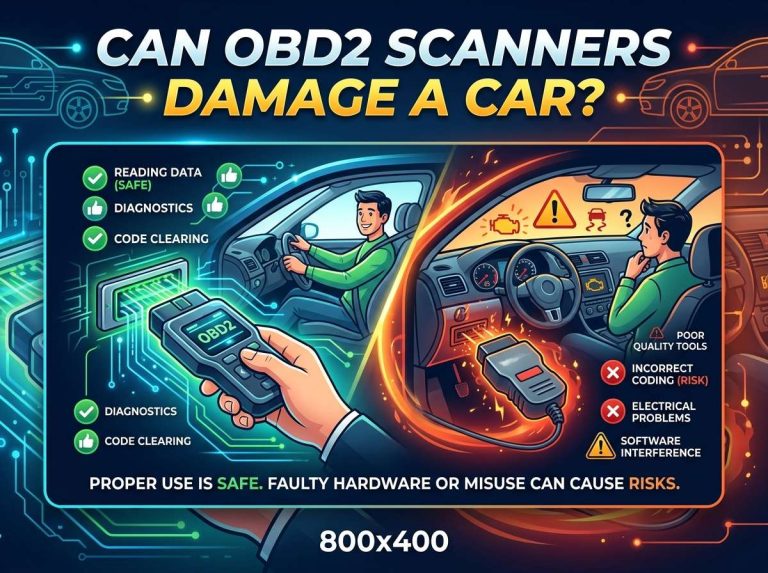
Clearing codes without fixing the problem The biggest mistake is clearing codes to make the check engine light disappear. The light comes back because you haven’t fixed what caused the code in the first place. Fix the problem first, then clear the code.
Trusting the code too much An OBD2 code points you in a direction, but it doesn’t always pin down the exact problem. A code might suggest a bad sensor, but sometimes a wiring issue or a loose connector is the real culprit. Investigation is important.
Ignoring codes you don’t understand If you get a code and have no idea what it means, don’t ignore it. Look it up. Some codes are minor. Others mean something more serious is developing. You can’t fix a problem you don’t understand.
Assuming all scanners are the same Budget scanners and professional tools can give different levels of detail. If your basic scanner can’t seem to help you find the problem, a more advanced tool might show you something your cheaper one can’t access. Know the limitations of your equipment.
Not checking the battery For wireless and battery-powered scanners, a dead or dying battery causes all kinds of connection problems. Before you assume your scanner is broken, check the battery first.
What Codes Really Mean for Your Wallet
Let’s get real about what different codes typically cost to fix. These are ballpark figures since costs vary by vehicle and location.
A faulty oxygen sensor usually runs you between 150 and 400 dollars in labor and parts. A bad thermostat is often cheaper, somewhere in the 200 to 300 dollar range. Catalytic converter problems are the pricey ones. You’re looking at 800 to 1200 dollars or more depending on your vehicle.
Engine misfires can stem from several sources. If it’s bad spark plugs, you might spend 100 to 300 dollars. If it’s a bad coil pack, 150 to 400 dollars. If it’s a valve problem, well, that’s much more expensive.
Knowing what’s wrong before you take your car to a mechanic helps you make informed decisions. Sometimes a cheap temporary fix gets you through until you can afford a permanent solution. Sometimes it’s better to bite the bullet and do it right. Either way, you know what you’re dealing with.
Building Your Car Maintenance Skills
An OBD2 scanner is just the beginning. Once you understand how to read codes, you’re primed to learn more about your car’s maintenance and repair.
Start by learning about basic preventive maintenance. Oil changes, air filter replacements, and fluid checks are things most car owners can do themselves. YouTube has thousands of videos showing you exactly how to do these tasks on your specific vehicle.
Once you’re comfortable doing simple maintenance, you might tackle slightly more complex jobs. Replacing brake pads, changing air filters, or swapping out a thermostat are all doable with the right guidance and tools.
An OBD2 scanner gives you confidence because you understand what’s happening in your car. That knowledge transfers to other maintenance tasks. You start to see your vehicle as something you can work on, not just something you drive.
Final Thoughts
An OBD2 scanner transforms you from someone who’s clueless about their check engine light to someone who actually knows what’s wrong. It puts diagnostic power in your hands, saves you money on unnecessary mechanic visits, and gives you information to make smart decisions about your vehicle’s repair.
You don’t need to be a mechanic to use one. You don’t need expensive equipment. A simple code reader costs less than a tank of gas and answers the biggest question every car owner faces: what’s going on under the hood?
Start with whatever scanner fits your budget. Learn how to use it properly. Keep records of what you find. And remember that knowing what’s wrong is the first step to making it right. Your car will run better, your wallet will thank you, and you’ll feel more confident behind the wheel knowing you’ve got a diagnostic tool in your garage.

Peterson is an automotive safety enthusiast and product reviewer with a passion for helping drivers stay safe on the road. He researches and tests dash cams, backup cameras, TPMS systems, emergency tools, GPS trackers, and other vehicle safety products to provide honest, practical recommendations. Through CarSafeties.com, Peterson shares in-depth reviews, buying guides, and maintenance tips to help drivers make smarter and safer decisions.